

When you’re on a train, you know it’s moving by the objects you’re passing. Similarly, you can tell the sun is rising because the horizon stays still.
In life, these reference points help you compare one state to another, like seeing if something is in motion. In project management, you use a similar reference point to check if your project is on track.
This reference point is called the project baseline.
What is a project baseline in project management?
A project baseline is the final, approved version of your project plan, including its schedule, scope, and budget. It’s a fixed reference point representing the original schedule, scope (baseline scope), and cost (baseline cost or baseline budget).
Using project baselines, you can measure, compare, and control your project’s progress against the original plan (baseline schedule), allowing you to handle minor issues while sticking to the baseline.
You set the project baseline at the beginning of the project or a project stage. This creates a solid foundation for executing on Classic and Hybrid projects.
Types of project baselines
Because you can use a project baseline to track and measure various parts of your project, you can distinguish three main baseline types.
If any part of your project goes above or below the baseline, you need to reassess the project’s business case or investment appraisal.
Baseline scope
The baseline scope defines the project’s deliverables and required work. It includes the scope statement, work breakdown structure (WBS), and WBS dictionary.
Baseline schedule
The baseline schedule is the approved project timeline with planned start and finish dates for activities and milestones.
Baseline budget
The baseline budget is the approved cost estimate for the project, serving as a benchmark for tracking actual expenditures.
Although most project managers don’t, you can baseline other aspects of your project.
Performance measurement baseline
The performance measurement baseline combines the schedule, scope, and budget baselines. It’s used to measure project performance, often with Earned Value Management (EVM).
Benefits baseline
A benefits baseline outlines the project’s expected benefits. You use this in addition to the schedule, scope, and budget baselines.
Risk baseline
The risk baseline sets the project’s initial risk level, which should decrease as the project progresses.
Value baseline
The value baseline combines benefits, risk, and budget baselines. Due to its complexity, managers often keep these baselines separate.
Product baseline
The product baseline outlines the initial specifications and design of the product.
Project baseline in Agile
In Agile projects, the scope changes with each sprint. Instead of a fixed scope baseline, you use a reference point that captures the current sprint’s requirements.
Can you change the project baseline?
Yes, but you need a good reason.
If your project is significantly disrupted and the original baseline is no longer valid, you can rebaseline it.
There are two ways to rebaseline your project:
- Reactive rebaselining: This happens when unexpected events force you to recreate the baseline. (You respond to what has already occurred.)
- Proactive rebaselining: This happens when you know something will happen at a certain point in your project, but you can’t predict the outcome. When the event occurs and impacts your project, you rebaseline. (You plan ahead for potential disruptions.)
Remember, project baselines are tools to help you, not restrict you. They show the original target and how it compares to your current status. Baselines should help you make informed decisions, not force you to stick rigidly to the original plan.
The importance of using a project baseline
Ensuring project alignment with objectives
A project baseline covering scope, schedule, and cost is key for project performance. It aligns the project with its objectives, enabling managers to track progress accurately and spot deviations early. This alignment is crucial for controlling deliverables, timelines, and budgets, contributing to project success.
Facilitating performance measurement and control
Project baselines provide a benchmark for comparing actual progress against planned progress. This helps identify potential issues and allows for timely corrective actions, keeping the project on track.
Supporting change management processes
Proposed changes to the scope, schedule, or budget can be evaluated against the baseline, helping stakeholders understand their impact and make informed decisions. Regular updates ensure the baseline stays relevant and accurate throughout the project lifecycle.
Enhancing communication and transparency
Well-defined baselines enhance accountability and provide a solid foundation for performance reporting and audits. They establish clear objectives, fostering collaboration and understanding among stakeholders. Transparent progress tracking against baselines enables timely interventions and informed decision-making. Regular communication builds stakeholder trust and engagement, encouraging support and collaboration.
How do you create a project baseline?
Creating a project baseline is a crucial step in project management. It involves defining the scope, developing the schedule, and estimating costs. This process provides a clear roadmap, ensuring the project team and stakeholders understand the project’s goals and constraints.
#1. Define project scope
Defining the project scope is the first step in establishing a project baseline.
The scope baseline includes:
- Project scope statement outlines the project’s objectives, deliverables, and boundaries, detailing what’s included in (and excluded from) the project.
- Work breakdown structure (WBS) breaks down the project into manageable components, helping to ensure that all aspects of the project are covered.
- WBS dictionary provides detailed descriptions of each WBS element, clarifying the responsibilities and expectations for each part of the project.
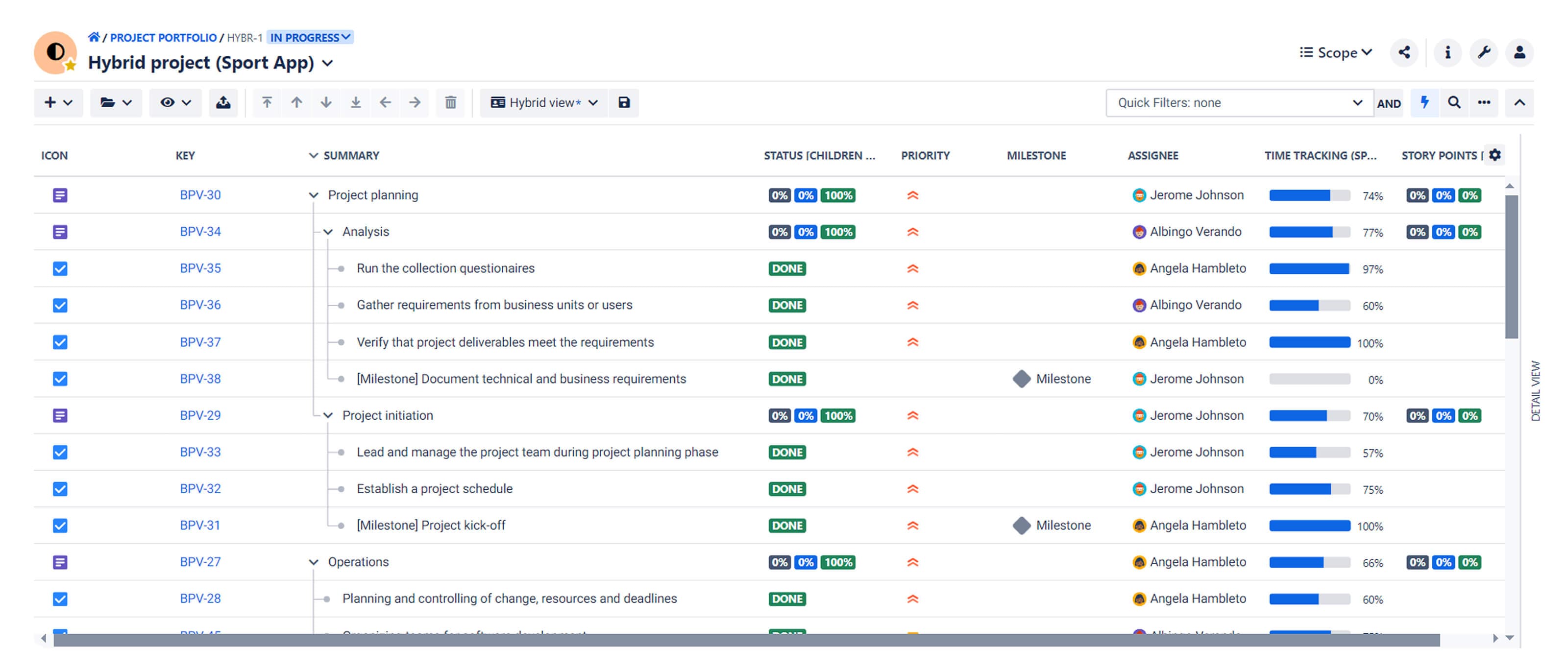
Clearly defining the scope helps prevent scope creep, ensuring that the project stays focused on its original objectives.
#2. Develop project schedule
Once you’ve defined the project scope, the next step is to develop the project schedule.
The schedule baseline includes a detailed timeline of all project activities, milestones, and deliverables. To create it, you identify all tasks needed to complete the project, estimate the duration of each task and phase, identify dependencies, and set start and end dates.
Tools like Gantt charts, roadmaps, and critical path analysis help visualize the schedule and sequence activities. Use these tools to update the schedule regularly and compare actual progress against the baseline to ensure timely project delivery.
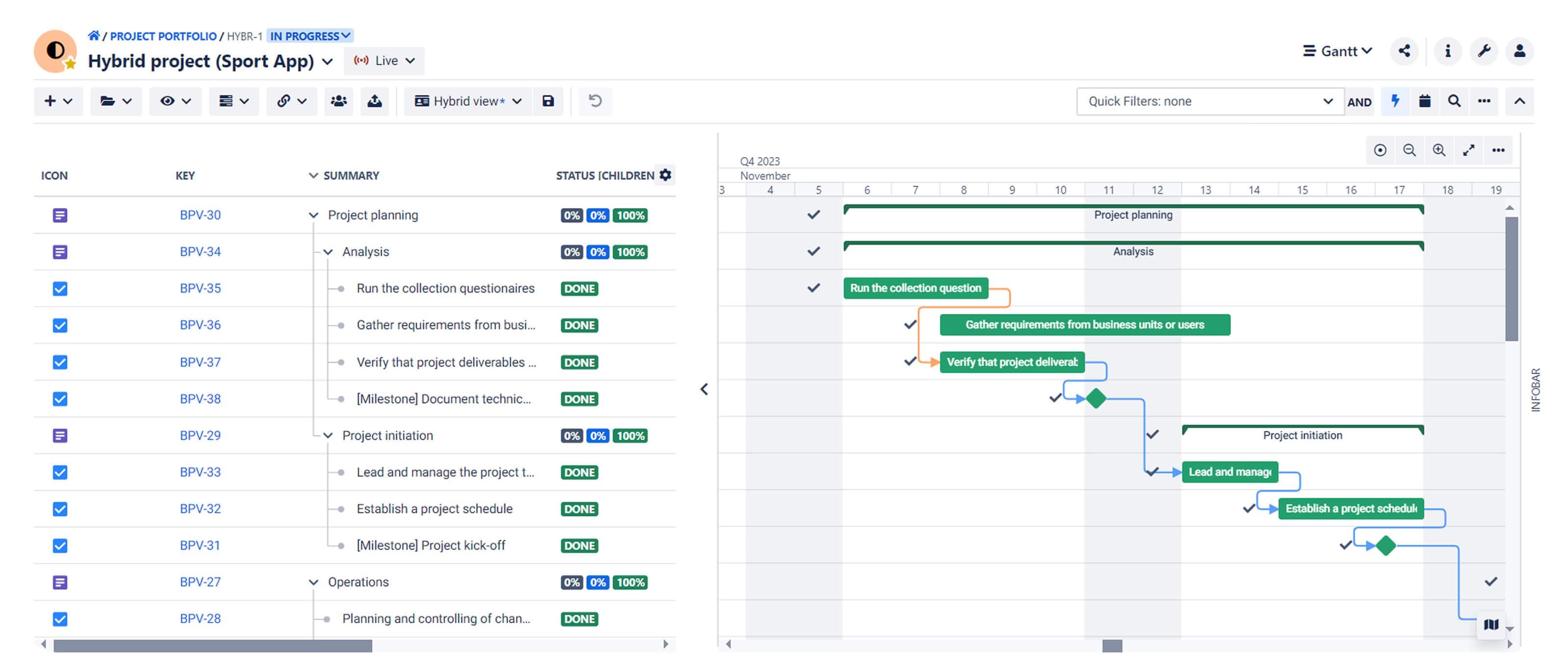
A well-developed schedule baseline ensures all team members understand the project’s timeline, helps with resource allocation, and provides a framework for tracking progress.
#3. Estimate project costs
The final step in establishing a project baseline is estimating the project costs.
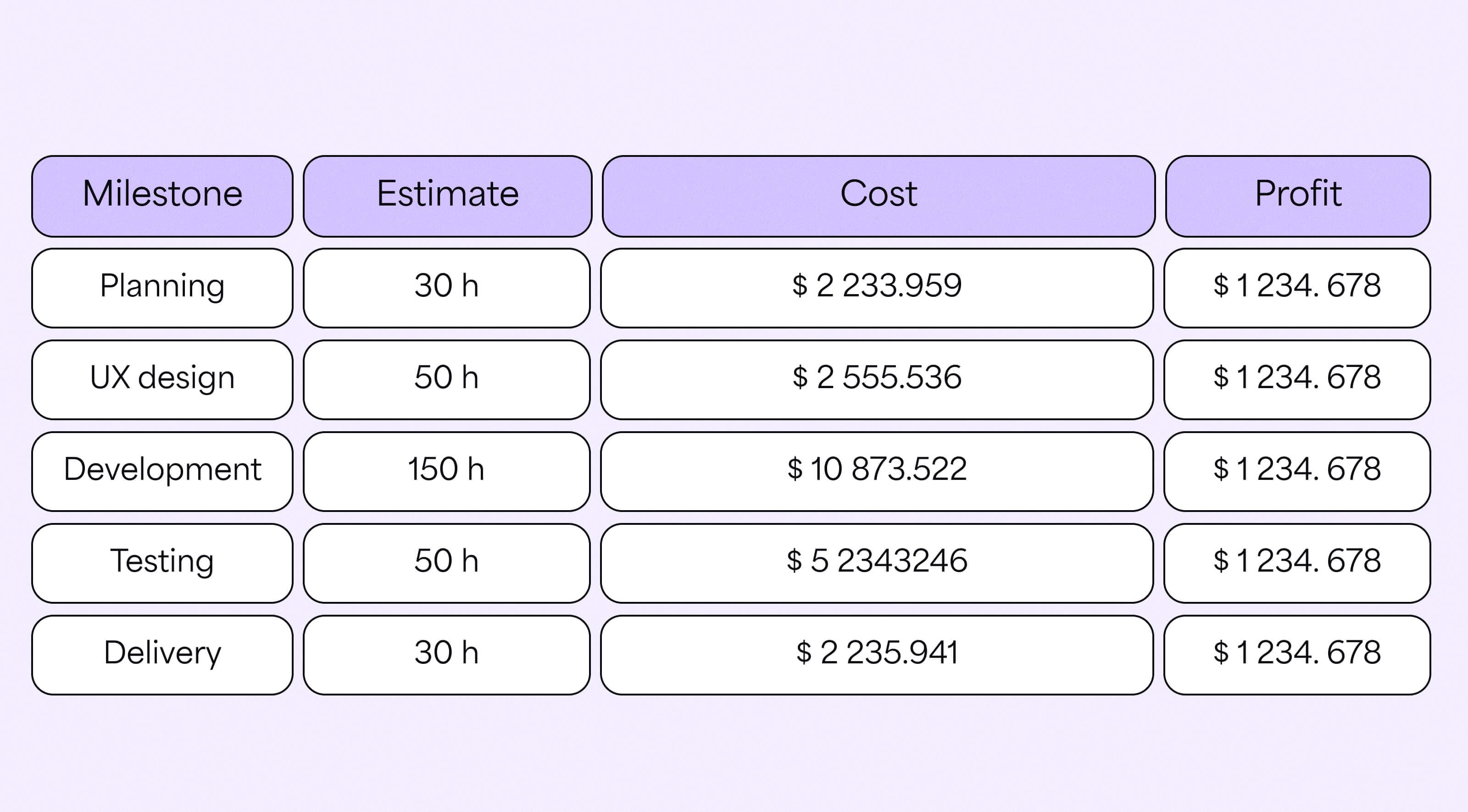
The cost baseline includes a detailed budget outlining all financial resources needed. Cost estimation involves identifying all expenses, including labor, materials, equipment, and other associated costs.
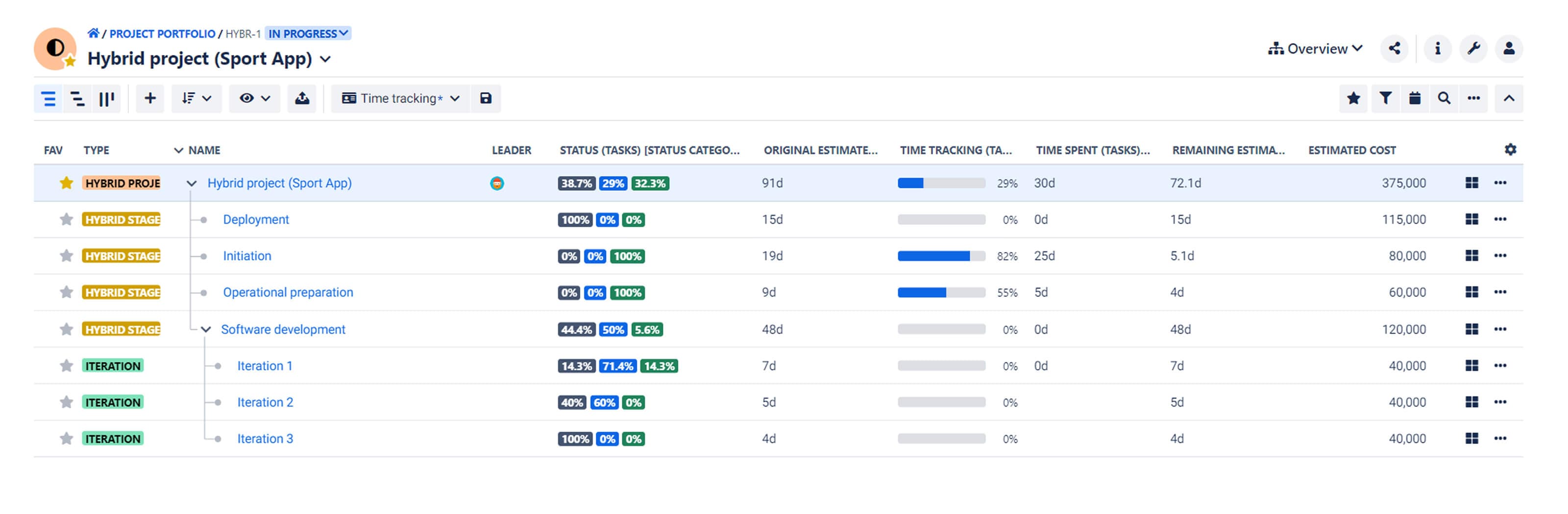
Techniques like analogous estimating, parametric estimating, and bottom-up estimating help you develop accurate cost estimates.
A comprehensive cost baseline helps secure funding, manage expenditures, and ensure the project’s financial viability. Regularly monitoring actual costs against the baseline allows you to detect cost overruns early and take corrective actions to stay within budget.
Like scope and schedule, cost remains fixed once it’s written into the project baseline.
How BigPicture can help you keep your project on the right track
Tracking your project, even with baselines, can be challenging. That’s why having the right project management software is critical.
Create a baseline schedule–even for individual project items
Baselines are integral to BigPicture PPM software for Jira. The app stores data on your baseline schedule, including start and end dates, which you can compare with your project’s current data.
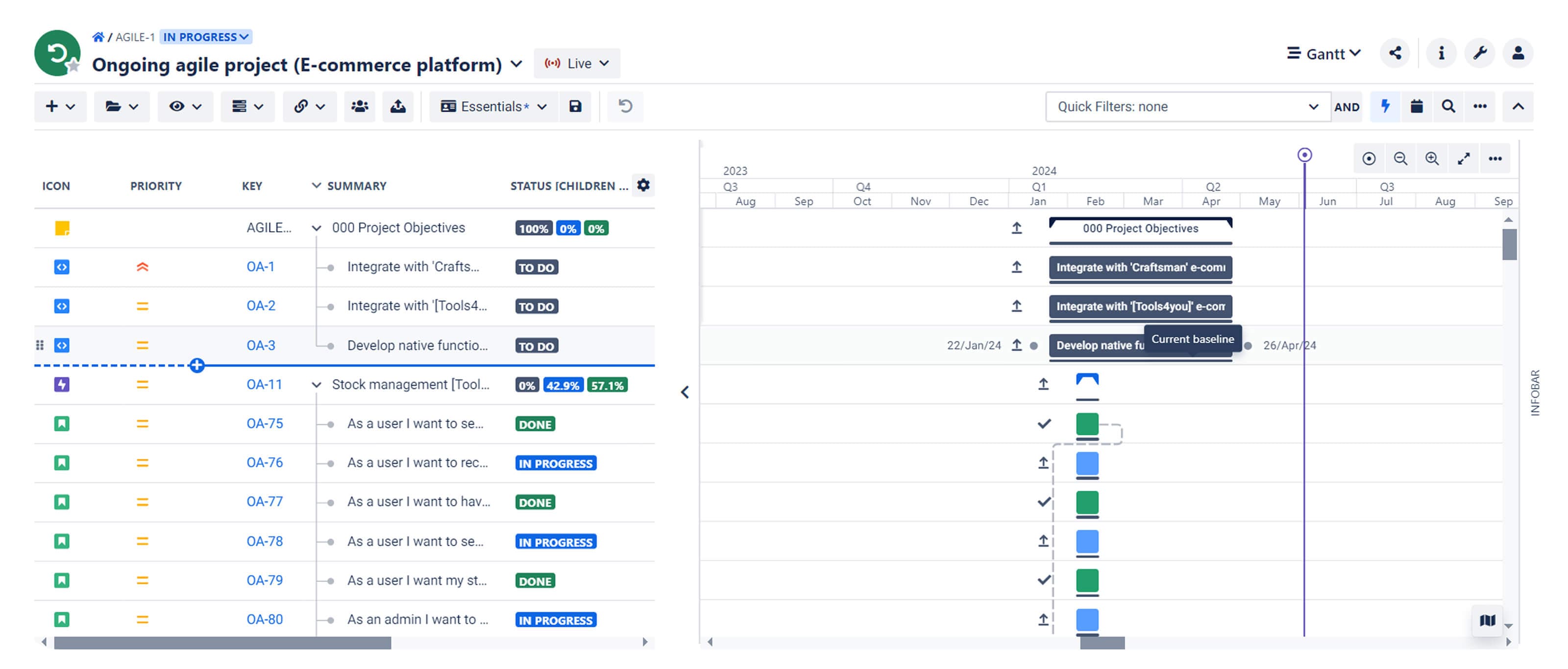
Once you create a baseline, the app displays it for all your project items. This lets you visually compare the original schedule with the current one.
If any project item is unscheduled (missing a start date, end date, or both), you can’t baseline it. But once it’s scheduled, you can create a baseline for that item.
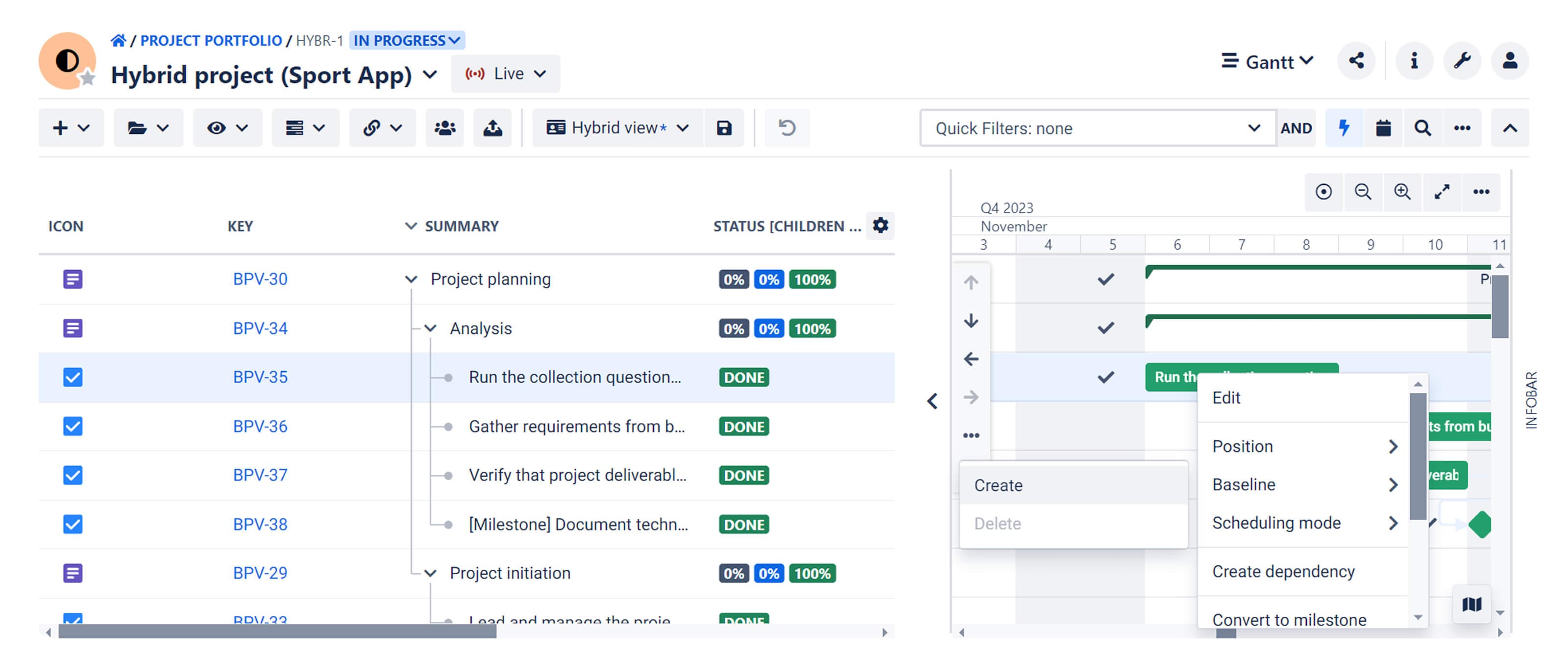
To keep your view clean, the app lets you hide project baselines and enable them whenever you need.
Rebaseline your project items and track baseline history
When you delete and add a new baseline to your project or an item, you’re rebaselining your schedule. If you save your changes, the app tracks your baseline history.
BigPicture Enterprise stores up to twenty baseline records per box. This means you can review all changes and restore specific versions from the past.
Having multiple baseline versions allows you to compare the original schedule with another version. Colored baselines help you see the differences clearly.
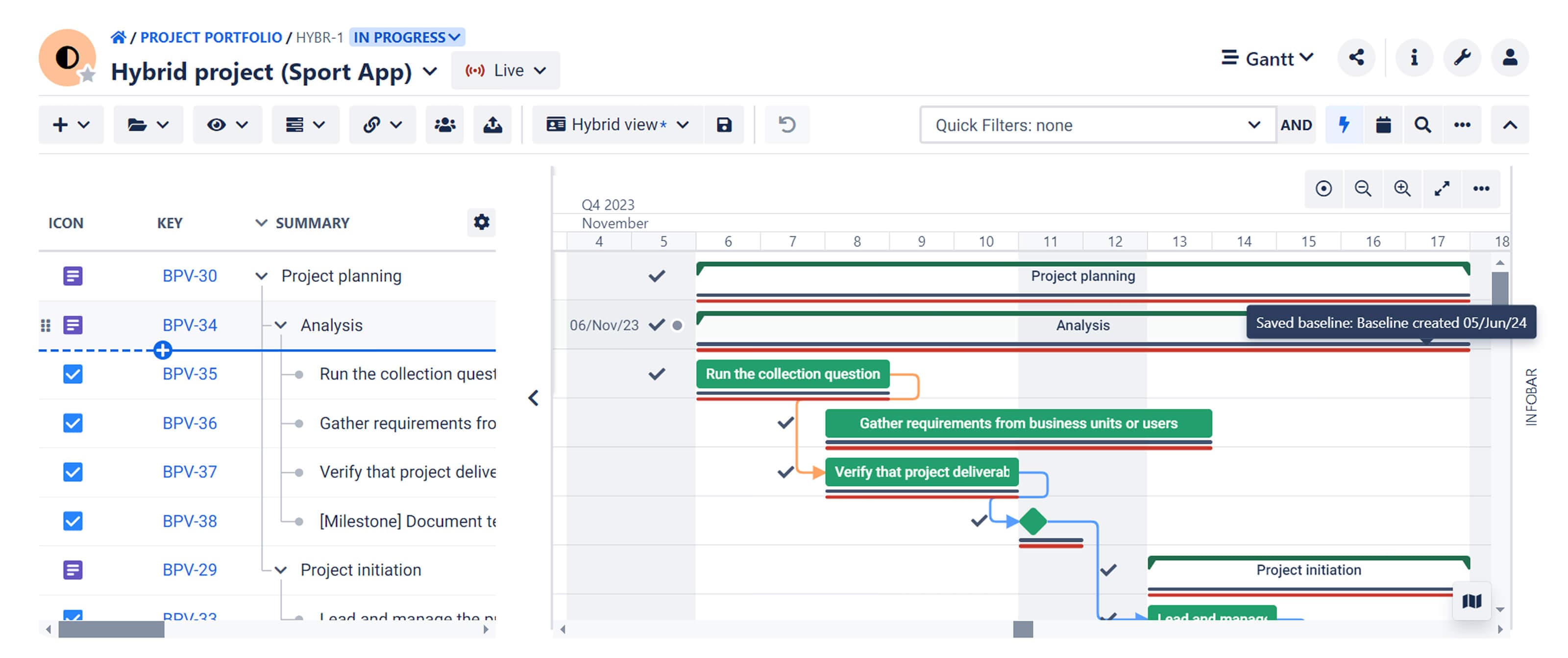
The app lists tasks without a baseline so you can quickly spot and add baselines as needed.
Reschedule tasks with baselines in mind
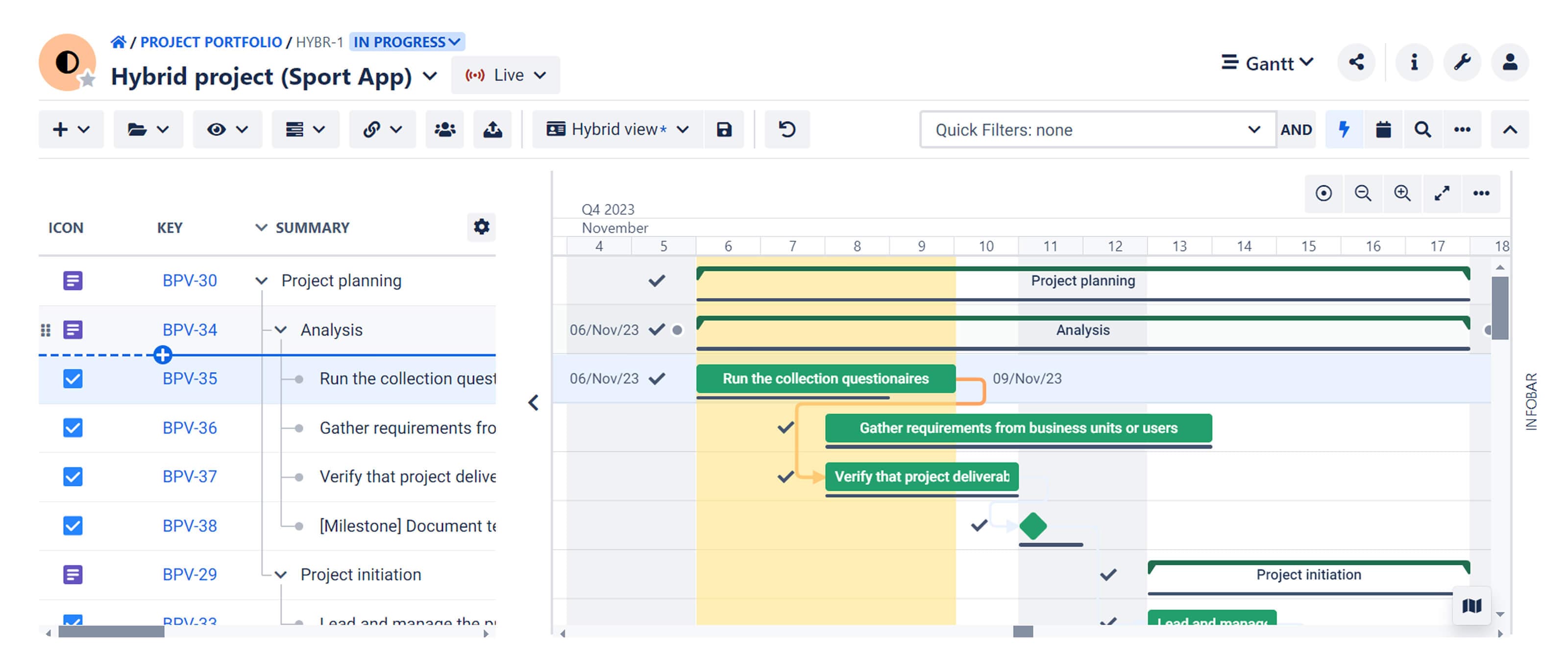
The project baseline is your reference point, helping you see how the new task schedule compares to the current one.
If you want to reschedule a task, the app shows the schedule discrepancy by coloring the difference between the task and the baseline on the Gantt timeline. This way, you can see how the new task dates compare to the current baseline schedule.
Keep track of deviations from the baseline schedule
How do you know if your project has deviated from the original plan? With hundreds of tasks, tracking them all isn’t easy.
Task and milestone reports for a comprehensive overview
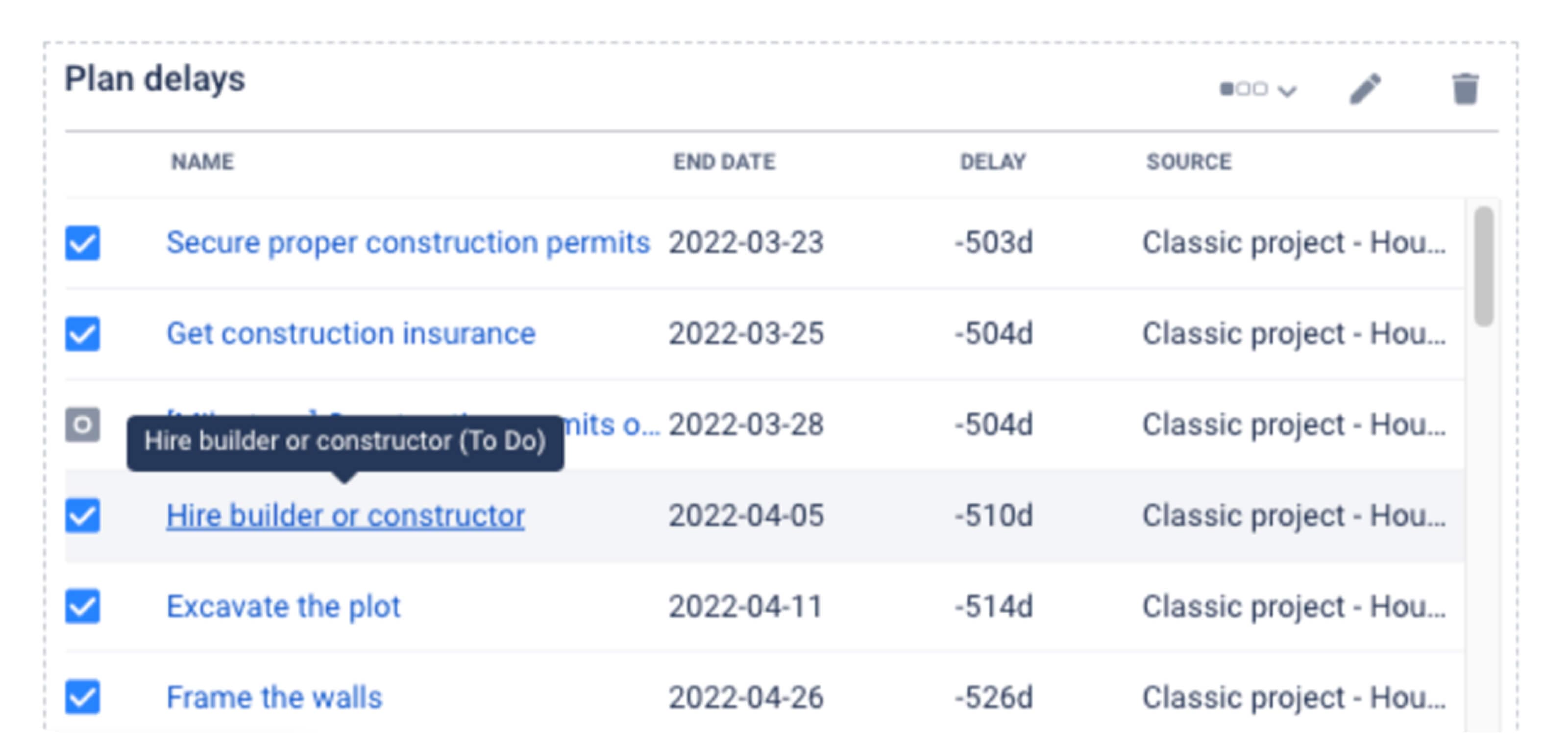
That’s where the Plan Delays report comes in handy. With this report, you can track:
- Open tasks – Monitor tasks running ahead or behind schedule.
- Closed tasks – Review the number of delayed tasks after project completion.
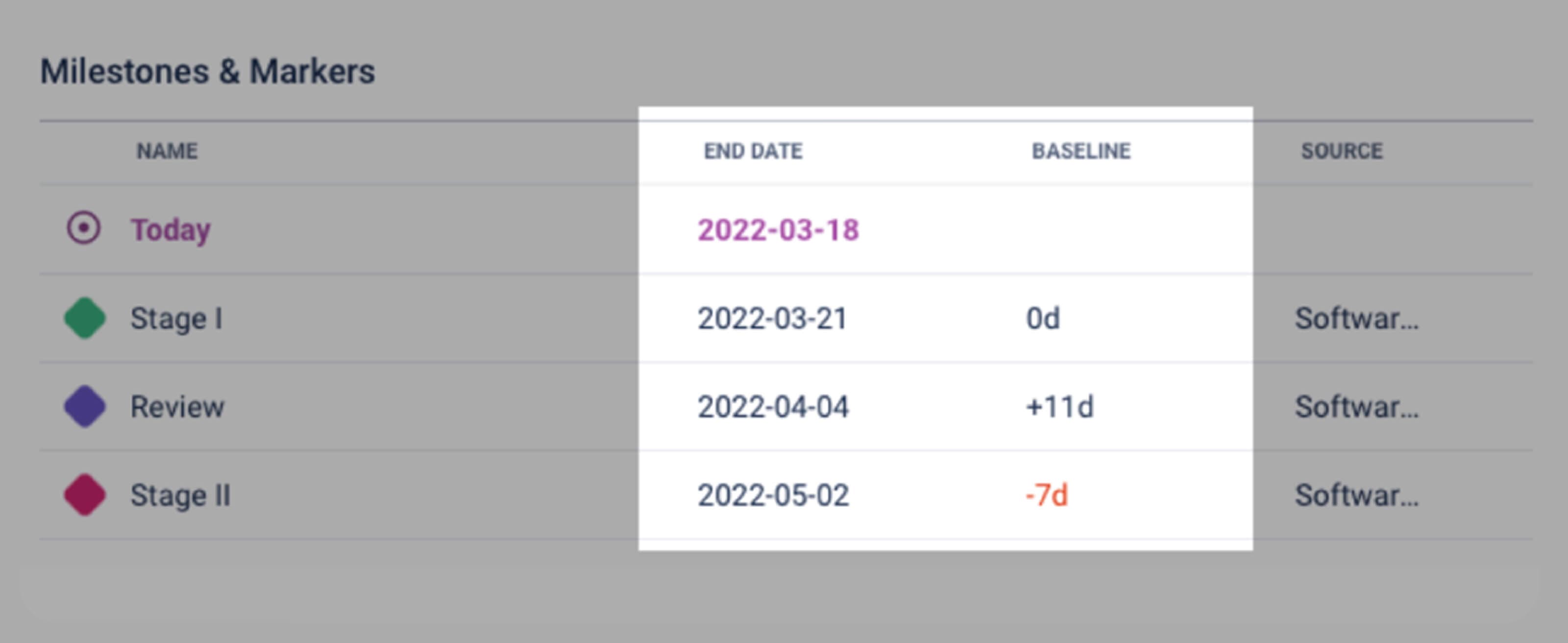
The Milestones and Markers report helps you track milestone delays. Similar to task delays, this report lists all your project milestones and indicates which ones are delayed compared to their baseline end dates.
Dedicated columns for a quick glance
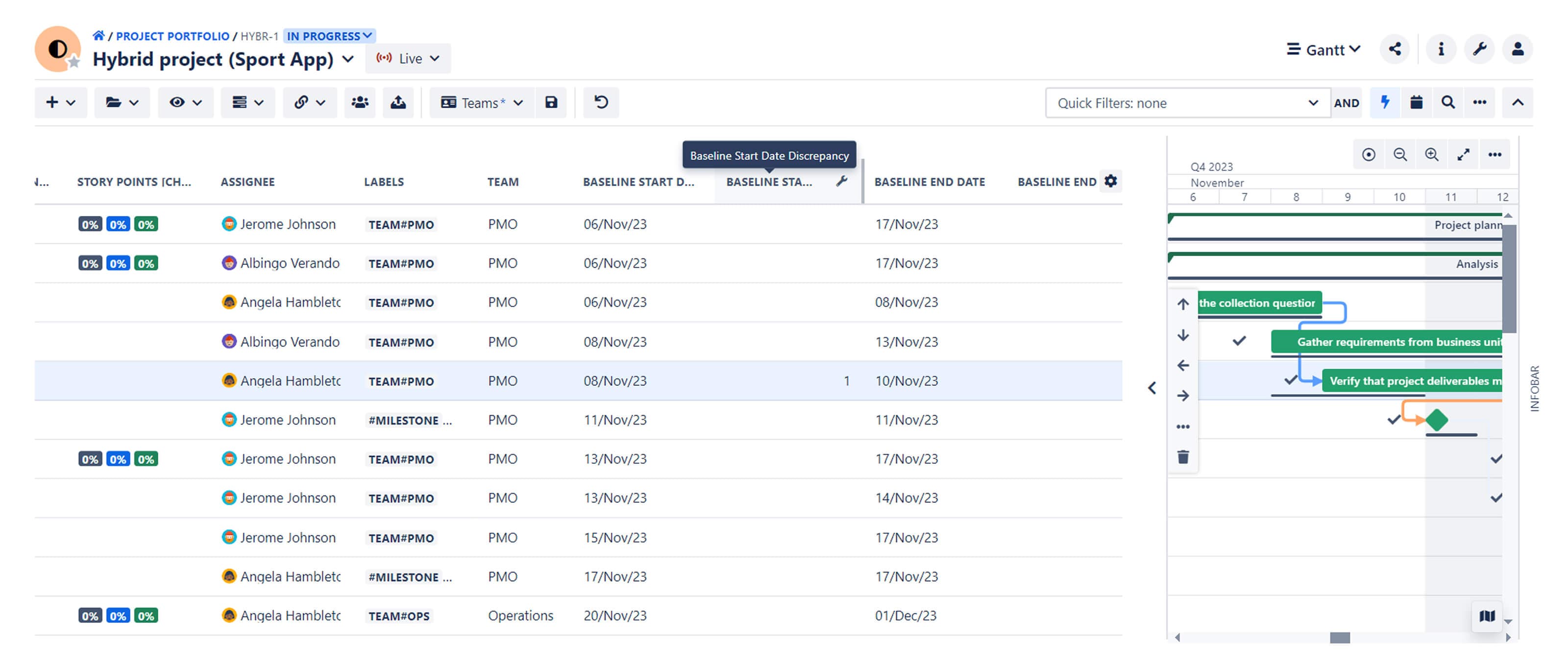
The app can also display baseline dates for your project items even when you have hidden baselines on your Gantt chart.
With baselines-related columns added to your WBS, you can track baseline end dates, start dates, and discrepancies between the baseline and baseline end dates.
Project (re)baselining made easy with BigPicture
BigPicture is a powerful PPM app for enterprise-level project and portfolio management. It integrates with Jira, keeping your project data, including baselines, synced.
You can create and manage multiple baseline schedules for your entire project or individual items and compare them with your current plan.
This helps you quickly identify tasks and milestones that are behind schedule so you can take timely action. The insights from baseline comparisons can also improve processes and practices in future projects. See what BigPicture can do for your team.
Try BigPicture for free