Time to SLA

Track SLAs in Jira. Stay ahead of breaches

Track SLAs in Jira. Stay ahead of breaches

Stop spreadsheet SLA tracking. Set flexible rules, monitor deadlines live, and report on performance across Jira and Jira Service Management.

Stop spreadsheet SLA tracking. Set flexible rules, monitor deadlines live, and report on performance across Jira and Jira Service Management.

Clock iconReal-time SLA tracking

Icon settings whiteFlexible SLA rules

Insert chart iconJira SLA reporting

Warning iconSlack and email alerts

Key benefits 02

Visibility Icon

Stop SLA breaches before they happen

See which tickets are at risk with live countdowns, color-coded SLA status, critical zones, and alerts before service commitments are missed.

Diversity icon

Fit SLAs to the way your teams work

Your SLAs should fit your workflow, not the other way around. Set start, pause, stop, and reset conditions using JQL, priorities, hours, and negotiated dates.

Bolt icon

Make Jira SLA reporting less manual

Replace spreadsheet-heavy service desk reporting with built-in SLA reports, reusable filters, JQL functions, and stakeholder-ready performance views.

Star icon

Stop at-risk tickets getting buried

Bring SLA status into Jira issues so agents can see time remaining, prioritize at-risk work, and keep ticket resolution tracking in the flow of work.

Search icon

Stop support and delivery working blind

Track SLAs across Jira Service Management and Jira Software, including linked issues, so support and delivery teams stay aligned on commitments.

Stack star icon

Don't manage OLAs and SLAs separately

Track customer-facing SLAs alongside operational level agreements (OLAs) so internal teams can support the service commitments customers depend on.
Customers 03

Teams who trust us

Key features 04

Manage the full SLA lifecycle without leaving Jira

Build SLAs around real service commitments

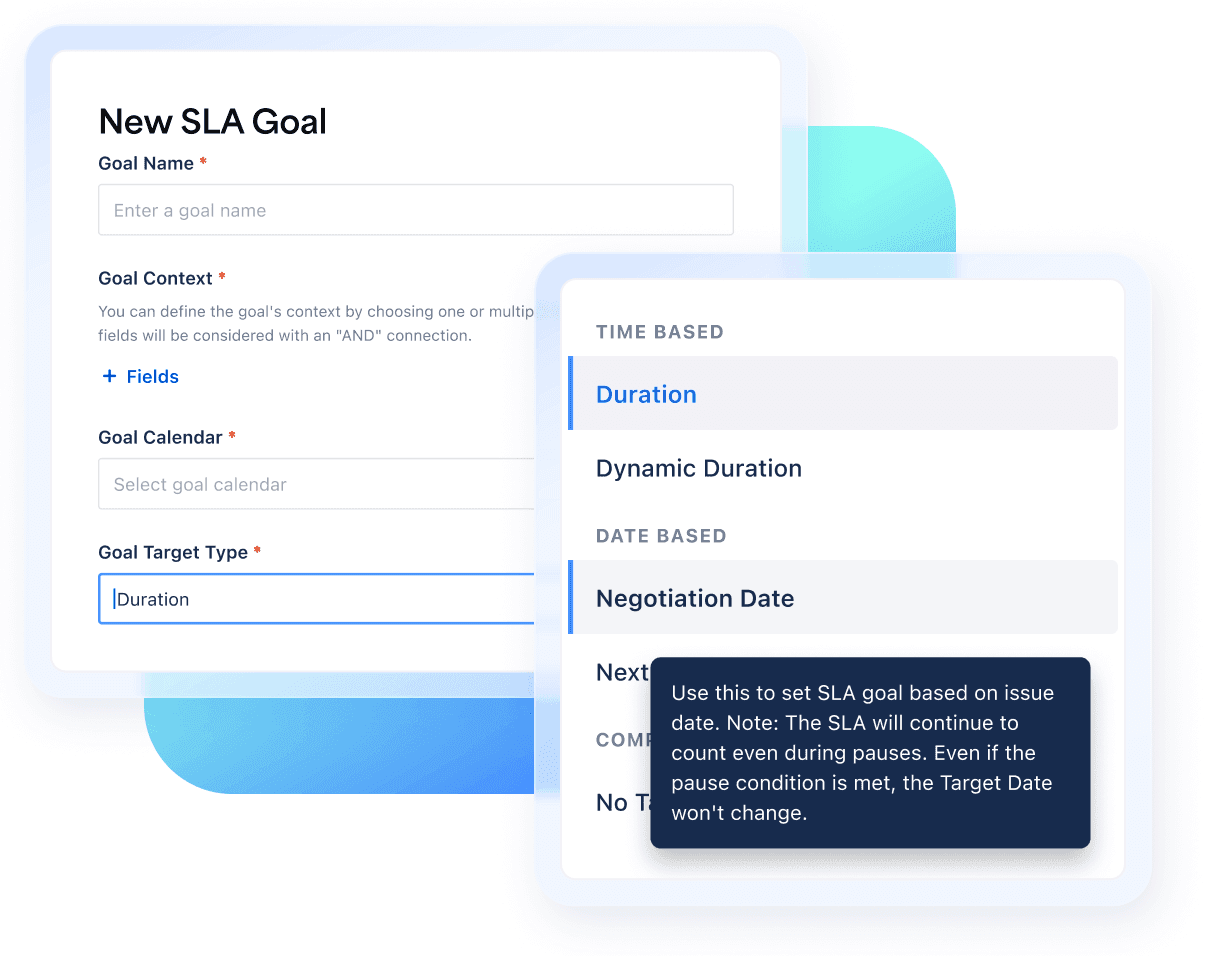
Configure goals by priority, JQL scope, status, dates, comments, and calendars. Pause or reset timers when the workflow calls for it, not when a rigid template does.

A graphic showing how to build SLAs around real service commitments

Catch at-risk tickets before they breach

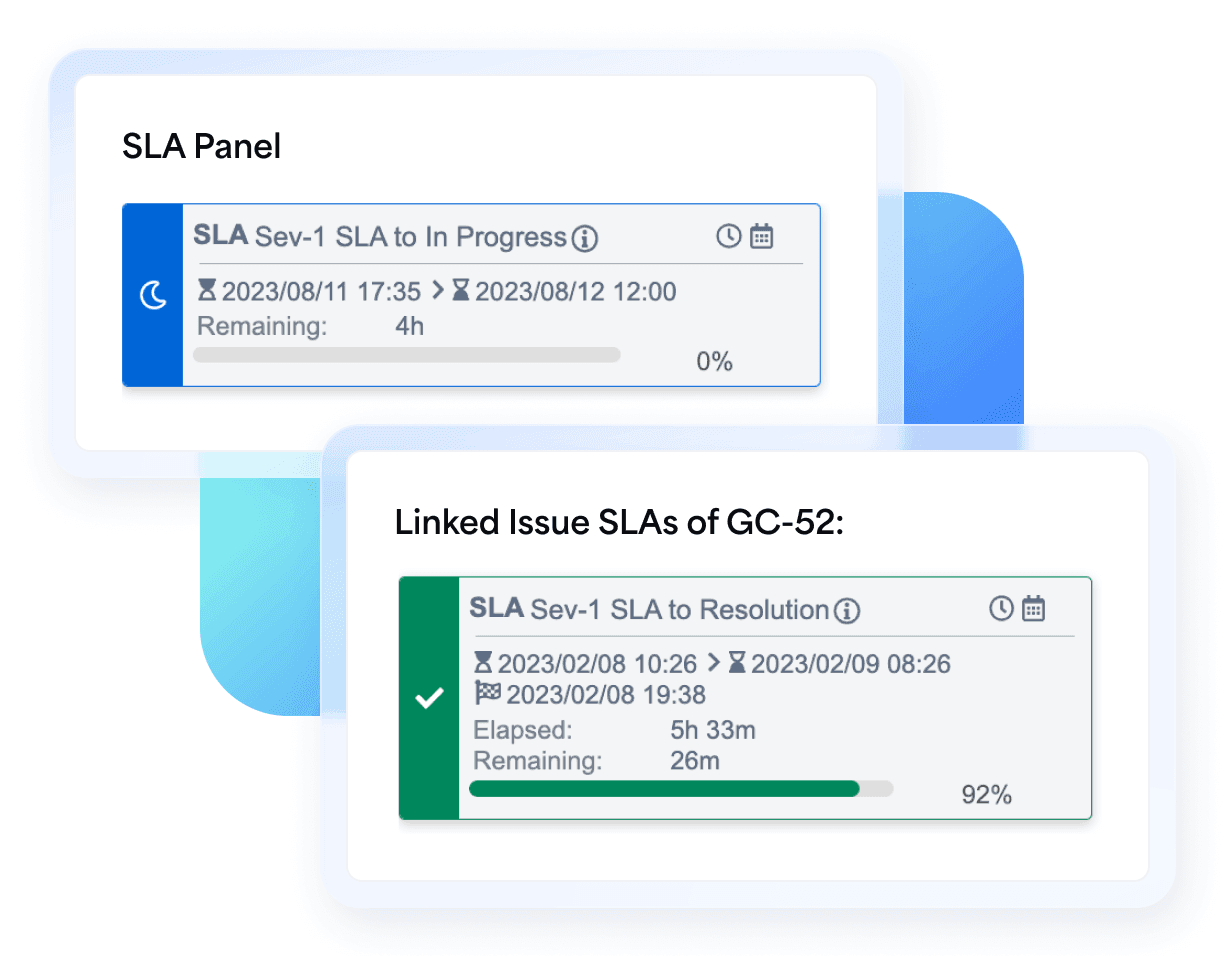
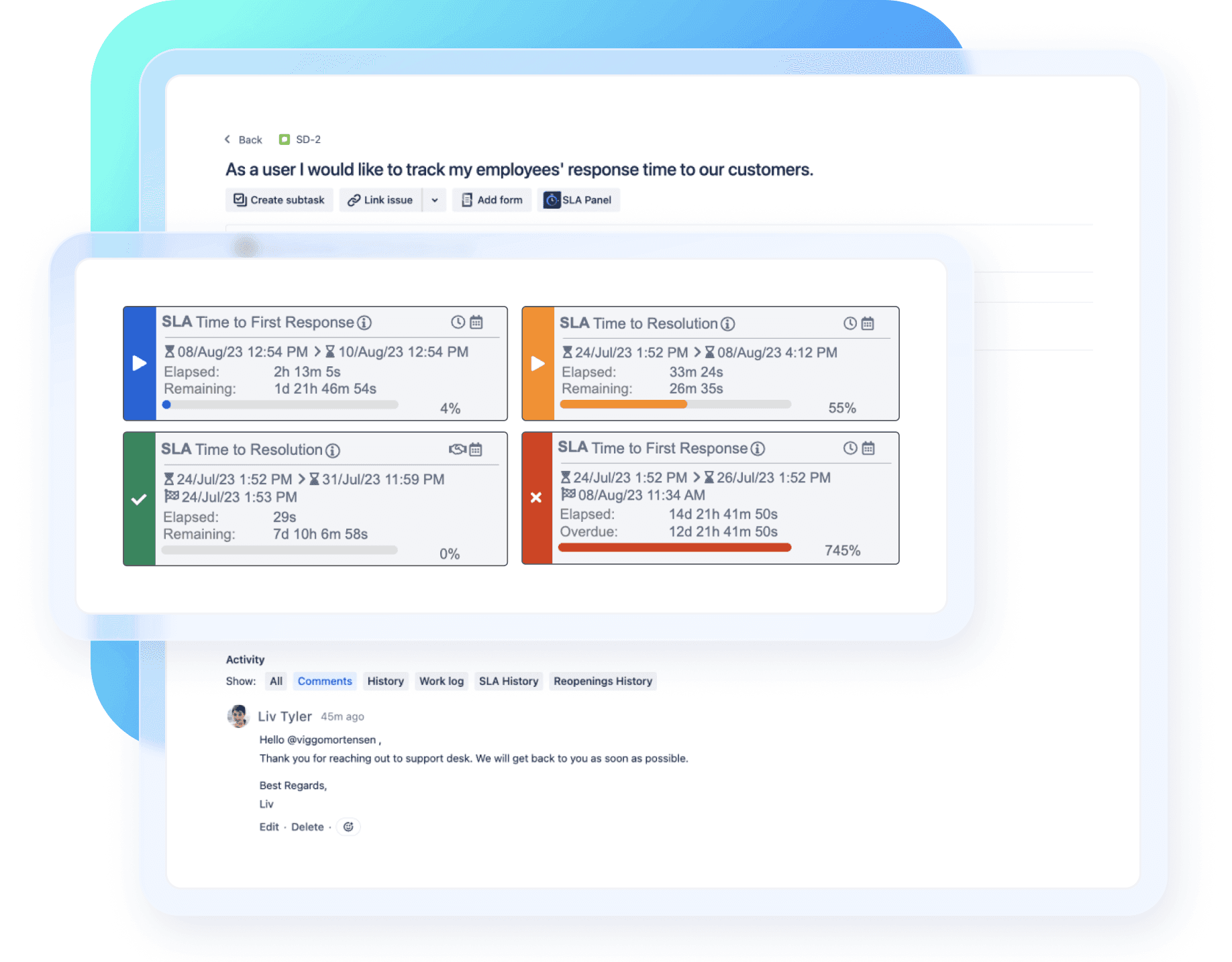
Live countdowns and color-coded SLA status make risk visible in the issue. Add Slack or email notifications so teams can act before a deadline is missed.

A graphic showing Time to SLA at-risk tickets before they breach

Turn SLA data into answers, not exports

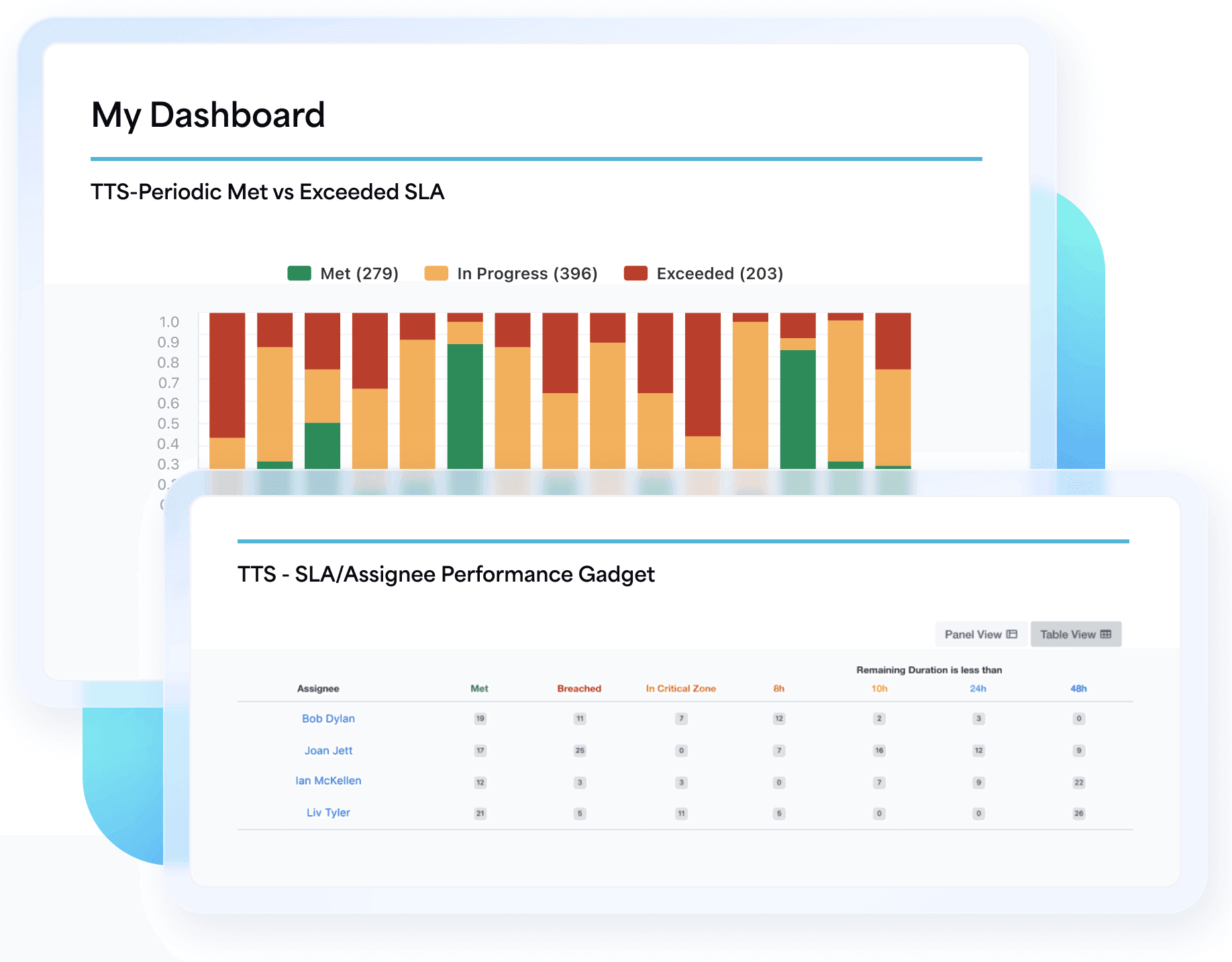
Use built-in Jira SLA reporting to review met and breached targets, trends, durations, and status. On Cloud, Executive reports add cross-project analysis and drill-downs.

A graphic showing Turn SLA data into answers, not exports

Keep customer and internal SLAs aligned

Manage SLAs and OLAs across Jira Service Management and Jira Software so support, engineering, and operations can work against shared service expectations.

A graphing showing how to keep customer and internal SLAs aligned

How Time to SLA works 05

Manage SLAs end-to-end

See how Time to SLA takes you from SLA setup to tracking, alerts, and reporting.

Explore features

Set SLA goals

Match your workflow

Track live deadlines

Get breach alerts

Report on SLAs

Executive reports
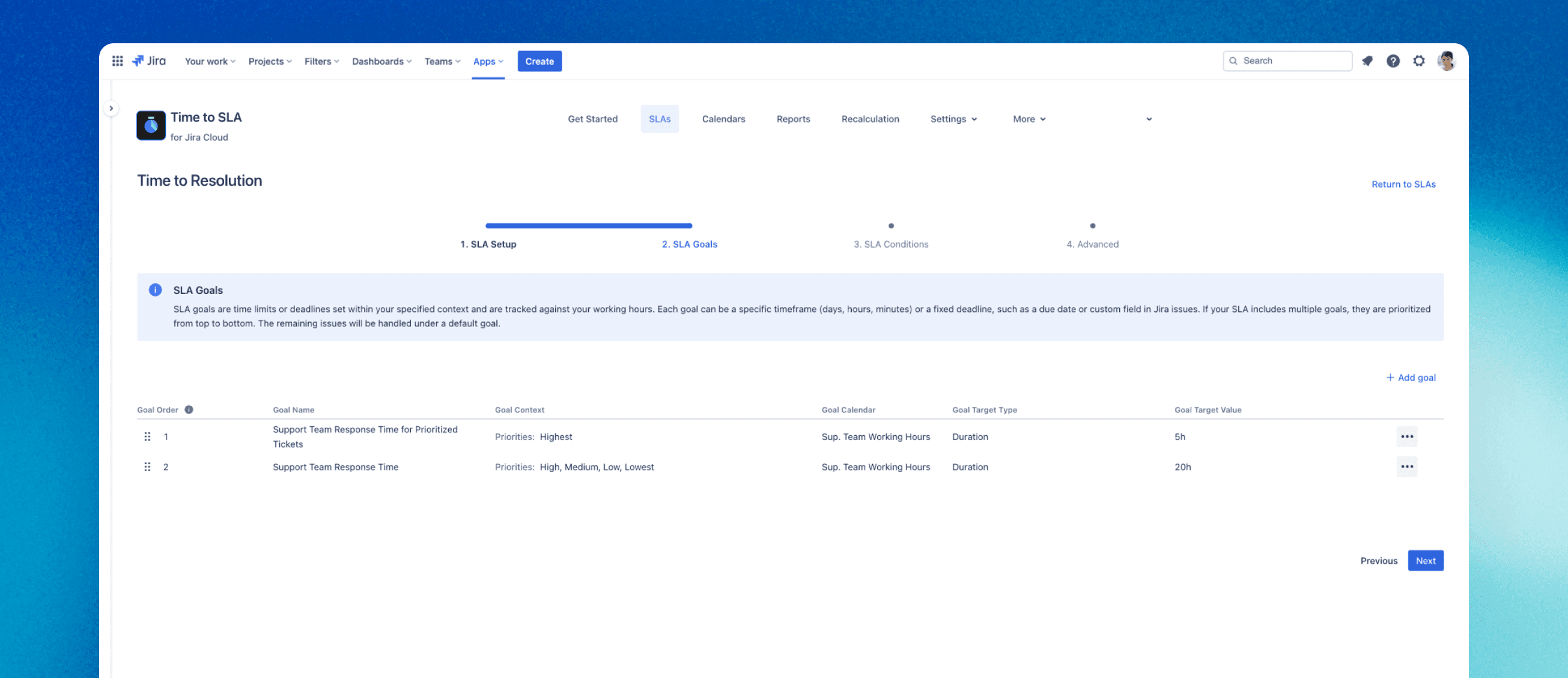
Define SLAs that match real service commitments

Define SLAs that match real service commitments

  • Set time-based or negotiated-date targets
  • Tailor goals by priority, customer, or service need
  • Use JQL to apply the right SLA to the right Jira work
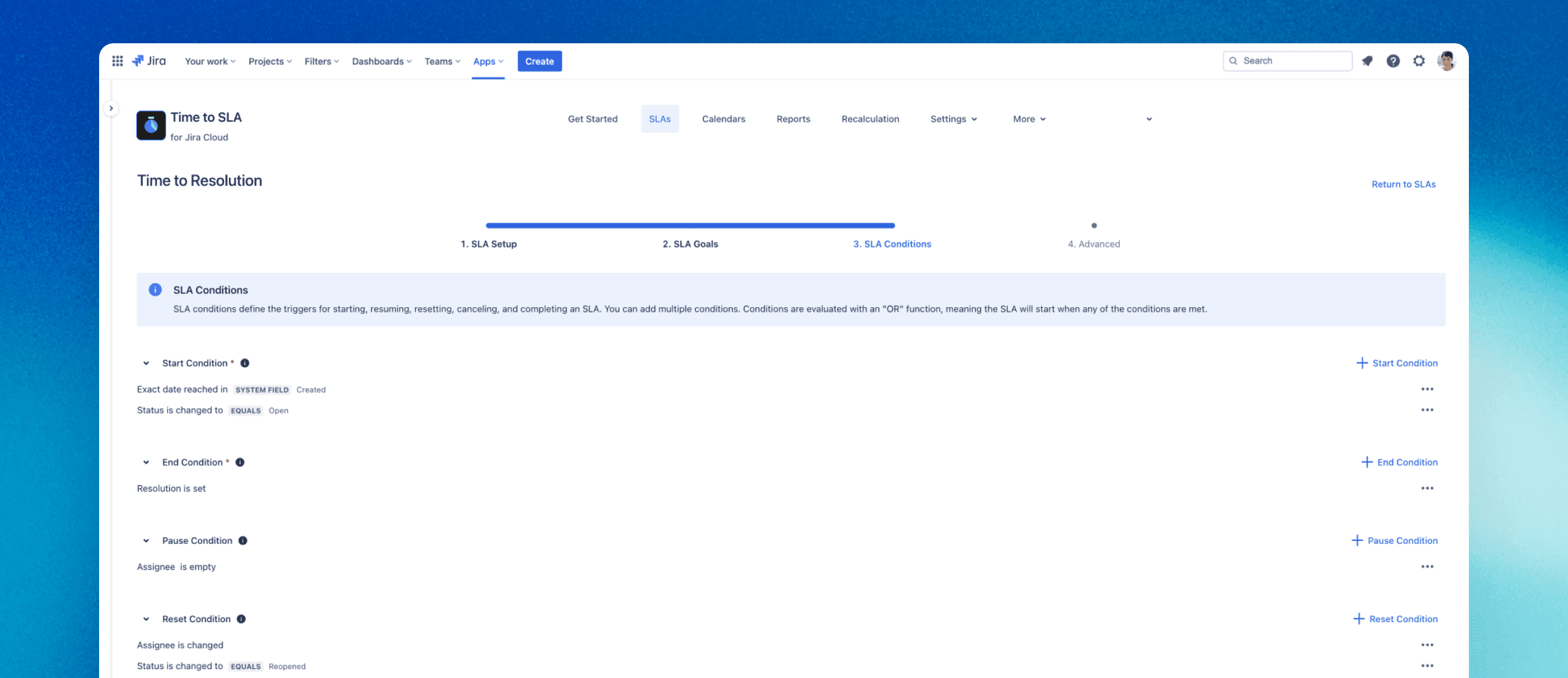
A graphic showing how to Start, pause, stop, and reset timers your way.

Start, pause, stop, and reset timers your way

  • Control timers with statuses, dates, comments, and conditions
  • Pause legitimate waiting time, such as waiting for a customer
  • Use working calendars so targets reflect real service hours
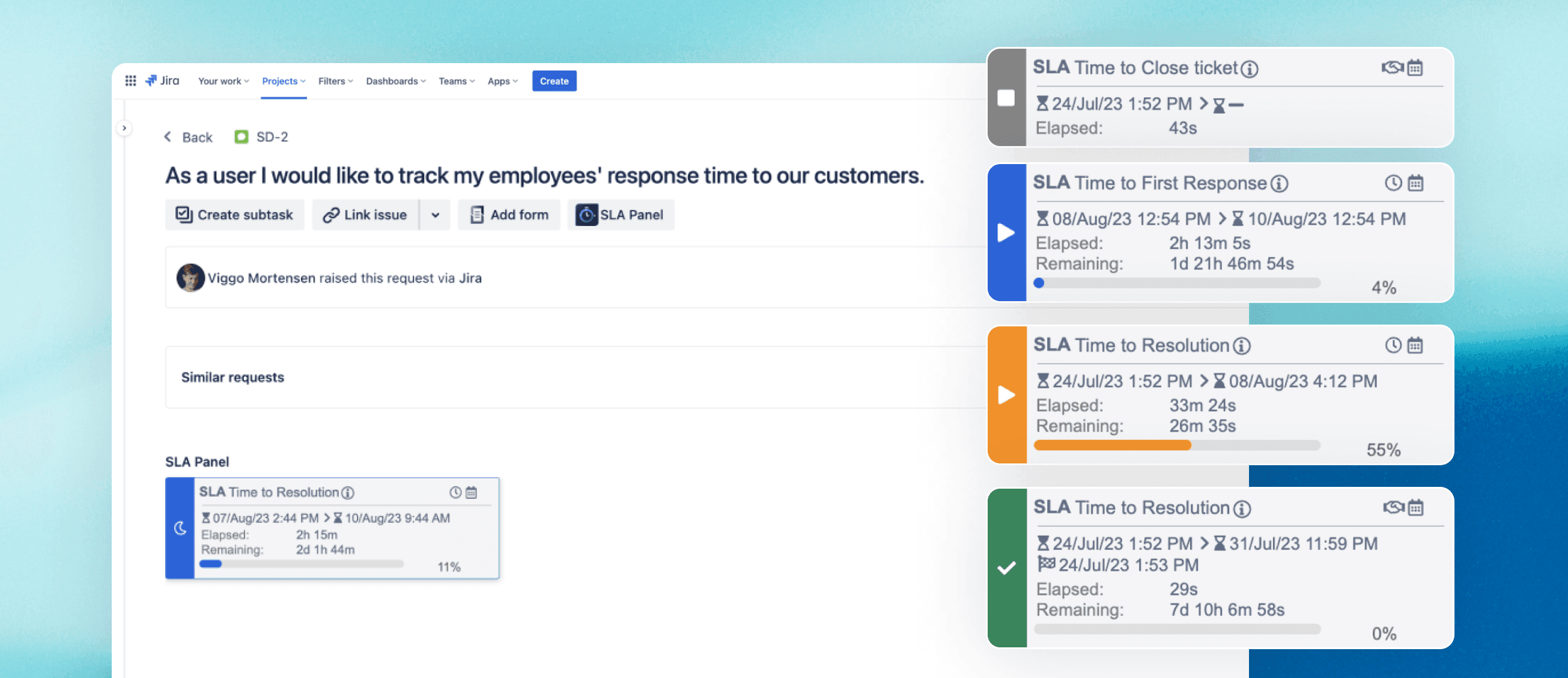
Graphing showing Know which tickets need attention right now

Know which tickets need attention right now

  • See real-time SLA countdowns directly in Jira issues
  • Use color-coded status to spot risk at a glance
  • Prioritize work approaching its SLA target before it breaches
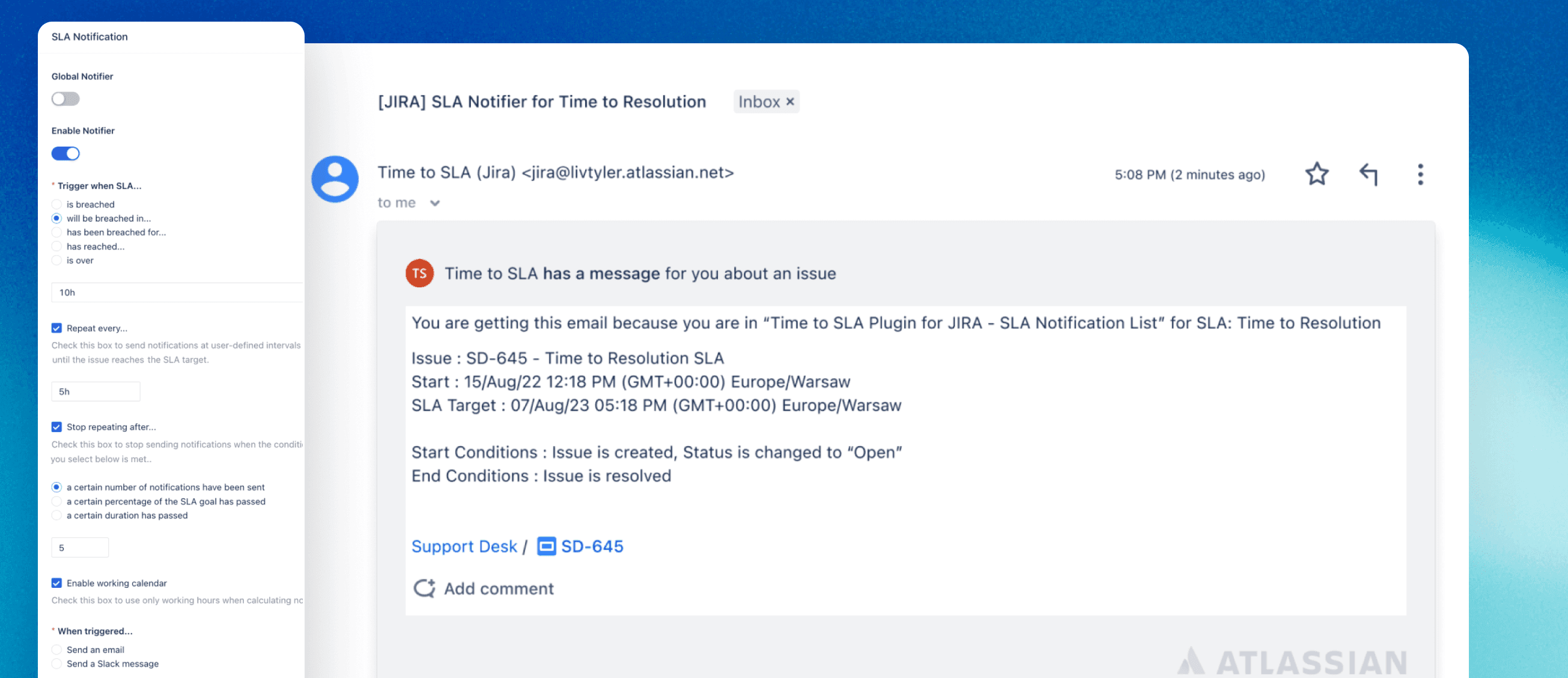
Graphing showing How to Act before an SLA deadline is missed

Act before an SLA deadline is missed

  • Set critical zones before the final deadline
  • Send Slack or email notifications as risk increases
  • Give owners time to intervene before customer commitments are missed
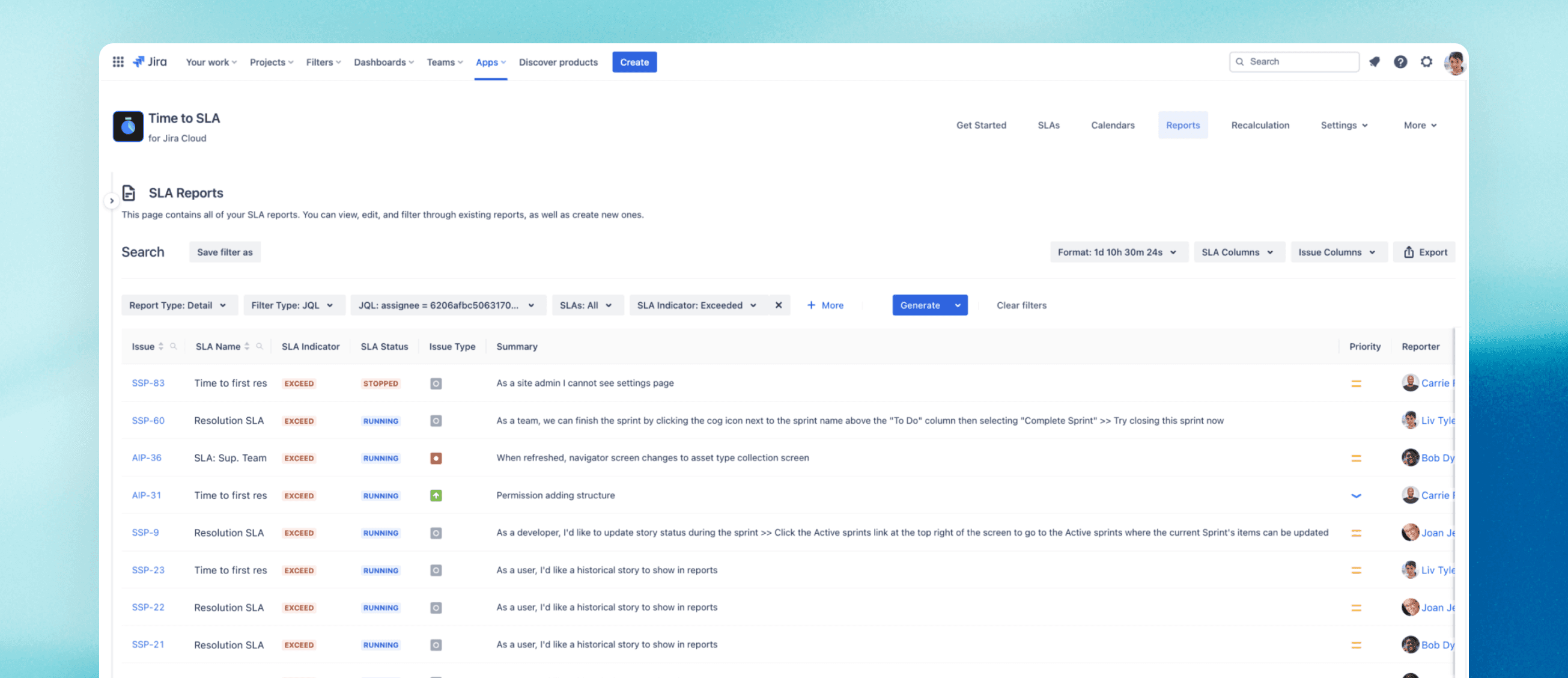
Graphic showing How to make Jira SLA reporting easier to act on

Make Jira SLA reporting easier to act on

  • Analyze SLA performance with Summary, Detail, Duration, and Status reports
  • Save report configurations for repeat analysis
  • Schedule periodic reports instead of rebuilding service desk reporting manually
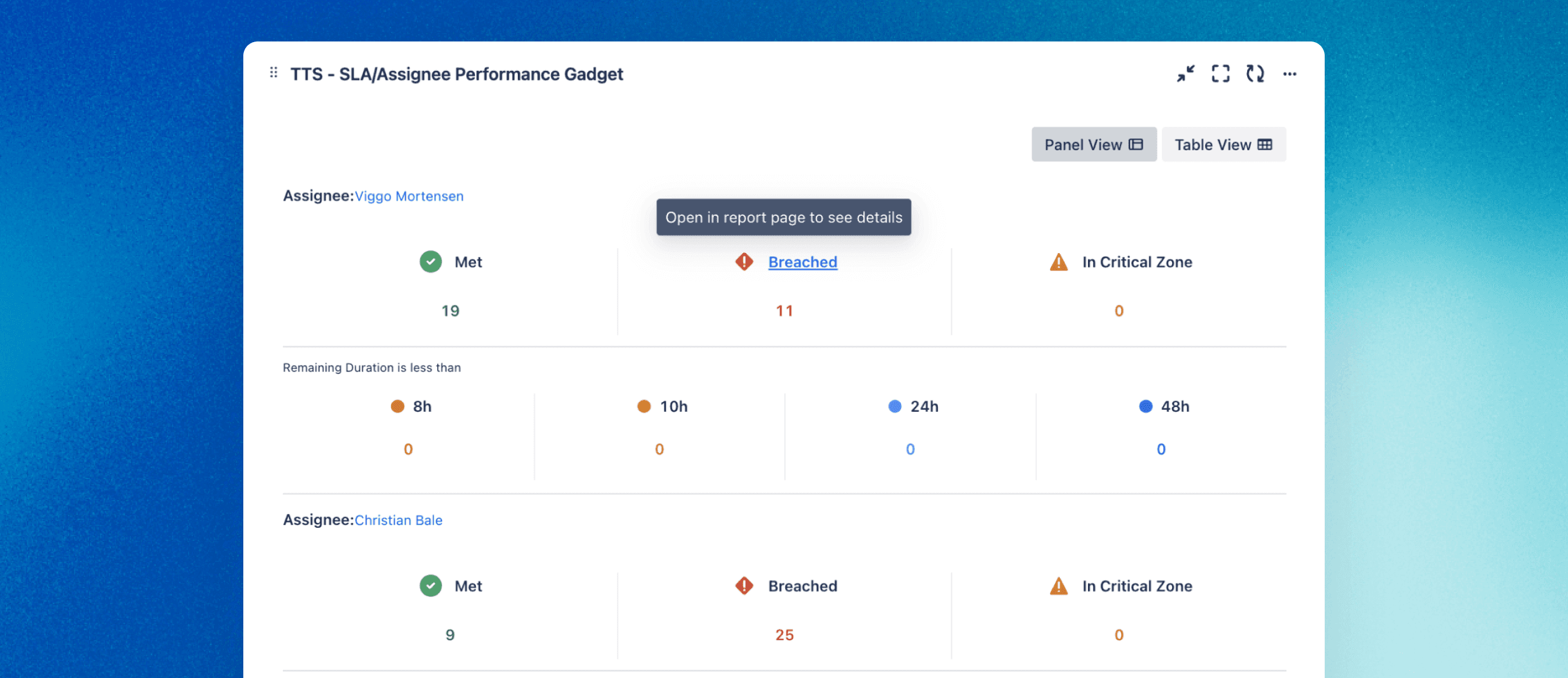
Graphic showing where SLA performance breaks down

See where SLA performance breaks down

  • On Cloud, review completed SLA performance across projects and teams
  • Group, filter, and compare results by time period
  • Drill into the Jira work items behind a drop in SLA success rate

“Time to SLA has a very sensible design and it behaves as advertised. It solves a real problem for us with regards to tracking SLAs across products (JSM and JSW).

The webhook into Slack was easy and worked immediately. The variables are very intuitively named and it just makes my life easier.”

Tim A.

“Fantastic add-on. Complements Jira Service Desk perfectly and let us easily set up complex SLA requirements we couldn't achieve with JSD's built-in functionality.”

Michael P.

“Great app, easy to configure. It took me a couple of minutes to define and watch SLAs.”

Barbara L.

“The native Jira SLA feature is inadequate, but Time to SLA lets us manage very complex SLAs. The support team is awesome, quick to respond and quick to act on our feature suggestions.”

Roy H.

“It's simply the best SLA app for Jira Software. We love publishing SLA information from TTS into Power BI and using their API to keep a single source of truth for our working calendars.”

Daniel R.

Compatible apps 06

Build the perfect SLA management app combo

Time to SLA logo

Connector for Salesforce & Jira

Connect Jira SLA information with customer-facing workflows by syncing Salesforce and Jira data, helping support and account teams stay aligned.

Learn more

Dashboard Hub Pro

Turn SLA metrics into shareable, customizable dashboards that combine service desk KPIs with reporting across projects and Atlassian tools.

Learn more

Jira Misc Workflow Extensions (JMWE)

Pair Time to SLA with JMWE to automate actions around SLA status. Trigger workflow actions as deadlines approach, enforce the right processes, and help teams respond consistently to at-risk work before SLAs are breached.

Learn more

Resources and news 08

Resources

FAQ’s 07

FAQ's

Time to SLA is a service level agreement (SLA) management app for Jira that helps teams define, track, and report on service level agreements and operational level agreements (OLAs) in Jira Service Management and Jira Software.

Create an SLA, define when its timer starts, pauses, stops, or resets, set the target and calendar, and choose which Jira issues it applies to. Time to SLA then shows live SLA status and time remaining directly in Jira.

Yes. Real-time countdowns, critical zones, and Slack or email notifications help teams spot at-risk tickets before deadlines are missed. Reporting then helps identify patterns behind breaches and improve service performance over time.

Yes. Time to SLA includes Summary, Detail, Duration, and Status reports. You can save report configurations and use periodic reporting; Cloud customers can also use Executive reports for high-level, cross-project SLA analysis.

Yes. Teams can track targets such as first response and resolution commitments, tailor SLA goals to different customers or priorities, and notify agents when customer support SLA deadlines are at risk.

Yes. Time to SLA can measure resolution and other service targets using configurable SLA start, pause, stop, and reset conditions, with real-time timers that keep ticket resolution tracking visible inside Jira.

Yes. You can configure pause conditions to match your workflow. For example, pausing an SLA while a ticket is waiting for a customer. You can also configure working calendars so non-working time is handled appropriately.

Yes. Time to SLA can apply SLA rules across Jira work using configurable scope and JQL. Built-in reporting helps teams review SLA performance, while Cloud Executive reports can analyze completed SLA data across multiple projects.

Time to SLA is for you if your team manages customer or internal service commitments in Jira and needs more flexible SLA rules, better visibility into potential breaches, or stronger SLA reporting. Typical users include service desk managers, ITSM leaders, support teams, operations teams, and Jira admins.

Time to SLA helps larger organizations standardize SLA and OLA tracking across teams, projects, customer commitments, working calendars, and reporting needs while keeping SLA data visible in Jira.