

Jira works beautifully for teams. Project management requires a different level of visibility.
TL;DR
- Jira supports team-level work extremely well, but project management becomes harder when visibility must span multiple teams or workstreams.
- Many project managers track schedules, risks, and dependencies outside Jira because these views are not assembled by default.
- Jira remains a capable project management foundation when the right structure is added on top.
- Portfolio-level planning requires cross-team visibility that Jira’s native features do not provide on their own.
- BigPicture extends Jira so teams keep working the way they prefer while project managers gain the clarity they need to plan with confidence.
Why Jira works well for teams but feels harder for project managers
Teams enjoy using Jira because it mirrors how they work day to day. Tasks move. Sprints finish. Boards show progress. At the team level, Jira feels fast, responsive, and intuitive.
A developer can update an issue and move on. A designer can see what is coming next. A product owner can glance at a board and understand what is in progress. For execution within a single team, Jira provides clear, immediate feedback.
Project managers experience a different set of demands.
They are responsible for timelines, dependencies, risks, and coordination across multiple teams. Their questions extend beyond a single board:
- When will the full project be done
- How does this work affect what comes next
- What depends on this task moving forward
- Are we still on track across all teams
These questions usually surface when leadership asks for a confident delivery date. That is when project managers often find themselves moving between several Jira boards, a spreadsheet, and past meeting notes just to assemble an answer.
Jira shows what each team is doing. Project managers are responsible for explaining how all of that work fits together.
Jira was designed to track tasks and support team execution. Teams adopt it because it is flexible and familiar. Project managers adopt it because the teams are already there. As long as the work stays contained within one team, that setup holds.
Once work spans multiple teams, timelines, or workstreams, the limits of that view become visible. Jira reflects activity clearly, but it does not assemble that activity into a connected project picture by default.
This is why project management in Jira can feel heavier than expected. Jira is doing what it was built to do. Project coordination simply requires visibility that sits above individual boards.
Why Jira works so well for teams
Jira is easy for teams to adopt because it fits naturally into how they work day to day. Tasks are visible, status changes are simple, and boards show what is in progress, what is coming next, and what has been completed.
For a single team, this level of clarity often feels complete. A board answers most day-to-day questions quickly, and progress is easy to communicate within the group.
That experience can create an expectation that the same clarity will extend automatically to project management. If each team keeps their board up to date, it seems reasonable to assume the overall project should be easy to understand.
In practice, that is where things start to feel harder.
Project management depends on more than accurate task updates. It requires understanding how work across teams connects, how timelines influence one another, and where risks are forming before they slow delivery. Jira continues to represent work clearly at the team level, but it does not automatically combine that information into a broader project view.
As a result, individual boards may look healthy while the overall project still feels unclear. Nothing appears wrong in isolation. The gaps only become visible when someone tries to step back and explain how all the work fits together.
How teams and project managers experience Jira differently
How teams experience Jira | How project managers experience Jira |
Clear tasks and updates | Scattered information across boards |
Immediate visibility | Missing context between workstreams |
Easy to adopt | Hard to assemble into a project plan |
Great for execution | Incomplete for planning and coordination |
It is common for a team’s board to look orderly while the overall project still feels unclear. The columns make sense. Work is moving. Nothing appears out of place. But stepping back to see how all of it fits into a larger plan often reveals gaps that team-level views do not resolve on their own.
Where project managers need more visibility than Jira provides by default
Jira works well when work stays inside a single team. A board shows tasks, progress is visible, and it is easy to see what is moving. For team-level execution, that view is usually enough.
Projects rarely stay that simple for long.
As soon as work spans multiple teams or depends on coordinated timing, project managers need to answer questions that sit above any one board. They need to understand how work connects across teams, how delays in one area affect another, and whether the overall plan is still on track.
This is often the moment when the work appears to be moving, but the project still feels unclear.
Common questions project managers cannot answer from a single Jira board
- How does this work connect to the overall schedule
- What happens if one team finishes later than planned
- Which dependencies may block the next phase
- How work from different Jira projects fits together
- Who has capacity for upcoming tasks
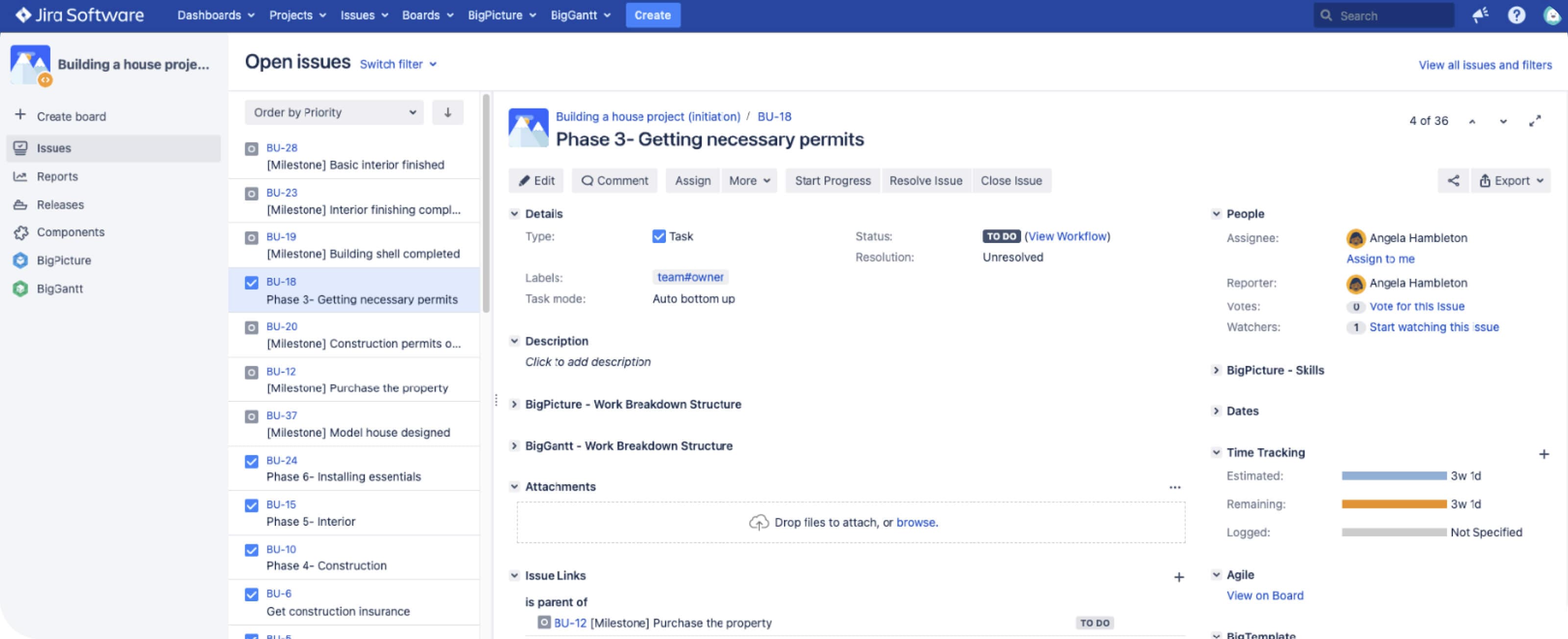
Many project managers recognize this situation. One board shows steady progress while another highlights blockers. A sprint update looks green, but a milestone feels at risk. To understand what is really happening, project managers move between multiple boards, dashboards, spreadsheets, and past conversations.
The information is in Jira, but it is spread across projects, filters, and views that were designed for teams, not for coordinating the whole.
As projects grow, these gaps become harder to ignore. Teams organize work in ways that suit their needs, which is often the right choice for execution. The tradeoff is that risks surface later, dependencies stay hidden longer, and reporting becomes a manual effort. Timelines end up in spreadsheets because that is the only place everything can be seen together.
Jira continues to do what it was designed to do. It shows work clearly at the task level. Project managers, however, need to understand the shape of the work as it unfolds across teams. Without a way to connect those views, they are left assembling the project picture by hand.
What project managers need beyond Jira’s default views
Managing a project involves more than tracking tasks as they move across a board. Project managers are responsible for coordinating people, timelines, decisions, and risks in a way that keeps work moving together instead of drifting apart.
Jira handles team execution well. It shows what work exists and where it is in progress. What it does not provide by default is a way to understand how that work connects across teams, phases, or time.
As projects grow, project managers tend to look for a small set of views that help them answer questions before problems surface, not after.
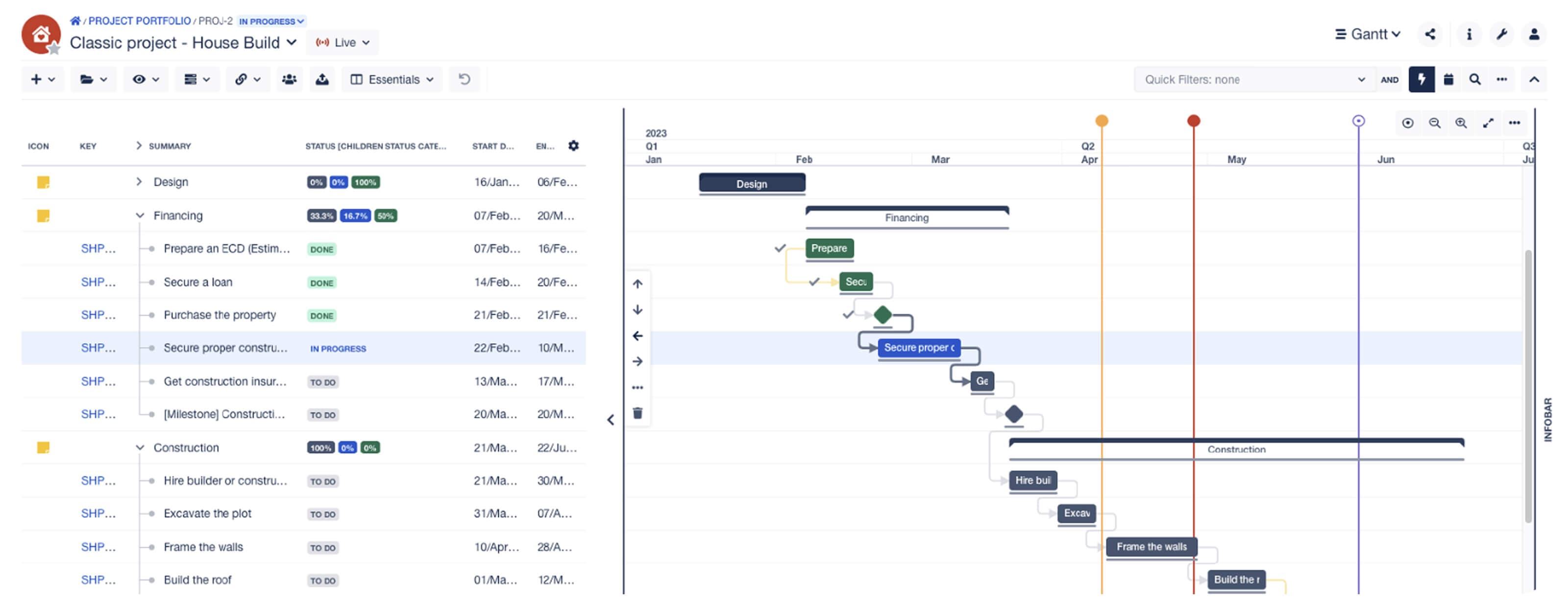
1. A connected timeline that shows how the project fits together
Projects rarely move in isolation. One stream’s finish date affects another’s start. When work is spread across several Jira projects or boards, those relationships are difficult to see in one place.
To understand how everything lines up, project managers often recreate timelines manually. This usually happens in spreadsheets or slides, not because they prefer them, but because Jira does not assemble cross-team timing into a single view on its own.
2. A way to see dependencies early
Teams can make steady progress on their own tasks while still blocking one another without realizing it. Dependencies that sit across teams or projects are easy to miss until they slow delivery.
Jira can show relationships between individual issues, but interpreting cross-team dependencies requires more context than a single board provides. Project managers need to see where work relies on other work before delays appear.
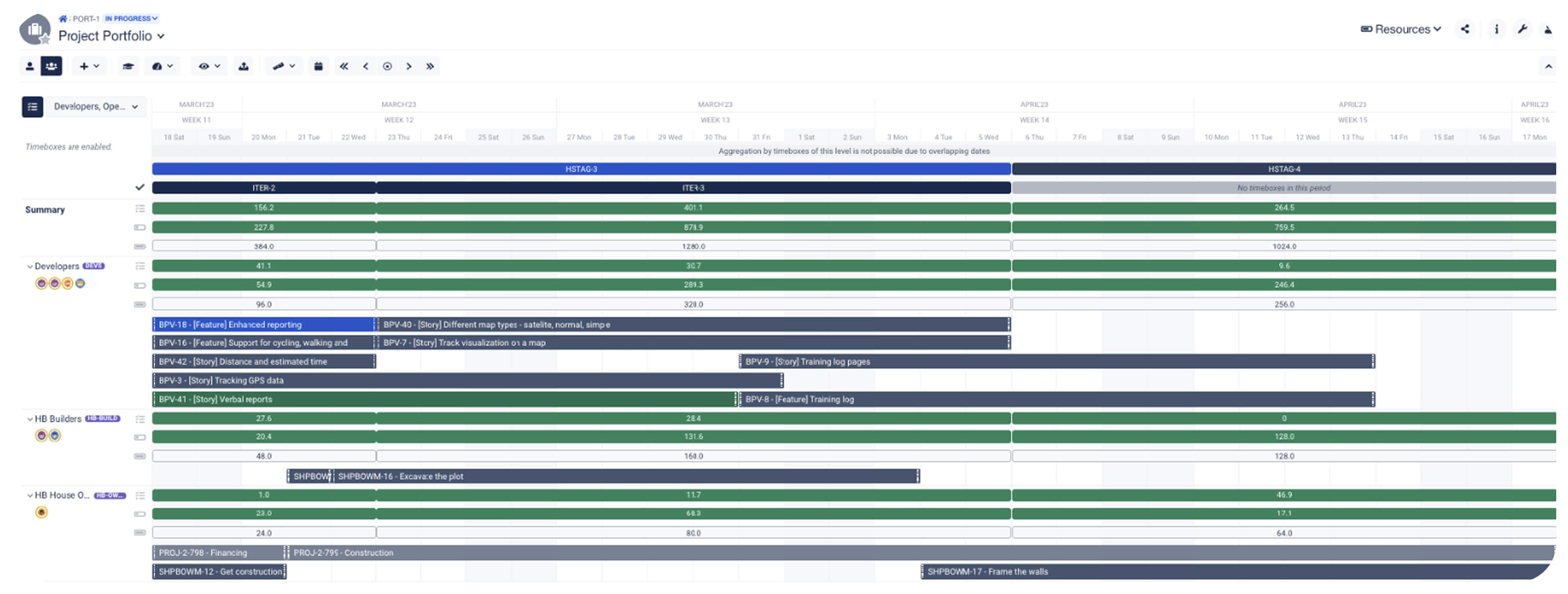
3. A clearer view of capacity across teams
Jira allows teams to assign work, but it does not show how those assignments stack up across multiple teams or time periods. Project managers often need to understand whether people have room to take on new work or whether bottlenecks are forming.
Without that visibility, capacity decisions become reactive. Work gets reassigned after delays appear instead of being balanced earlier.
4. A single place to understand overall progress
Projects that span multiple Jira projects often require project managers to assemble progress manually. Even when teams update their work consistently, there is no single view that shows how everything is progressing together.
As a result, understanding project health becomes a manual process of checking boards, running filters, and comparing notes from different teams.
5. Reporting that reflects the project, not just the tasks
Stakeholders usually want to understand progress in terms of milestones, risks, and upcoming decisions. Jira’s native reports focus on activity within a board, which works well for teams but does not always translate into project-level insight.
Project managers often end up creating separate reports to explain where the project stands, what has changed, and what needs attention next.
These needs surface because Jira is optimized for team execution. Project managers need visibility that connects those team-level updates into a coherent picture. As soon as a project spans multiple teams or workstreams, that gap becomes harder to ignore.
How projects in Jira turn into portfolios faster than teams expect
Most project managers do not plan to manage a portfolio. It usually happens as work grows and becomes more interconnected.
A single project expands into several workstreams. One Jira project becomes two or three. A feature turns into a release, then into a set of related initiatives. Over time, the work stops behaving like a single effort and starts behaving like a network of connected pieces.
Signs a project is becoming a portfolio
- One team grows into several teams
- One board becomes multiple boards
- One release turns into several phases
- One initiative expands into multiple workstreams
- One status meeting becomes updates across several efforts
This shift often becomes visible through small, practical moments rather than a formal decision. A team cannot start until another team finishes their part. Work for the same initiative lives across multiple Jira projects. Priorities begin competing across teams or departments, even when everyone is working toward the same goal.
You may notice it during planning sessions. One team is ahead. Another is behind. A shared component team is waiting for decisions. The roadmap suggests everything is moving together, but the actual work tells a different story.
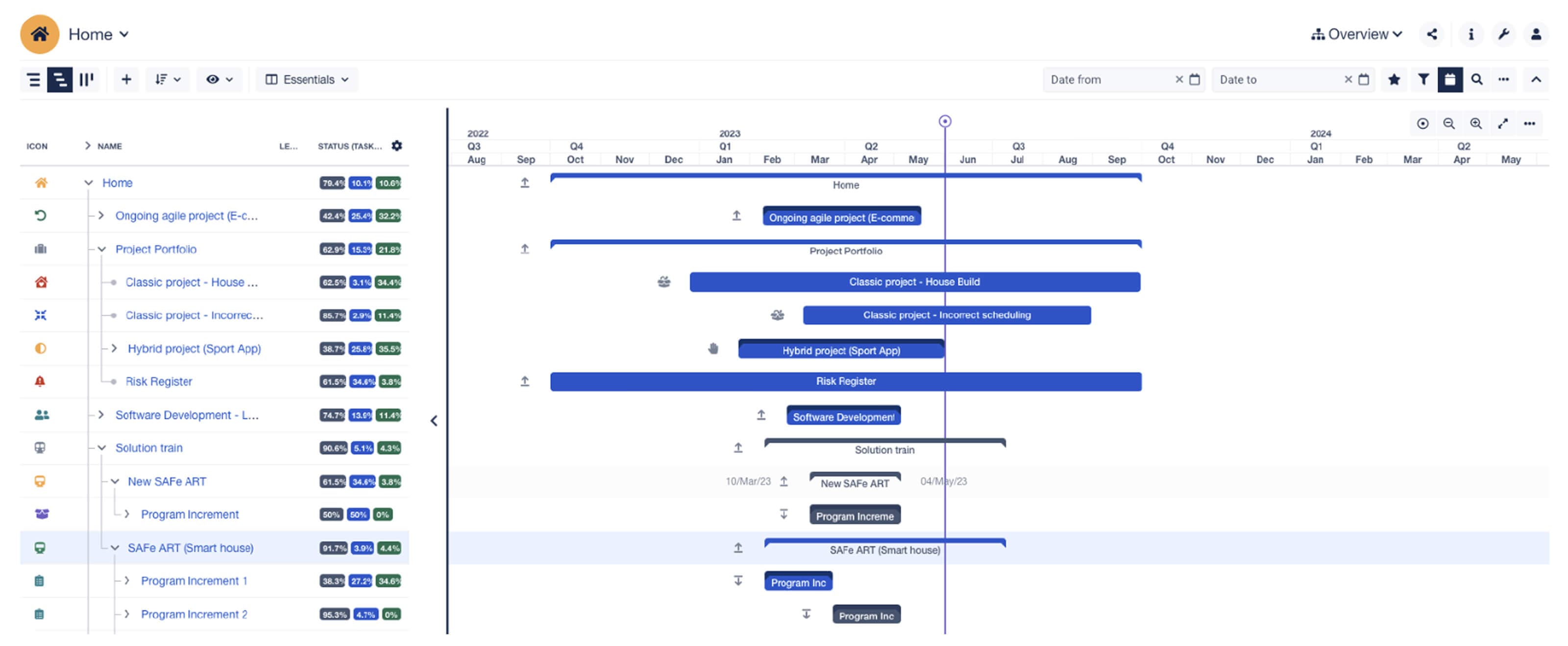
At this stage, project managers are no longer just tracking tasks. They are trying to understand how work fits together across teams and time. Dependencies matter more. Timelines intersect more often. Decisions in one area have visible impact elsewhere.
Jira continues to capture the work clearly at the issue level. The challenge is that the work no longer fits into a single board or backlog. Understanding progress now depends on seeing how all of those pieces connect.
This is the point where managing a project inside Jira begins to feel like managing a portfolio, even if the organization does not use that language yet.
Portfolio management in Jira is possible when the right structure is added
Jira can store all the work that contributes to a portfolio. Each team can track tasks in the way that fits their workflow, and that flexibility is one of Jira’s strengths.
The challenge appears when project managers and PMOs need to understand how that work connects across projects.
Cross-project relationships do not assemble themselves by default. When work spans multiple Jira projects, understanding how timelines overlap, where dependencies sit, and how delays ripple across teams often requires manual effort. Project managers end up stitching together updates from several boards, filters, and conversations just to understand how the work fits together.
At the portfolio level, planning raises questions that sit above individual tasks:
- How do these projects relate to each other
- Where do timelines overlap or conflict
- Which dependencies carry the most risk
- What does delivery look like across all teams
- How does a delay in one stream affect the rest
Questions project managers ask as portfolios emerge
- Are we managing several separate projects or one interconnected effort
- How do we keep timelines consistent across teams
- Which dependencies matter most right now
- Who needs to coordinate with whom
- What does leadership need to understand next
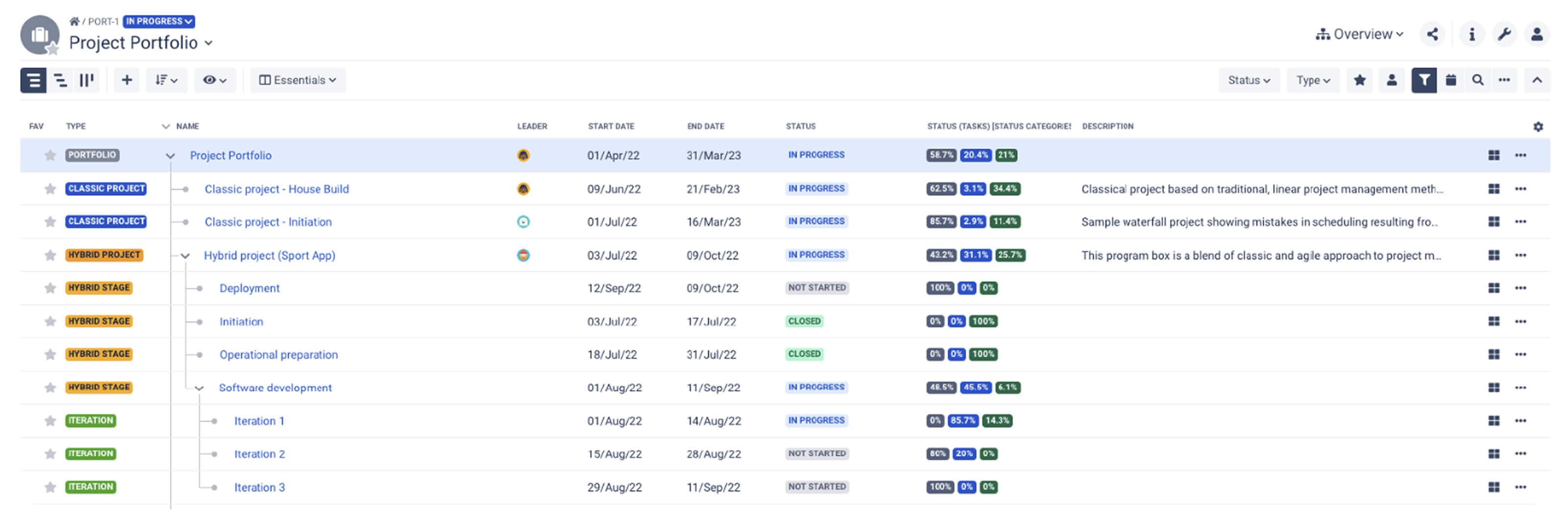
These questions usually surface when project managers prepare updates for leadership. The information exists inside Jira, but it is scattered across multiple projects and boards. Without added structure, it is difficult to turn that information into a clear, shared view of the portfolio.
Work is also organized differently by each team, which is often the right choice for execution. The tradeoff is that relationships between workstreams become harder to see, and important connections can remain hidden until they create problems.
Portfolio management in Jira becomes challenging when the visibility required lives above the team level. Jira continues to support execution well. Portfolio planning requires views that bring several streams of work together so teams and stakeholders can understand and act on the work as a whole.
How BigPicture upgrades Jira from project tracking to portfolio management
Jira gives teams a strong foundation for planning and delivering work. It captures issues, updates, and progress where the work happens. What it does not provide on its own is a way to understand how that work connects across teams, projects, and timelines at a higher level.
BigPicture adds that missing structure inside Jira.
Instead of asking teams to change how they work, BigPicture builds on the information already in Jira and organizes it into views that support project and portfolio planning. This allows project managers and PMOs to see how separate efforts relate without pulling data into spreadsheets or separate tools.
As work scales, this added structure becomes increasingly useful. Project managers can see how multiple projects fit together, where timelines overlap, and which dependencies carry the most risk. That context makes it easier to plan realistically and explain tradeoffs before they become problems.
BigPicture helps teams and leaders by making it easier to:
- See how multiple projects relate in one place
- Understand timelines and dependencies across teams
- Identify risks earlier, before they slow delivery
- Plan capacity and workload across teams without changing team workflows
- Align execution with higher-level goals and priorities
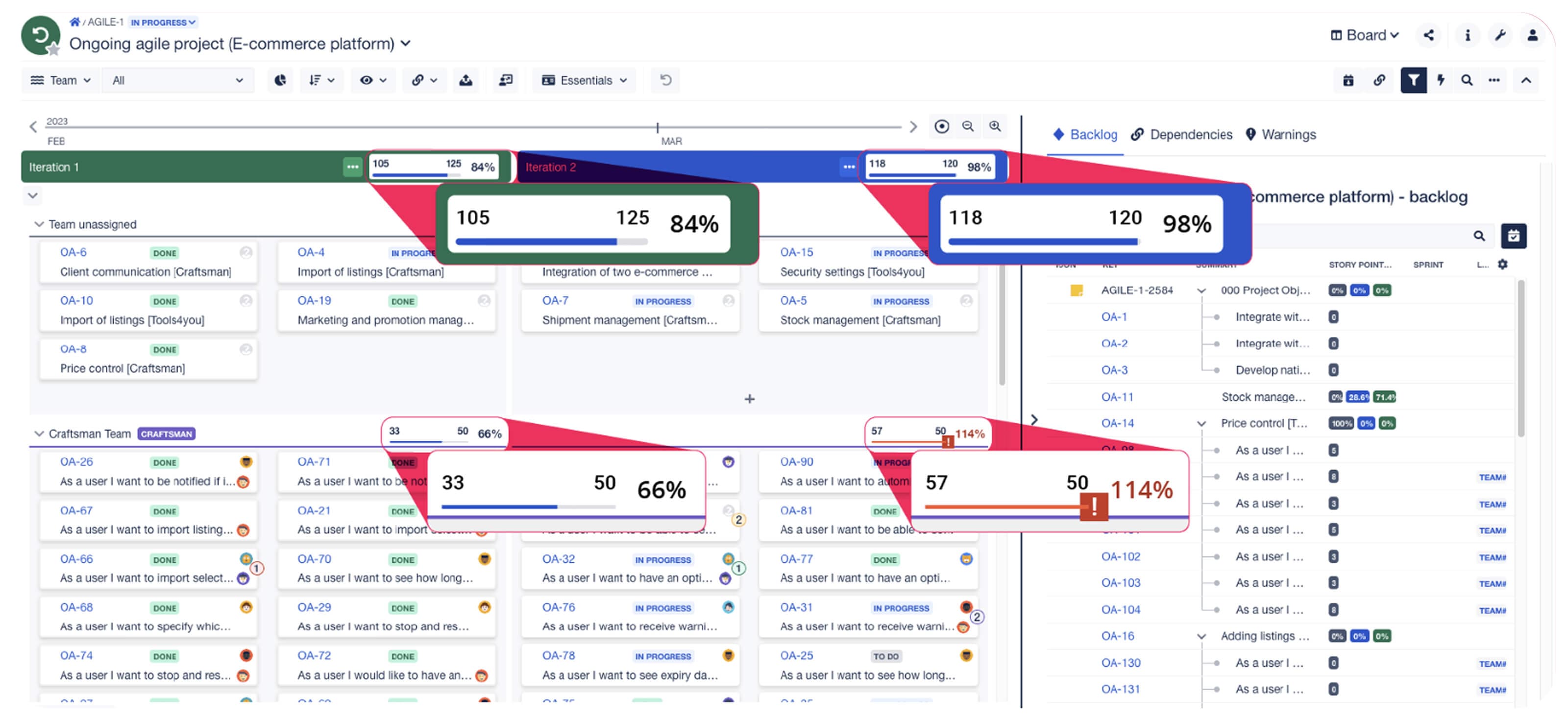
Teams continue working in Jira the way they always have. Boards, sprints, and issues stay familiar. BigPicture brings those pieces together so project managers can plan with confidence and communicate more clearly with stakeholders.
Jira shows the work teams are doing. BigPicture helps project managers understand how all of that work fits together.
How to bring clarity to project and portfolio management in Jira
Project management becomes harder when visibility stops at the team level. Tasks may be up to date, boards may look healthy, and teams may feel confident in their work, while project managers still struggle to understand how everything fits together.
Clarity returns when teams and leaders can see how work connects across projects, timelines, and dependencies. When that structure is visible, planning becomes more grounded. Risks are easier to spot earlier. Conversations shift from reconciling status to making decisions about what to do next.
BigPicture extends Jira in a way that supports this kind of clarity. Teams continue working in Jira as they always have, while project managers gain views that show how work aligns across teams and scales from individual projects to portfolios.
When structure is easier to see, coordination becomes simpler. Updates are easier to explain. Decisions feel less reactive and more deliberate.
Project and portfolio management do not require abandoning Jira. They require seeing the work from a wider perspective so plans, priorities, and progress can stay aligned as work grows.
Try BigPicture for Jira today