
Project planning and time tracking finally work together — inside Jira Cloud. Track estimates, actuals, and billable hours in one connected workflow.
Why project planning and time tracking in Jira need to be connected
If you’ve ever found yourself toggling between tabs, trying to compare estimated hours in BigPicture with actuals from somewhere else, you’re not alone.
Project and resource managers know the drill: time tracking lives in one tool, project plans in another. You spend more time stitching together updates than using them.
Now, with the BigPicture and 7pace Timetracker for Jira integration — available for Jira Cloud — your planning and time tracking are finally connected, right where the work already happens.
No more spreadsheet patchwork. No more manual comparisons. Just smarter planning, cleaner reporting, better decisions, and less rework.
Meet 7pace Timetracker for Jira
If you’re new to 7pace, here’s the short version:
It’s seamless, integrated time tracking — purpose-built for Jira teams.
7pace Timetracker replaces spreadsheets and clunky workarounds with flexible, structured time tracking that fits naturally into how your teams already work. You can log time directly on issues, use calendar or timesheet views, and track more than just hours — custom fields let you capture billable vs. non-billable time, CapEx vs. OpEx, or activity type for deeper reporting.
Because it lives inside Jira, your data is always synced and ready for planning, reporting, or exporting.
Teams love that they can:
- Track time in seconds using a calendar, timesheet, or directly on issues
- Get at-a-glance insights into estimated vs. tracked time
- Save and export reports for deeper analysis
- Set permissions to control who sees what across teams and roles
- Configure it once, and teams can start tracking time right away
With 7pace Timetracker, time tracking finally feels like part of the process, not an extra task at the end of the week.
What the BigPicture + 7pace Timetracker integration unlocks in Jira
With the 7pace Timetracker for Jira integration, BigPicture users can now connect time data and planning data in a single view — inside Jira Cloud.
No more switching tools or patching together spreadsheets. This integration brings time estimates, actuals, capacity metrics, and billable hours into one connected workflow.
From the BigPicture perspective
See time data right where your plans live
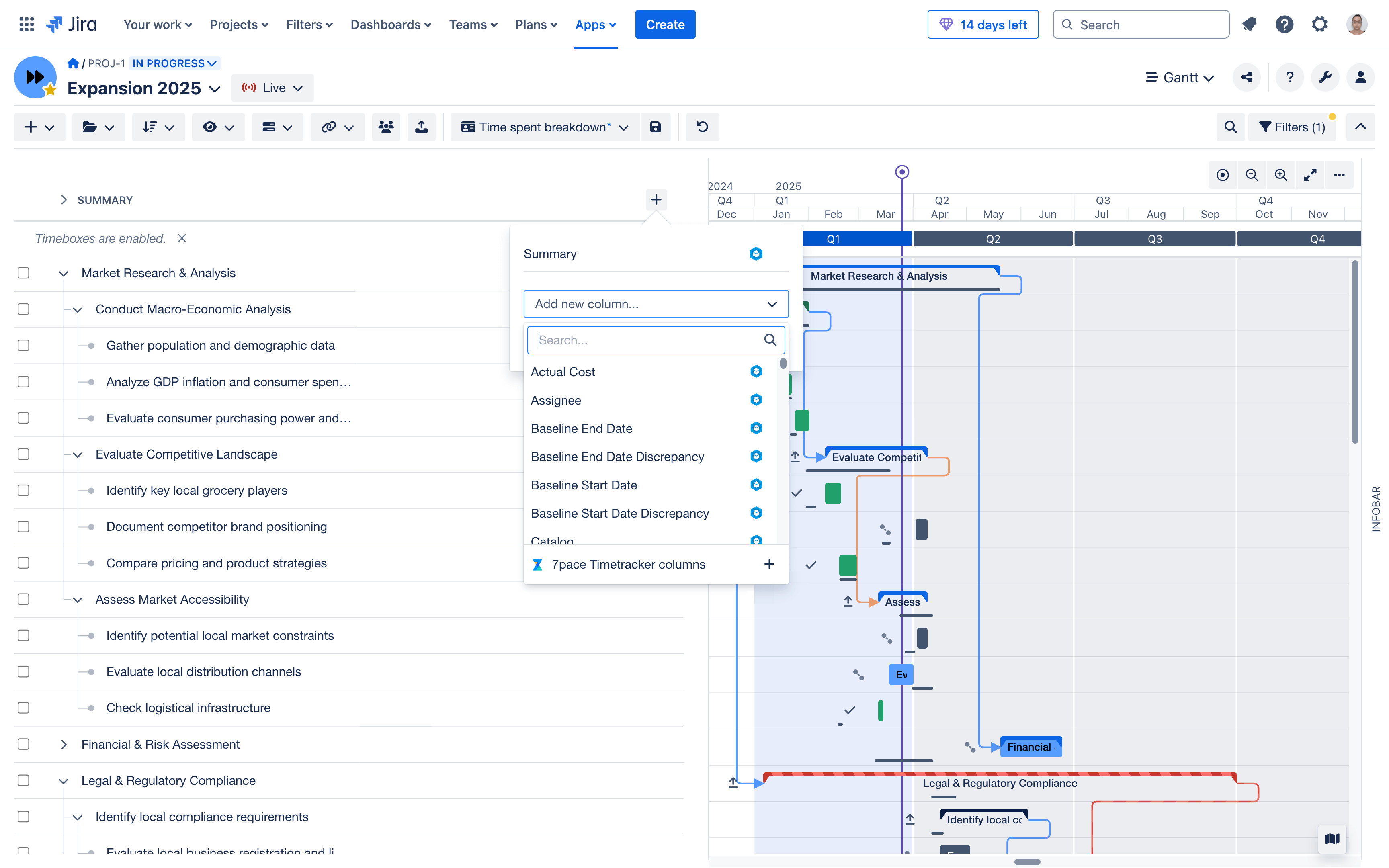
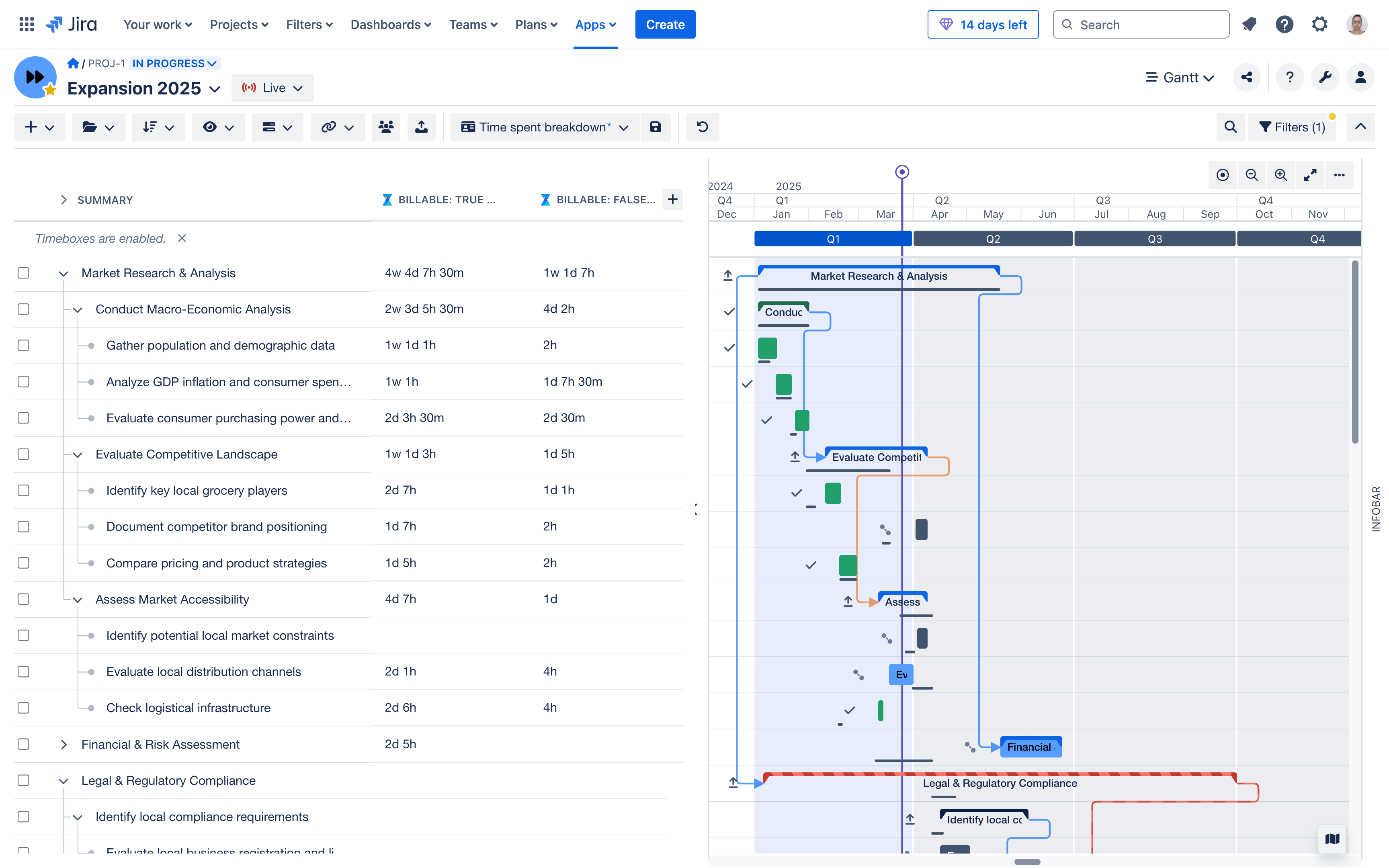
In BigPicture’s Gantt view, you can now track and compare four critical time metrics:
- Original estimate – The original estimate
- Time spent – Actual hours tracked by the team
- Remaining estimate – The hours still needed to complete the task
You can also:
- Compare estimated vs. actual hours at both the task and project level
- Export clean, structured time data directly from BigPicture
- Differentiate billable vs. non-billable time using 7pace Timetracker custom fields
From the 7pace Timetracker perspective
See BigPicture-informed capacity data — inside 7pace Timetracker
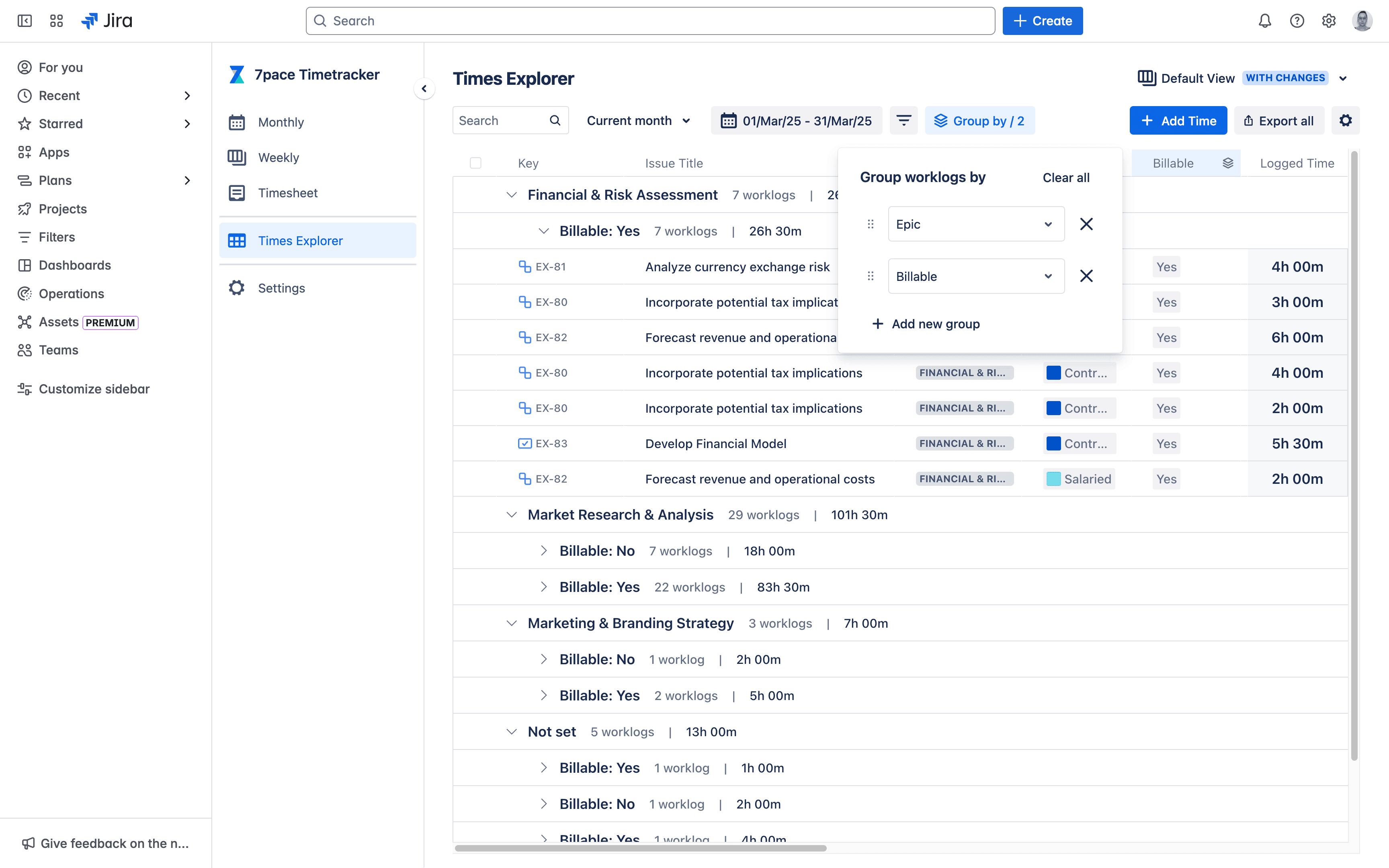
In 7pace’s Times Explorer, you can now pull in BigPicture-based capacity metrics to:
- View each team member’s actual workload against planned availability
- Identify who’s under or over capacity at a glance
- Adjust assignments without jumping between systems
Everything stays inside Jira — so your time data stays connected to your work, your teams stay aligned, and your reports stay clean.
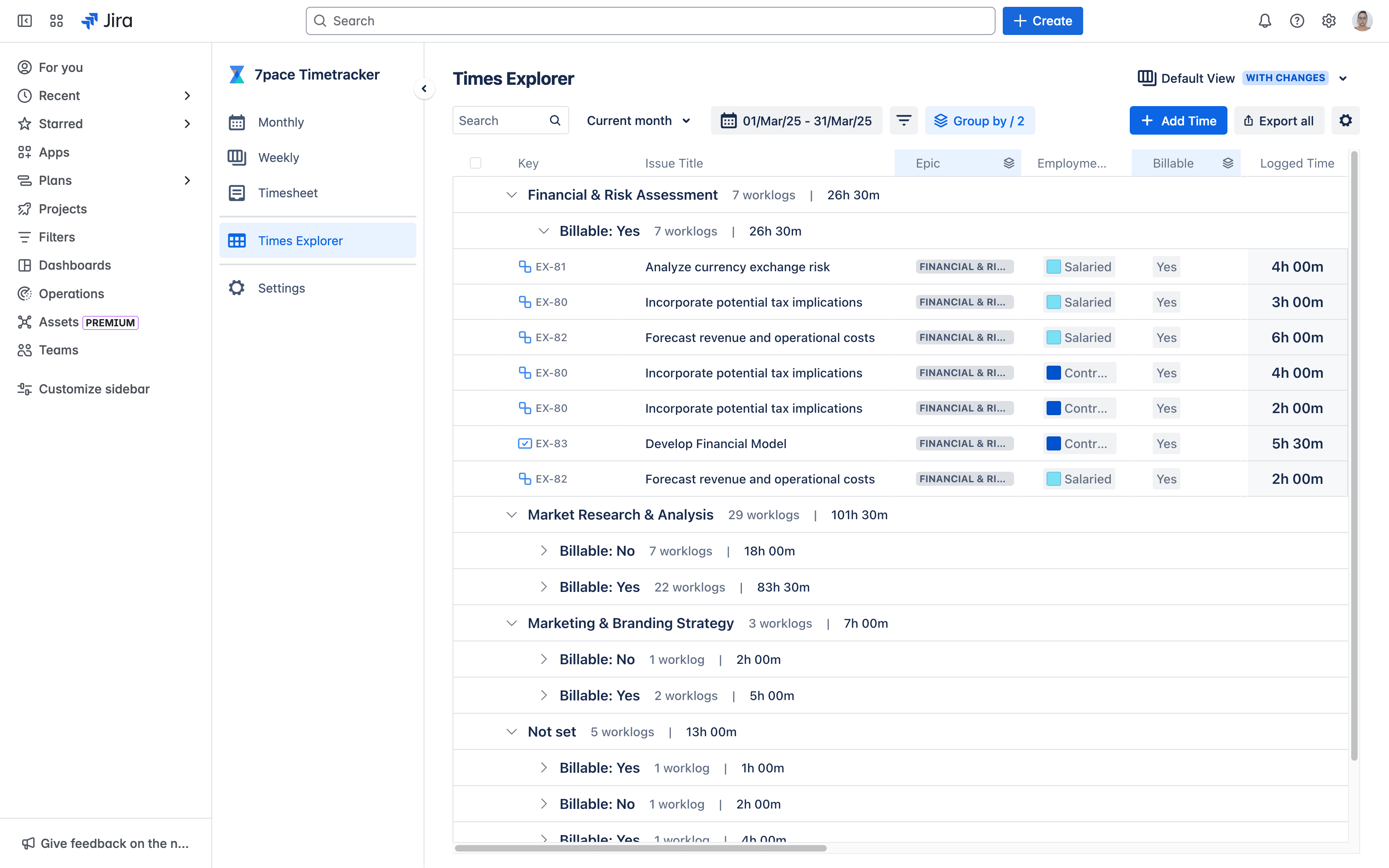
How different teams use BigPicture and 7pace for time tracking in Jira
This integration isn’t just about tracking time. It’s about making the work you already do easier to plan, manage, and report on, with less friction and more confidence.
For project managers
Move beyond guesswork.
With actuals and remaining hours visible in your Gantt view, you can replan quickly and answer stakeholder questions with confidence.
For resource managers
Balance team capacity with project demands.
Adjust workloads in BigPicture using real-time time data from 7pace Timetracker — so your plans reflect what your team can actually deliver.
For teams on billable hours
Track and report on billable time without the busywork.
Tag billable vs. non-billable time at the source, then generate clean, client-ready reports without chasing down updates.
For portfolio and finance teams
Tie time to cost — and plan smarter for what’s next.
Assign time to cost centers or departments, identify trends across teams, and forecast future budgets using actual effort instead of assumptions.
How the integration works
To connect time tracking and project planning, you’ll need both BigPicture (or BigGantt) and 7pace Timetracker for Jira installed in your Jira Cloud environment.
Once connected, everything lives inside Jira — no jumping between tools, no rebuilding reports. Just one integrated experience, structured, reliable, and always up to date.
Here’s how it works:
Log Time
Team members track time in 7pace Timetracker — using a calendar view, timesheet, or logging directly on Jira issues.
Sync Time Data
Logged hours automatically sync into BigPicture’s Gantt and Scope modules, appearing alongside baseline and updated estimates.
View Capacity
BigPicture uses 7pace time logs combined with resource availability to calculate real-time capacity, giving you visibility into team workload and bottlenecks.
Configure Permissions
Admins manage who sees time, billing, and capacity data, so sensitive information stays secure and relevant for each user role.
Final thoughts and what to do next
When time tracking and project planning live in the same place, everything just works better.
The BigPicture and 7pace Timetracker for Jira integration is here — and it’s ready to simplify your planning, forecasting, and reporting from day one.
Not using BigPicture yet? Start with 7pace Timetracker for Jira. When you’re ready to scale into portfolio planning, you’ll already be set up for success.
Want to learn more or see it in action?
- BigPicture and 7pace Timetracker integration documentation
- 7pace Timetracker for Jira documentation
- Schedule a 1:1 session with a Solution Advisor
Bring your time data into BigPicture — and see what it’s like to plan with the full picture.
Start your free trial of 7pace Timetracker for Jira