
As you know, Jira helps organizations improve productivity and streamline workflows in the field of project management and issue tracking. But before putting Jira into practice or when you’re migrating from Jira server, there's one important choice to make: Jira Cloud or Jira Data Center?
Operations, scalability, and security are just some things that might be affected by the decision. Atlassian's server end-of-life has already passed, so it's crucial to consider how this affects migration timelines and processes. Although support has ended, Server instances are still running, but they won't get updates or security patches, potentially leaving your system vulnerable.
It's important to know that Atlassian is fully committed to the Cloud, with a bright future ahead. The Cloud has many benefits, including continuous updates, scalability, and enhanced security features. Considering the time it takes to migrate and how that affects your decision is essential. Moving to Data Center can still offer advantages in terms of migration ease and speed, making it a viable interim solution on your way to the Cloud, especially if you need more time to plan your migration strategy. Alternatively, you might find that Data Center suits your long-term needs. Regardless, you need to carefully consider your options.
In this article, we’ll explore the aspects of Data Center and the Cloud and their differences.
Key aspects of Jira Data Center
Jira Data Center is an extensive enterprise solution designed for businesses that are looking to improve the scalability, dependability, and control of their project management initiatives.
In the Jira Data Center, you can create self-managed enterprise solutions, that aim to meet your organization’s unique needs and demands, as well as modernize your IT infrastructure while maintaining security and control.
Let’s explore some of the aspects of Data Center that will provide you with information on how it may help solve your organization's needs:
Architecture components
There are two ways to deploy a Data Center: Non-clustered (single node) - that is when your application will run on a single server or node, or cluster, which means your application runs on multiple application nodes configured in a cluster. This architecture requires specialized components, such as a load balancer. We explained the components below.
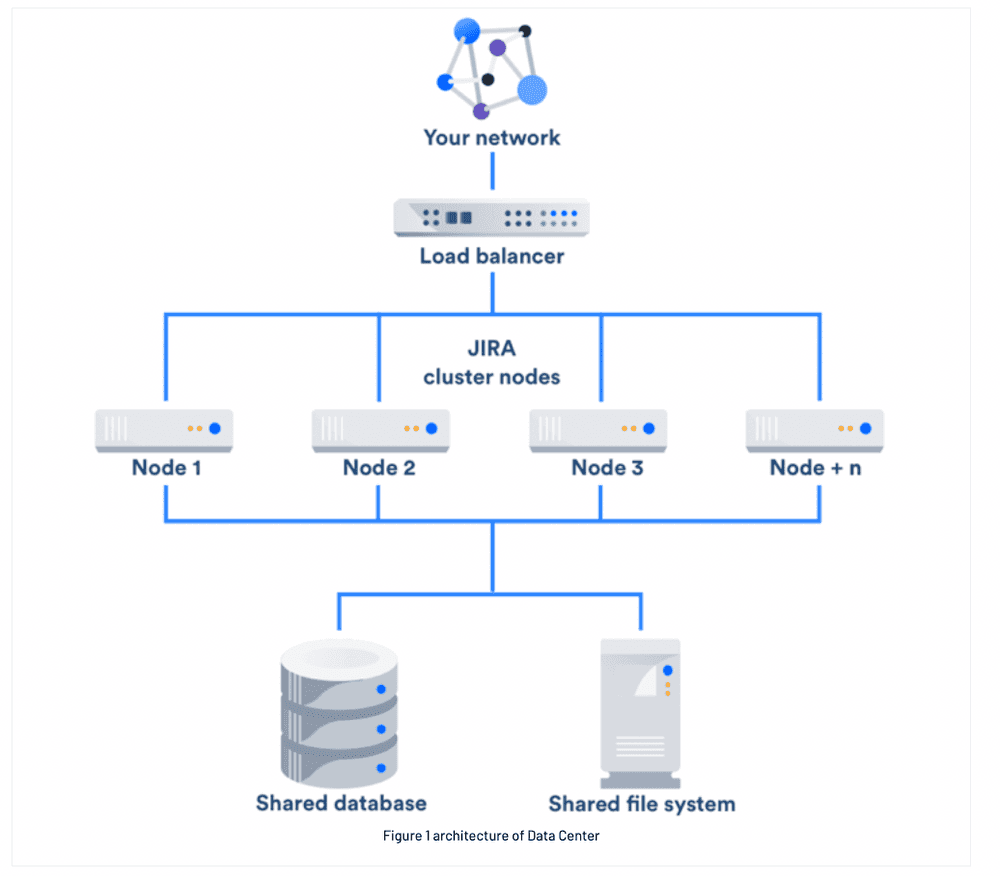
A demonstration of how the Jira Data Center is made up of a chunk of dedicated and connected machines
So, once you establish the connection, the network then connects to the load balancer. A cluster of nodes connected to the shared file system and database is located beneath the load balancer.
Load Balancer
The load balancer helps distribute user requests to cluster nodes, identifies failures, and redirects them to other nodes for efficient data flow. It also maintains session affinity.
Application Nodes
The cluster in Data Structure (DS) nodes shares the workload of new or incoming requests. If a failure occurs, you can direct the requests to other nodes, ensuring minimal user availability.
Shared database and Storage
The Jira Server and Data Center support the same databases. Notable database configurations are Amazon RDS Multi-AZ and Amazon PostgreSQL-Compatible Aurora.
Data Center also supports shared file systems, which include:
- Plugins
- Shared caches
- Import/export files
- Logo director
- Any type of data directory that includes the avatars, attachments, and icons
Features that characterize DC
High availability
Clustering critical applications in an active manner ensures constant user access and reduces downtime in case of hardware failure. You can achieve this by using methods such as shared file systems, load balancing, and database clustering.
Performance at scale
By adding more nodes to the Data Center clusters, you can boost their ability to handle additional users and improve response times as user activity grows.
Key aspects of Jira Cloud
Jira Cloud is another great option for software houses, teams, and developers. Atlassian's cloud products are “Software-As-A-Service" that help organizations reduce operational, IT maintenance, and hardware costs associated with managing Jira. It provides high-quality developer tool integrations and features for Agile software development.
Jira Cloud products respond quickly to growing customer loads and data. They use product-specific security practices and employ high-tech security consulting firms for security testing.
And because you’re using one Cloud platform, your experience across Atlassian products and third-party apps is more connected. This interconnection helps your team get work done faster and with less effort.
Atlassian leverages a wide number of techniques to achieve high performance in Cloud architecture. These techniques include:
Global distribution
The global reach of the Cloud enables customers' content to be closer to end users. This offers optimization of user performance based on the location with the highest traffic.
Dedicated internal networks
You can connect users to the Cloud via a private dedicated internal network that is nearest to them. This speeds up the connections and creates a smoother user experience.
Content Delivery Networks and caching
The Cloud automatically stores often-used content in a network for fast delivery to many users.
Breaking down the differences between Jira Data Center and Jira Cloud
Deployment and administration
In the Jira Cloud, Atlassian hosts your Cloud products, so they manage security and maintenance. With Data Center, you host your products, so you get to decide how to do that. But that means you’re also responsible for maintenance and upgrades.
Support after Atlassian Server end of life
Atlassian will end support for their Server products on February 15, 2024, which means Atlassian and Marketplace vendors will no longer release updates or fixes to their Server products after that date.
How much time you have before Atlassian Server EOL should factor into your decision between Data Center and Cloud. Because you don’t want to leave your business unsupported.
If you’re behind on starting your migration and Server end of life is looming, the easiest solution is to upgrade your license to Data Center. Then you’ll have "migrated" off Server without having to move your data. If you want to stay on Data Center, you can set up a clustered environment later. Or you can move to Cloud later, if that works better for your organization in the long term.
Upgrades
Speaking of upgrades, Jira Cloud product upgrades are no longer necessary because Atlassian automates them. This improves security by guaranteeing quick access to updated features. In Jira Center, administrators manually update products, scheduling, maintaining, and implementing software upgrades.
User management
In Jira Cloud, you can centrally manage the user accounts. Atlassian access allows you to manage authentication and security policies and offers better affordability to manage user accounts.
Server admins can be more efficient in the Data Center by managing user accounts using product-by-product methods or Atlassian Crowd.
Backups
You can generate backups daily and retain them on the server for a maximum of 30 days in the Cloud.
In Data Center, the administrator has to go through a complex process to set up the backup, and the admin is solely responsible for maintaining it.
Direct access to the database
Jira Cloud offers extensive REST APIs for data access, but users do not have direct access to modify file systems or server infrastructure.
In the Jira Data Center, the admin is given full access to the database directly.
Mobile apps
Jira Cloud apps and Confluence apps are offered to all Cloud customers for secure and fast collaboration without setting up a VPN.
In Jira Data Centers, if the instance is public and it does not have a firewall, the user will first have to connect to the organization’s VPN to access the products.
Marketplace apps
If you want to use a specific third-party app in Data Center or Cloud, you’ll need to verify that it's available on that hosting type. You’ll also want to make sure that version of the app has the functionality you’re looking for (“feature parity”). If you’re migrating from Server, you’ll need to check with the vendor (or review your vendor documentation) to see what the supported migration path is. (You’ll find that information for Appfire’s top apps here.)
User limit
Cloud:
- Up to 50,000 users per instance (Confluence)
- Up to 35,000 users per instance (Jira Software). (But Atlassian's product roadmap aims to increase this to 50,000 users.)
Data Center:
- Unlimited users (Jira Software, Jira Service Management, Confluence)
- 30,000 users (Bitbucket)
Popular products offered in Cloud & Data Center
At Appfire, we provide a comprehensive suite of apps for Jira Administrators, Atlassian consultants, Business users, and other functional Atlassian stakeholders. Take a look at some of our most popular apps in the Atlassian Marketplace.
As you can see, there are critical differences between Jira Data Center and Cloud, so your decision should be based on your company's specific needs. Be sure to explore Appfire's list of cloud-ready apps, which provides detailed descriptions of their migration paths and how they compare to their Data Center counterparts.
Try Appfire migration apps free