
Setting an accurate budget is crucial, but many budgets fall short. They’re often created in isolation, without real-world data to back them up.
Studies back this up — McKinsey found that 66% of enterprise software projects exceed their budgets.
The key to achieving your software development goals is to start with a thoughtfully crafted budget from the outset.
And what’s more realistic than a budget created with input from your team, stakeholders, and historical development data?
Let’s walk through the step-by-step process of creating a realistic software project budget that’ll get approval from your C-suite and ensure efficient use of your development resources.
Make an internal software development budget that wins approval
From building strong stakeholder relationships to analyzing time data, these tactics will help you create an accurate budget that gets your internal software project off the ground and into production.
1. Define the project (in stakeholder-friendly terms)
Building an effective budget isn’t just about the numbers. When seeking stakeholder approval for internal software projects, adding context helps them understand and support the initiative.
Start by creating a clear elevator pitch that communicates what you intend to build and, most importantly, why. Maybe your current tech no longer fits due to team growth, new markets, or industry changes. Or perhaps no off-the-shelf solutions meet your needs. Is this an opportunity to create efficiencies or improve integrations to eliminate data silos?
Once you’ve explained this, focus on the value. What will this project deliver in terms of cost savings or new revenue, and how does that compare to the project’s cost? Especially for internal spending, framing the expense in terms of value helps stakeholders move beyond sticker shock and see the project’s true impact.
2. Connect with stakeholders
You’ve crafted your elevator pitch, complete with clear descriptions, purpose, and value statements. Now it’s time to bring it to your key audience: stakeholders.
While company structure and culture may vary, engaging some stakeholders early can be helpful for a couple of reasons:
First, the right stakeholders can offer early buy-in, making it easier to get budget approval and preventing overruns by ensuring more colleagues and leaders are on board.
Second, advice from key early-stage stakeholders can help you shape a more realistic (and often more affordable) budget for a minimum viable product (MVP).
Which stakeholders should you approach at this stage?
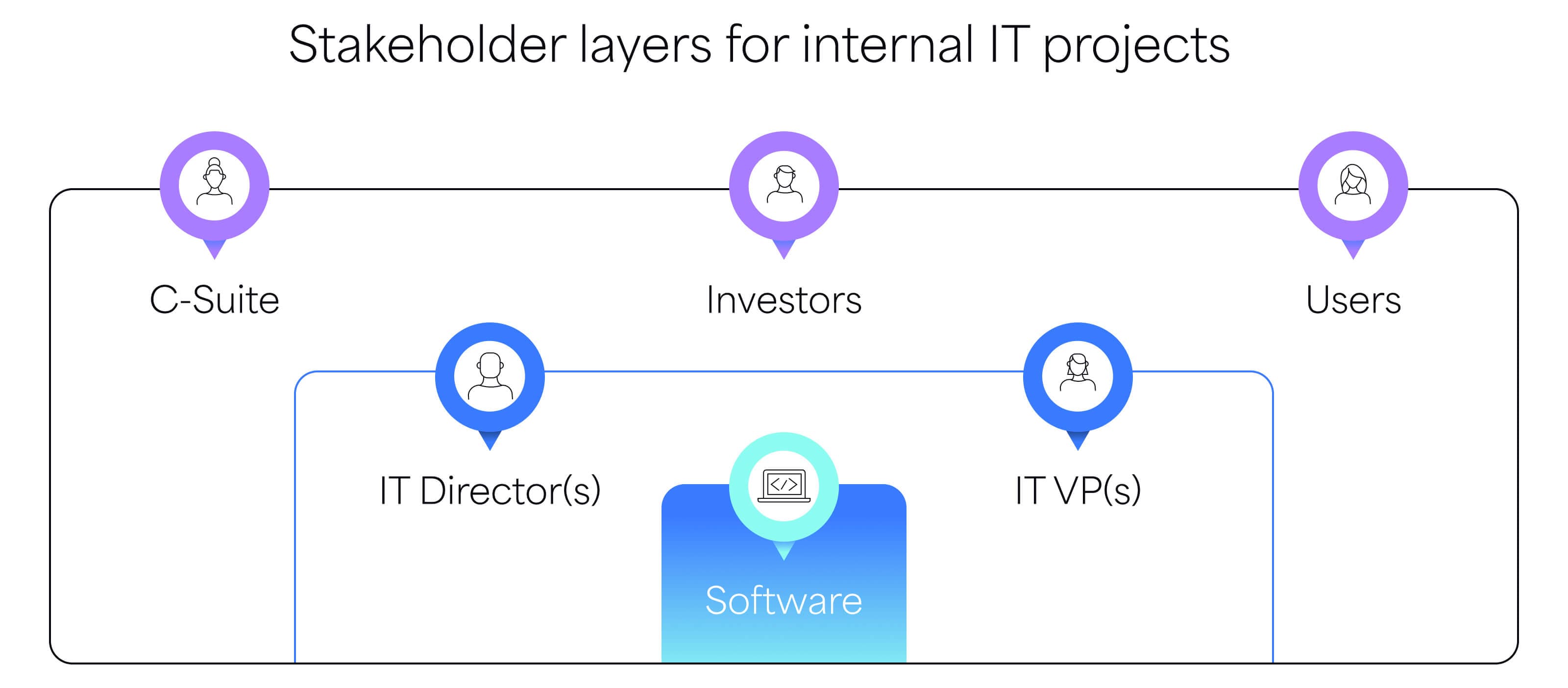
Focus on those who will adopt, oversee, or approve the project. Avoid reaching out to too many at this point — just a select few to prevent overwhelm and ensure the conversation stays manageable.
For internal software development, early stakeholders include product users, department leaders impacted by the project (especially for implementation), and IT leaders you report to, such as directors and VPs.
Later, you’ll work with the C-suite, finance, investors, and colleagues as you finalize the budget and roll out the solution, shape new workflows, and conduct training.
3. Define deliverables for the MVP
All the functionality and fixes and value you’ve been talking about for this new software project? Flesh all of that out into what the actual product will look like and do.
Now that you’ve defined the functionality, fixes, and value of your software project, it’s time to flesh out what the final product will look like and do.
Break each feature down into tasks that will form the minimum viable product (MVP). Here are key questions to ensure you’re covering all essential areas and accurately estimating the effort required:
- What core features and functionality will make the software perform as promised? (No extras yet!)
- What level of backend processing and infrastructure is needed?
- How simple or complex will the code be, and can open-source resources speed up development?
- What level of user experience design is required?
- How many security and compliance measures are necessary at this stage?
- What development methodology will you use (Agile, Waterfall, etc.)?
- How much manual and automated testing is needed?
- Are you accounting for post-launch tasks like employee training, server maintenance, plugins, and libraries?
- What level of project management is required?
- How much stakeholder involvement do you expect?
- Can anything be reused or purchased?
- Does in-house development or outsourcing make more sense?
- What’s the timeline? (Longer timelines often mean higher costs.)
That’s a lot to consider, but it’s crucial to create an accurate budget and reduce scope creep (and expense).
Without clearly outlining these requirements, the project can easily expand beyond expectations — leading to unnecessary costs.
4. Use historical data to estimate labor costs
Once you’ve defined the elements of your MVP, the key to building a realistic budget is assigning each a price. The best way to estimate costs is by using time data from past projects.
Labor is a significant part of building internal software, so looking at historical time data from similar features or projects is crucial. Understanding how things were done before helps you gauge how long it will take and how much it will cost this time around.
This is where time-tracking software becomes invaluable. For engineers, time tracking reveals patterns and boosts productivity. For engineering leads, it enables realistic project planning and protects teams from burnout.
With 7pace Timetracker for Azure DevOps, teams can mark time entries as billable with one click, and managers can assign work to specific budget for better organization.
You can create unlimited budgets and assign work at any level—from entire releases to a single work log. Once all the data is logged, you can export it to a spreadsheet with ease.
You can build unlimited budgets and assign work at any granularity, from entire releases to a single work log. Once you have all the data logged in a budget, you can quickly export it to a spreadsheet.
Pro Tip: Budget with developer intricacies in mind
Time and cost estimates shouldn’t be applied uniformly across the team. Task completion time varies depending on experience, skill level, and working methods.
Consider each developer’s strengths when budgeting for labor—and involve the team in scoping for more accurate estimates.
5. Add in all other expenses
Your project will likely involve costs beyond labor. Think about equipment, plugins, and other tools that support your development process. Be sure to account for these when building your budget.
There are other factors that can increase project costs, even if they’re not specific items:
- Sprint length: Longer sprints may require less management, but the operating costs can add up. Shorter sprints give you more control, but that control comes with more management time — and expense.
- Project timeline: Longer timelines can lead to higher costs due to inflation, shifting market conditions, overhead, missed opportunities, and potential personnel changes.
And don’t forget Parkinson’s Law: Work expands to fill the available time. Even if you think it’s a quick project, a longer timeline can stretch it out.
6. Contingency planning
A contingency plan is a strategy to handle unexpected issues, like time sinks or team turnover, during a software development project.
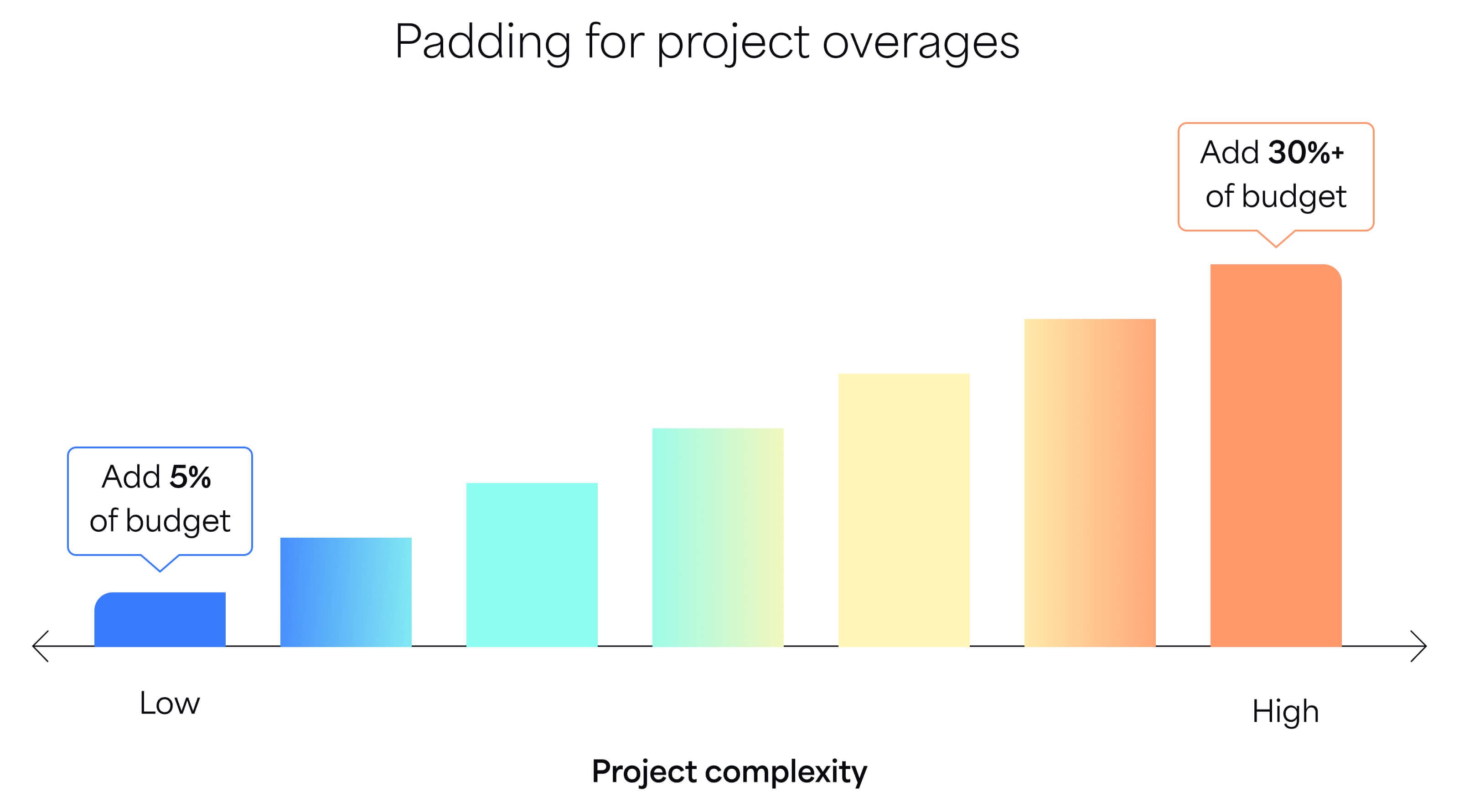
In budgeting, this means adding some padding to help absorb setbacks and still deliver as planned.
Consulting firm Axia recommends adding 5% of the total budget for smaller, quicker projects. For larger, more complex software builds, the contingency may need to be 30% or more.
Gut check: Does my project budget make sense?
Every software project is different, which is why building a unique budget is so important. If you want to assess the numbers you’ve come up with so far, we have something that might help.
Atomic Object gathered real-life numbers from 93 software projects they completed. They found that the median cost to build a software product was $228,000, covering about 1,750 working hours. Three-quarters of their projects were under $600,000. Consumer-facing products built from scratch ranged from $100,000 to $500,000. Rewriting existing software was more intensive, averaging just over $1M for 8,000 hours of work.
These numbers reflect agency experience, considering location, hourly rates, overhead, and industry variety. Still, they offer a helpful reference point to see if your assumptions are realistic.
7. Document your budget
Software development is a process of discovery. While you can define project requirements, costs, and resources as thoroughly as possible, nothing is set in stone. Your project will evolve as you progress and learn more—especially with larger projects and greater stakeholder involvement.
That’s why the final step in building your budget is to document all relevant elements. Once documented, it’s time to communicate the budget to any stakeholders who need to review or approve it.
Documentation ensures everyone agrees on the timeline and resources required, even as the budget changes, helping to avoid surprises down the road.
To simplify monitoring your project budget, your documentation should go beyond a list of numbers. Ideally, you’re using a system that breaks down the budget by task, tracks spending vs. budget, shows remaining funds, highlights risks, and gives stakeholders the insights they need to succeed.
Add and manage time data with 7pace Timetracker for Azure DevOps
Software developers aren’t fond of time tracking. But it is invaluable as a reference point for new projects. Whether it’s a timeline or budgeting estimation, knowing how much time devs spend on a feature or project can help you make more informed decisions.
So, it’s all about finding a sweet spot: a time-tracking app that developers will love and one that provides valuable insights.
7pace Timetracker for Azure DevOps is exactly that. The time logging aspect is quick, easy, and user-friendly thanks to a deep integration with Azure DevOps. So developers don’t spend too much time tracking their own time.
And with the ability to assign work and time to budgets, managers can get a better sense of how time is spent. Then, they can use this data as a reference for future projects.
Make better use of your time data and simplify the tracking process for developers. Try 7pace for Azure DevOps for free for 28 days.
Get started