
TL;DR
- Your Comala Document Management setup can move to Cloud — workflows, approvals, structure, and all
- A few smart checks now can save hours of cleanup later (we’ll flag what matters)
- We crunched it down to five steps you can actually follow
- Need more detail? Docs and an infographic are waiting
Comala Document Management is Cloud-ready
If you’re planning a migration, hesitating because of missing features, or dragging your feet because you don’t want to wrangle 500,000 pages, this blog is for you.
You’ve tuned CDM in Confluence Data Center to work like your team actually works: structure, automation, audit trail. Now your org is moving to Cloud, and the question is: Do you really have to rebuild it all?
You don’t. Comala Document Management is ready for Cloud — and so is the work you’ve already put in.
This post covers what comes over cleanly, what needs a little prep, and how to dodge the gotchas that catch people mid-migration.
No fluff. No 40-tab doc deep dives. Just what you need to feel confident in the move.
What actually migrates from Comala Document Management to Cloud
Let’s start with the good news.
Global workflows migrate. So do space workflows, workflow states, metadata, and approval history. Even the Document Activity view makes the trip. If you’ve spent hours building a structured review process, that work isn’t going in the trash.
Your structure and audit trail are coming with you. But this isn’t a one-click operation. There are still a few things that need your attention.
What to check before you migrate Comala Document Management to Cloud
This is where admins tend to hit snags. The prep work isn’t overwhelming, but it matters.
- Page workflows need to be converted to space workflows. They won’t migrate on their own.
- Restricted pages can get skipped during migration if permissions aren’t addressed.
- Metadata, macros, and automation typically migrate fine, but test custom setups in Cloud before you move.
None of this will tank your migration. But fixing it after the move is like realizing you left your passport at home — annoying and avoidable.
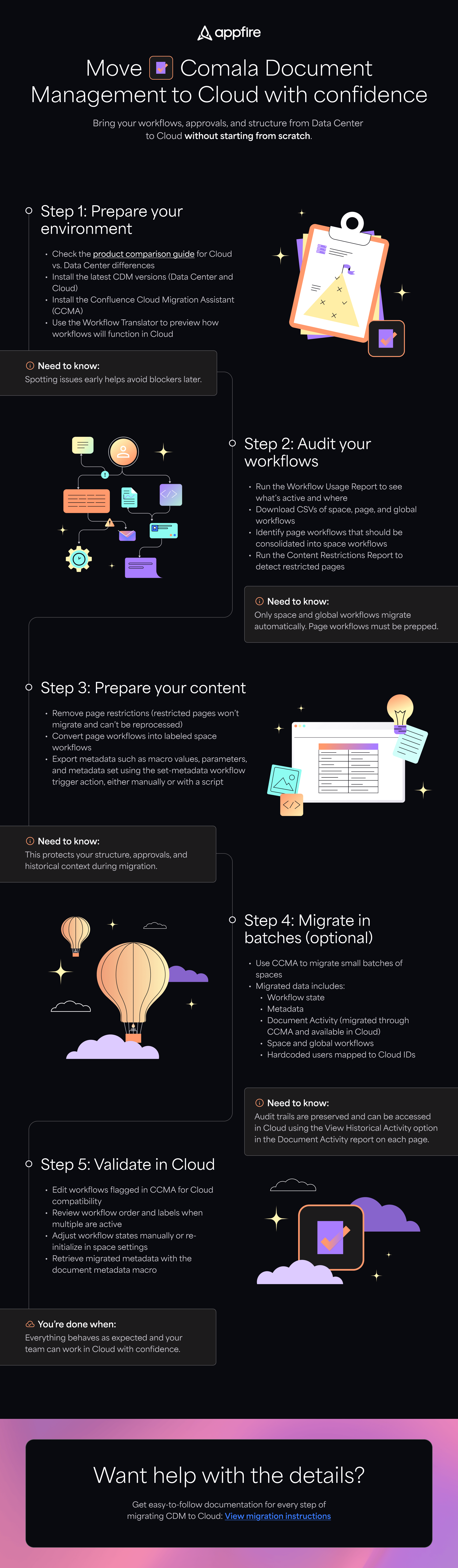
How to migrate Comala Document Management to Cloud in 5 steps
This isn’t a training manual. It’s a high-level checklist your future self will thank you for.
Step 1: Set up your apps and preview what’s changing
Why it matters: Surprises are fun at birthdays, not in migrations.
Step 2: Audit your workflows
Why it matters: Sure, you could move blind… but do you really want mystery workflows waiting for you in Cloud?
Step 3: Clean up page restrictions and convert page workflows
Why it matters: Think of it like packing for a move — label the boxes now, skip the chaos later.
Step 4: Migrate in batches (Optional)
Why it matters: Smaller batches mean easier validation. Think of it as taste-testing before you serve the whole meal.
Step 5: Spot-check everything in Cloud
Why it matters: “Looks fine” isn’t enough when your team relies on approvals working right.
What’s better in Comala Document Management Cloud now
This isn’t just about parity — it’s an upgrade.
- A cleaner Document Report with live Document Activity
- A “My pending approvals” filter that keeps things moving
- Label-based triggers and global workflows for more control
- Bulk actions to speed up setup
- New workflow actions like copy page, send email, and apply restrictions
- Metadata and page parameters that now play nice with macros
The short version: everything you liked, plus the stuff you wish you had.
Want more detail?
This post gives you the overview. The infographic breaks it down step by step. And if you’re the kind of admin who wants to see every screen, setting, and obscure checkbox, we’ve got documentation for that too.
View the infographic