

You understand DevOps orchestration, but turning scattered automation into a single, dependable flow is where most teams stall. You've automated 80% of your CI/CD pipeline. Tests run on every commit. Deployments happen multiple times a day. And still, releases still feel like a high-stakes juggling act.
Here's why: Your toolchain is fragmented. Jenkins, GitHub, Terraform, Kubernetes, and Jira all work correctly, but nothing coordinates them. Engineers manually trigger deployments, chase approvals in Slack, and scramble when scans fail on Friday afternoon. You haven't orchestrated the workflow.
Orchestration in DevOps is the difference between a collection of scripts and a predictable, high-velocity delivery machine.
DevOps orchestration vs. automation
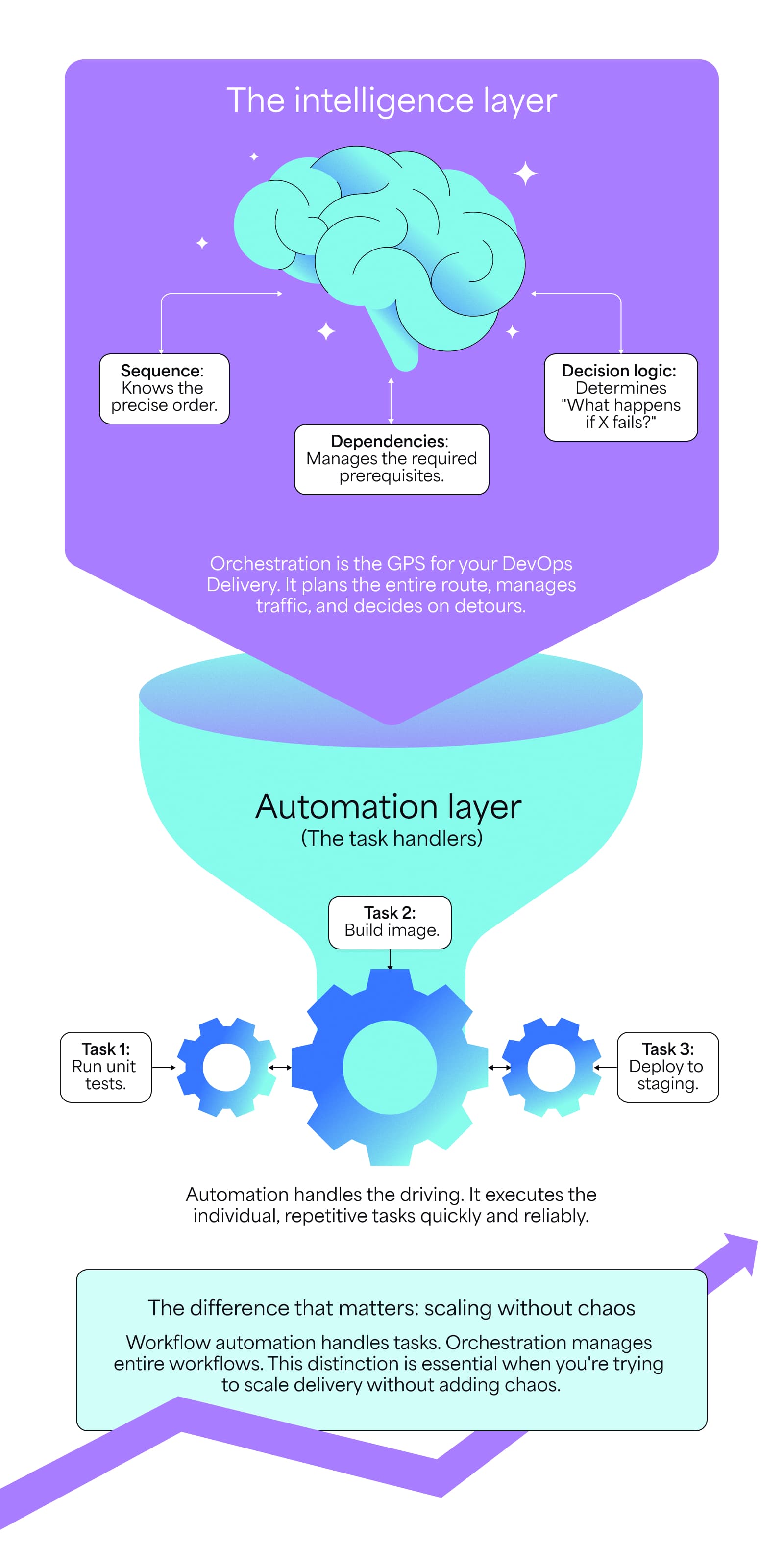
In DevOps, orchestration is the intelligence layer that manages sequence, dependencies, and decision logic across your entire delivery process.
DevOps workflow automation handles tasks. Orchestration manages entire workflows. The distinction matters when you're trying to scale delivery without adding chaos.
Automation: The individual task
Automation handles one job. A script compiles code, a test suite runs on pull requests, and a CI tool builds Docker images. Each task executes without human intervention, but it doesn't know what happens before or after.
The limit: Automation is task-specific. It can't see across systems. It can't make decisions based on context. It executes a single task and then stops.
Orchestration: The coordinated workflow
Most engineering teams think they've achieved orchestration because they've automated a bunch of tasks. They haven't. They've just built silos that happen to run automatically.
Real orchestration manages the entire sequence from start to finish. It coordinates multiple automated tasks across different systems, teams, and IT workflows. It enforces dependencies. It applies conditional logic. It sees the whole picture.
What if a security scan fails and automation stops? Orchestration automatically notifies the code owner, blocks deployment to staging, and logs the issue in Jira, all without anyone touching a keyboard.
Automation is the engine, and orchestration is the transmission and navigation system. One gives you power. The other gives you control.
Three key benefits of DevOps orchestration
Orchestration isn't a nice-to-have. It's critical, and how you scale delivery without increasing the number of engineers.
Increased engineering velocity
Orchestration eliminates friction between development, testing, and deployment. No more waiting for someone to manually trigger the next step. No more context-switching between tools to figure out what's blocking a release.
You can check off faster cycle time and higher deployment frequency, which are two of the four key DORA metrics that separate high-performing teams from everyone else.
Let’s say you're running microservices. A single feature might touch five repos. Orchestration coordinates the build, test, and deployment of all five services in the correct order. Without it, engineers manually sequence releases and hope nothing breaks. With it, the pipeline handles dependencies automatically.
Reduced risk and enhanced reliability
Consistency and predictability aren't optional at scale. Orchestration enforces it.
Quality gates ensure mandatory checks: security scans, compliance validations, and performance tests. They all execute in order and can't be skipped. No one deploys to production without passing every checkpoint. The pipeline won't allow it.
Orchestration also handles failure gracefully. Automated rollback logic triggers the moment DevOps monitoring tools detect an anomaly. Your system reverts to the last known-good state before users notice the problem.
No panic. No fire drill. Just automatic recovery.
Financial efficiency and resource optimization
Orchestration ensures you only pay for what you use, which is critical for R&D capitalization tracking.
Infrastructure orchestration using tools like Kubernetes, Terraform, or Ansible spins up temporary environments for testing and tears them down immediately afterward. No more zombie instances running 24/7 because someone forgot to shut them down.
This matters when you're managing hybrid deployments, multi-cloud infrastructure, or large development teams. Every idle resource costs money. Orchestration eliminates waste by treating infrastructure like code: version-controlled, predictable, and automatically managed.
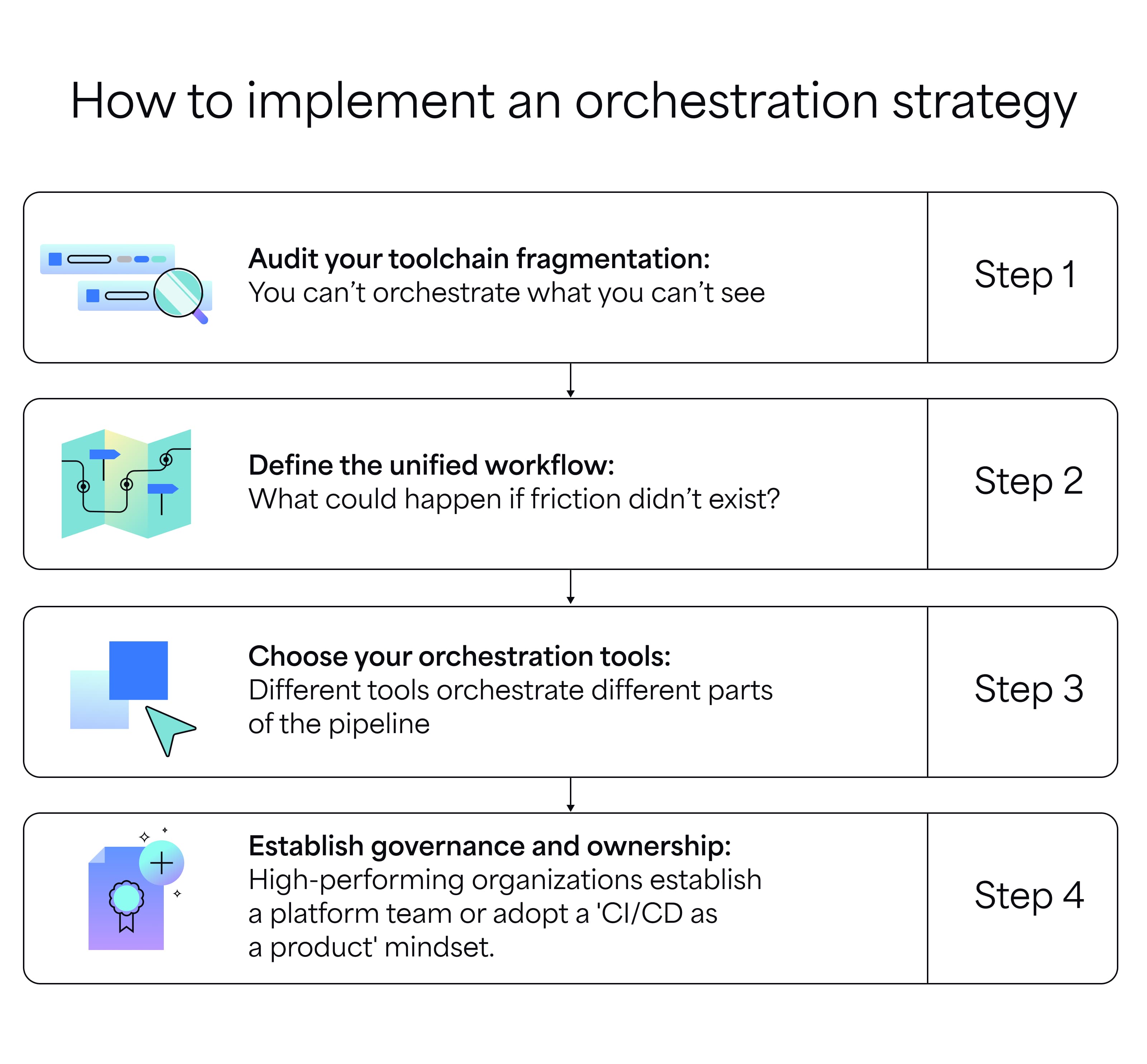
How to implement an orchestration strategy
The biggest mistake engineering leaders make is buying tools before understanding their current state. Start with visibility, define the workflow, then build the solution.
Step 1: Audit your toolchain fragmentation
You can't orchestrate what you can't see. List every tool in your software delivery lifecycle. These might include Jenkins, GitLab CI, Jira, Terraform, GitHub, Datadog, Slack, and others.
Ask a few questions. Where are the manual handoffs? Where does someone need to copy a deployment ID from Jenkins into Jira? Where does a release manager send a Slack message to kick off the next phase?
Those manual touchpoints are your orchestration gaps. They're where velocity dies, and errors creep in.
Step 2: Define the unified workflow
Map the ideal path for a feature from concept to production. Not what you do now. What you should do if friction didn't exist in a perfect reality.
Define checkpoints:
- What needs to happen before code moves from dev to staging?
- What approvals are required before production?
- What tests must you pass? What security scans must run?
Establish decision points:
- If tests fail, what happens?
- If a compliance check flags an issue, who gets notified?
- If deployment succeeds but health checks fail, does the system roll back automatically?
This is your blueprint. Don't pick tools yet. Define the workflow first.
Step 3: Choose your orchestration tools in DevOps
Orchestration isn't about adding more tools to your stack. It's about connecting the signals between the tools you already have so they can actually talk to each other.
Different tools orchestrate different parts of the pipeline. You'll likely need more than one, but the goal is integration, not accumulation.
- CI/CD orchestration: These tools coordinate the build, test, and deployment workflow from code commit to production release. Examples include Jenkins, GitLab CI, GitHub Actions, and Azure Pipelines.
- Container orchestration: Tools like Kubernetes and Docker Swarm manage containerized applications, including deployment, scaling, networking, and high availability.
- Infrastructure orchestration: These tools — like Terraform, Ansible, Chef, and Puppet — automate provisioning and configuration of infrastructure resources across cloud and on-premises environments.
- Workload automation software: Tools like Apache Airflow, Control-M, AutoSys, and Rundeck orchestrate complex job scheduling, batch processing, and cross-system workflows. These handle dependencies between workloads, manage retry logic, and coordinate jobs across heterogeneous environments.
The goal isn't to replace your entire stack. It's to connect what you already have into a unified system that shares context across every stage of delivery.
Step 4: Establish governance and ownership
Someone needs to own the pipeline like a product, not a side project. High-performing organizations establish a Platform Team or adopt a “CI/CD as a Product” mindset. The pipeline becomes a versioned, maintained system, just like the applications it deploys.
This team defines standards. They enforce quality gates. They ensure the pipeline evolves with the business. Without ownership, orchestration degrades into another fragmented mess.
Common orchestration patterns
Real orchestration isn't theoretical. Here's what it looks like in practice.
Multi-environment deployments
A developer merges a pull request. Orchestration runs lint checks and unit tests, builds a Docker image, executes security scans, and then deploys to the dev environment. Automated smoke tests run. If they pass, the code moves to staging for integration testing. A manual approval gate blocks production until a human reviews. After approval, orchestration deploys using a blue-green rollout, validates with health checks, and automatically rolls back if anything fails.
No human intervention until the approval gate. Every other step happens automatically, in sequence, with built-in safeguards.
Infrastructure provisioning
An engineering team needs a new testing environment. An engineer submits a request through Jira. Terraform provisions the cloud resources. Ansible configures the instances and installs dependencies. Kubernetes deploys the application containers. Monitoring tools set up alerts. The engineer receives access credentials. If no one intervenes, the environment will destroy itself within 48 hours.
Cost control. Speed. Consistency. All automated.
Incident response
A production alert fires. The system triggers an incident in PagerDuty and runs diagnostic scripts automatically. It captures logs, metrics, and traces. If the issue matches a known pattern, automated remediation runs. If that fails, the system escalates to the on-call engineer with full context. After resolution, it documents the timeline and root cause in Jira.
You're not eliminating human judgment. You're eliminating manual work so engineers can focus on real problems.
Measuring orchestration success
You can't improve what you don't measure. Track DevOps metrics to validate your orchestration strategy.
- Lead time for changes: How long from code commit to production? Orchestration should drive this down by eliminating manual handoffs and wait states.
- Deployment frequency: How often do you ship to production? Effective orchestration enables multiple daily deployments without increasing risk.
- Change failure rate: What percentage of deployments cause incidents? Good orchestration reduces this by enforcing quality gates and enabling fast rollbacks.
- Mean time to recovery (MTTR): How quickly do you restore service after an incident? Orchestration shortens recovery through automated diagnostics and rollback.
These are the DORA metrics. They're industry standard for a reason. They tell you if orchestration is working or if you're just adding complexity.
For deeper visibility into delivery performance, map your value stream to identify where bottlenecks persist even after orchestration. The data will show you where to focus next.
The financial case for orchestration
Engineering leaders optimize for speed and cost. Orchestration delivers both.
- Reduced cloud spend: Automated environment teardown and right-sizing eliminate waste. One mid-sized SaaS company saved 30% on AWS costs by orchestrating test environment lifecycle.
- Lower operational overhead: Engineers spend less time coordinating releases and more time building features. That's expensive headcount redirected to value creation.
- Fewer incidents: Automated quality gates catch issues before production. Every avoided incident saves engineering time, customer trust, and revenue.
- Faster time to market: Products ship faster when pipelines move predictably. In competitive markets, speed drives revenue.
If you're tracking software development costs for capitalization or budget planning, orchestration directly impacts both velocity and efficiency metrics that finance cares about.
Orchestration pitfalls to avoid
Orchestration can fail. Here's how to avoid the common traps.
- Over-engineering: You don't need perfect orchestration on day one. Start with high-impact workflows. Automate the path from merge to production. Add complexity only when it solves real pain.
- Tool sprawl: Don't add orchestration tools without consolidating your existing stack. More tools mean more integration points and more failure modes. Why would you add a new tool when what you are doing already is not working? Simplify first. Orchestrate second.
- Ignoring team readiness: Orchestration changes how teams work. If engineers don't understand the pipeline, they will either bypass it or break it. Invest in training. You know what they say in the software industry, “The only thing worse than training your employees and having them leave is not training them and having them stay." Make the pipeline transparent. Build confidence before enforcing strict gates.
- Lack of monitoring: An orchestrated pipeline that fails silently is worse than manual processes. Instrument every step. Track success rates. Alert on anomalies. Visibility is mandatory.
Improve your DevOps orchestration with Appfire
DevOps orchestration only works if you can see what's happening across your delivery system. Most teams use Jira for work tracking and GitHub, GitLab, or Bitbucket for code. Those tools generate massive data — commits, pull requests, builds, deployments — but it stays siloed. You can't see the full picture without manual effort.
Appfire Flow connects your toolchain into a single source of truth. It surfaces bottlenecks, tracks cycle time, and shows exactly where work gets stuck, from backlog to production. Appfire Dashboard Hub gives leaders the metrics that matter: DORA metrics, sprint velocity, and deployment trends. You're not guessing where to optimize. You're seeing it in real time.
If you're running Jira and a modern Git/CI system, you have the foundation in place. Appfire Flow and Dashboard Hub transform your existing tools into a unified orchestration system. See where your pipeline breaks. Fix it. Ship faster.
Try Flow free