
Smart IT teams innovate and use emerging software to optimize complex workflows. But sometimes, the most impactful process improvements are also the simplest — for example, using emojis.
Believe it or not, something as simple as an emoji can save your team hours. If your engineering or support teams use Slack, emojis can unlock warp-speed efficiency for developers, support agents, and even customers.
There are a variety of apps that take complex processes — which involve multiple steps and switching contexts between software — and turn them into single-click actions using the power of emojis in Slack.
Here’s how it works:
Create support requests in threads using a ticket emoji
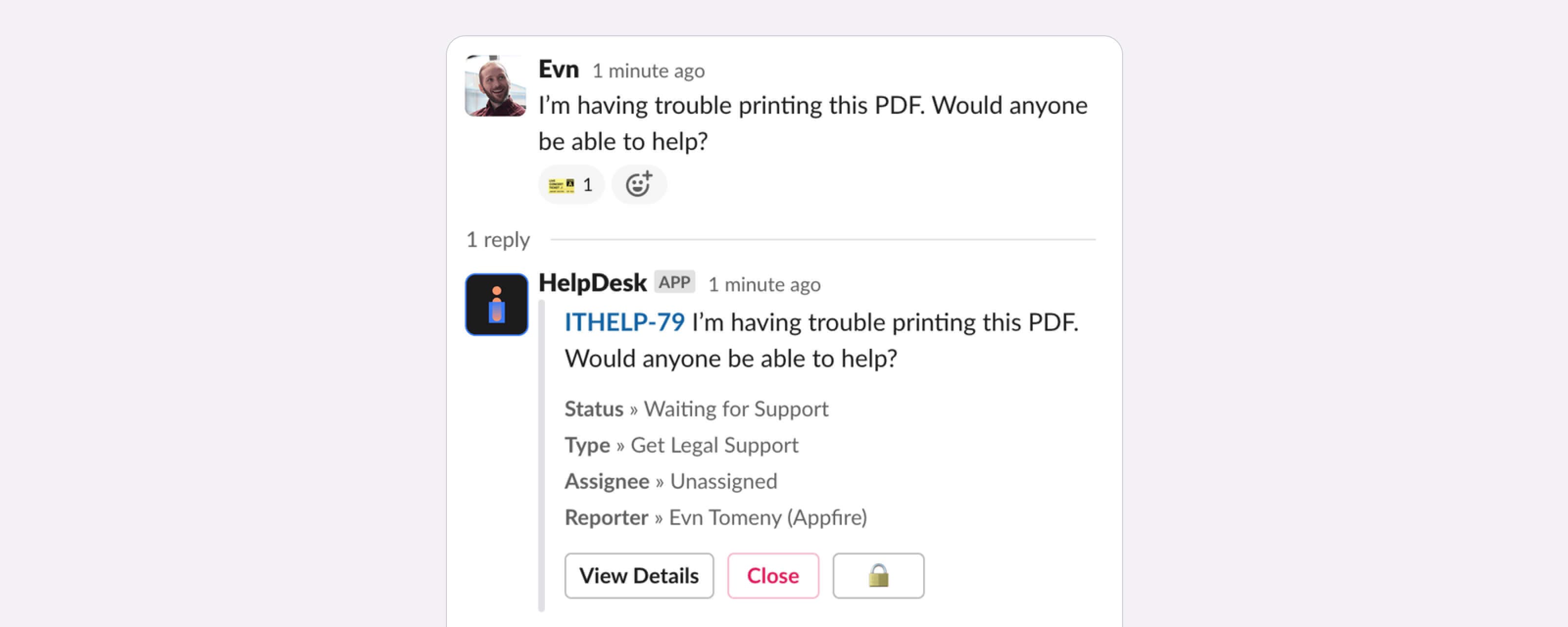
Agents and customers can easily create a support ticket that’s mapped to an issue type in Jira Service Management (JSM) by simply adding the ticket emoji in any Slack thread or message.
In your channel settings, you can use HelpDesk+ for Slack to automatically create a support request in that specific request type in JSM any time a ticket emoji (or any emoji you designate) is added to a thread.
When the emoji is added, the app automatically creates a ticket that includes all the relevant information from that Slack thread. And the sync works both ways: any edits made to the ticket in JSM will be reflected back to the user in Slack.
This is an efficient way to quickly capture requests happening in Slack to JSM, so no information gets lost and work moves forward without disruption.
What’s it handy for?
Create support requests in a single click with an emoji mapped to an issue type in JSM.
A few uses for this workflow:
- Selectively create issues when support cases need to be tracked further.
- Teach users to process visually with emoji reactions performing actions.
- In your support channels, anyone can message your team and you can create tickets when you need to track your work and sync your conversation.
To get started:
- Install HelpDesk+ for Slack to your Slack workspace.
- Invite the app to your channels.
- Configure your request types in your support channel.
See it in action:
A ticket is created from the message when the ticket emoji is added as a reaction.
Capture Slack threads in Jira with the camera emoji
Development teams can harness the time-saving power of emojis to easily capture important discussions in Jira with the camera emoji.
With Integration+ for Slack, any time the camera emoji is added to a thread, the app will automatically add relevant messages from Slack to a new issue or existing issue as a comment. The user can determine which messages get added and which to leave off, so only the important information appears in Jira.
Using the camera emoji enables engineering teams to track important information in Jira without manually copying/pasting it from Slack to Jira. The result is fewer information gaps and greater efficiency, which helps your team deliver projects faster.
Log bugs with screenshots from Slack using the bug emoji
IT teams can easily track Slack threads around bugs, including adding screenshots or attachments, in Jira using the bug emoji and Integration+ for Slack.
The app makes it easy to add files and attachments to new or existing Jira issues without any manual copy/paste. Users simply add the bug emoji to any message with one or more files or attachments, and the app will automatically add those files to the Jira issue of your choice.
This a simple way for development teams to speed through the QA process without missing bugs or wasting time manually transferring Slack threads into Jira issues.
Emojis can help you eliminate the manual work associated with tracking important information shared in Slack over to Jira or JSM. Our apps make it easy to eliminate unnecessary steps by just clicking an emoji, leading to less information loss, better collaboration, and faster project delivery.
Assign issues to yourself using emoji
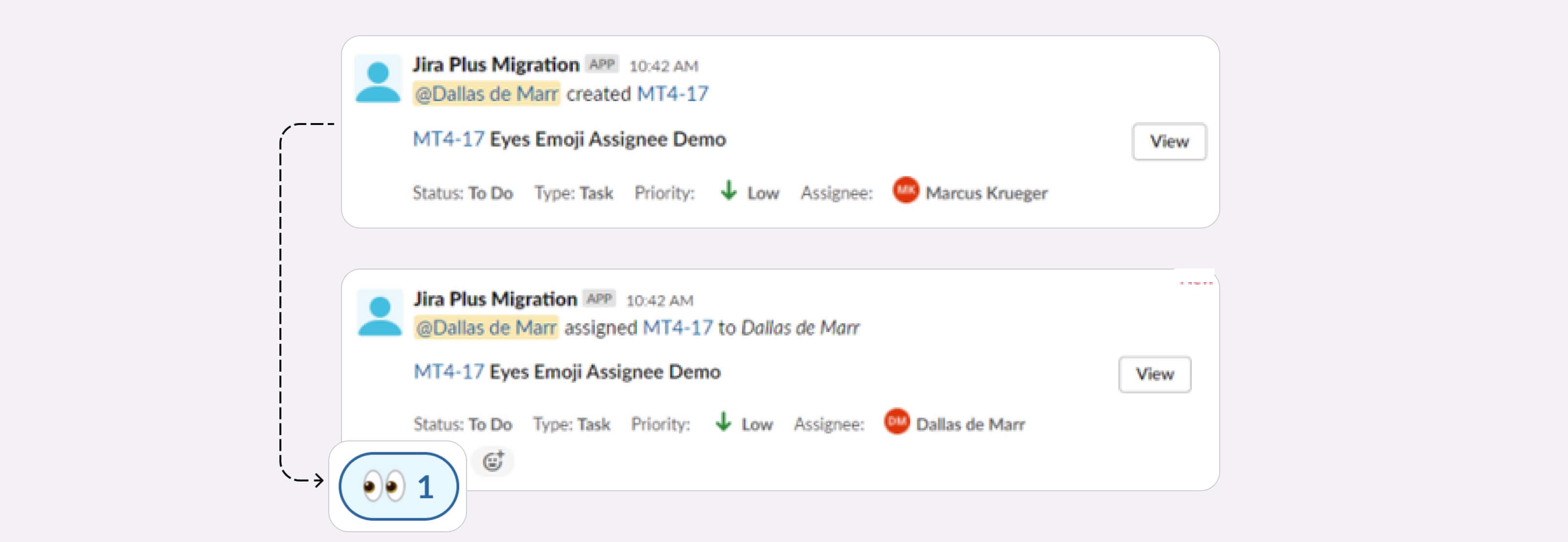
Quickly assign issues to yourself for implementation or review.
What’s it handy for?
Quickly assigning issues to yourself enables you to update Jira on the fly without leaving the Slack context or interrupting your current tasks.
Use cases:
- Update issues in real-time.
- Assign issues with no interruption to the current workflow.
To get started:
- Install Integration+ for Slack on your Slack workspace.
- Connect to Jira.
- Invite the app to your channels.
- React to a ticket message with the :eyes: emoji.
See it in action:
The issue message before the emoji and after.
Try HelpDesk+ for Slack for support teams or Integration+ for Slack for engineering teams now for free and let us know how much time you save!

