
Have you ever felt like Jira bulk editing is more of a battle than a breeze?
You’re not alone.
Managing multiple issues in Jira can be a headache, especially when hidden in any field, locked behind edit issue permissions, or unavailable for bulk editing.
Jira’s native bulk edit capabilities often fall short, limiting users with unavailable operations, inconsistent system fields, and complex field configurations. If you’re struggling to edit multiple issues, bulk change due dates, or transition issues across different workflows, you’ve hit these roadblocks.
That’s where Appfire’s JXL for Jira comes in.
As a powerful spreadsheet-like solution, JXL simplifies Jira bulk editing, making it easy to update selected issues, bulk transition issues, and stop watching multiple issues—all from one intuitive interface.
Do you need to bulk move tasks, change fix versions, change comment, or update remaining estimates? Regardless of the specific issue type, JXL offers an alternative method that enhances efficiency while maintaining security levels and global permissions.
In this guide, we’ll cover the common challenges of Jira’s bulk editing tools and how JXL simplifies bulk operation details and affects active and future sprints, i.e. closed completed sprints.
By the end, you’ll be armed with the knowledge to tame the Jira bulk edit beast and boost your team’s project management productivity. Let’s get started!
The bulk edit struggle is real: User pain points
Before we get into solutions, let’s address the elephant in the room: it’s true that Jira’s bulk edit limitations can be inefficient to work with sometimes.
From restrictive edit issue permissions to unavailable operations, managing multiple issues is an uphill battle.
Let’s break down the most common pain points users face.
Limited functionality
Jira’s bulk editing covers basic operations but when it comes to more complex needs—like handling sub-tasks, applying conditional logic, or managing issues across different workflows—users often hit roadblocks.
For example, if you need to edit multiple issues with sub-tasks that have varying statuses and assignees, Jira’s native bulk operation tools struggle to keep up.
Some fields may be unavailable for bulk editing, requiring manual adjustments that defeat the purpose of efficiency.
Time & efficiency
Manual editing in Jira can become tedious, error-prone, and frustrating to manage quickly. When you have to update multiple issues, custom fields, or change fix for version one by one on the same project or multiple ones, it takes a big hit on productivity.
The impact is clear: not only does it eat into your time spent, but it also opens the door for data inconsistencies across all the selected projects.
These inconsistencies can lead to confusion, misplaced information, and project delays, making it hard for your team to stay on track and hit deadlines.
Custom field complexities
When it comes to custom fields in Jira, things get messy. Fields like multi-select and cascading select require extra care when bulk editing and Jira’s native tools don’t cut it.
For example, updating a multi-select field across hundreds of issues is a nightmare, even in the same workflow.
Without the ability to bulk edit these fields, each update becomes a tedious task, increasing the chance of missing important changes or applying the wrong values to issues.
Automation gap
One of the biggest frustrations Jira users face is the lack of native automation for bulk edit tasks. For teams managing many issues, automating recurring tasks like updating due dates or moving issues between sprints can be a game changer.
The bad news is that Jira’s built-in tools and service management just don’t provide enough support for this.
The benefit of automation is clear: it saves time, reduces errors, and ensures consistency across tasks.
Without it, teams are left to do it manually, slow down their workflow, and increase the chance of mistakes that can ruin projects with no possibility of bulk editing the sprint.
Large dataset challenges
When working with large datasets, Jira’s performance starts to suffer.
Trying to bulk edit hundreds or thousands of issues will result in lags, delays, and even system crashes, making what should be a smooth process a major bottleneck.
The impact is big: teams get frustrated as they wait for updates to process, slowing down their workflow and overall productivity.
This can also lead to an increased risk of errors or missed deadlines as teams spend more time on administrative tasks than on their core responsibilities.
Human error factor
One of the biggest problems with manual bulk editing is the risk of mistakes. With so many fields to update, data can slip through the cracks and errors can be devastating. One must not underestimate the human side when using such platforms.
A small mistake like updating the wrong field or misassigning an issue might seem harmless at first, but the consequences can be huge.
For example, when working on large projects like construction or infrastructure, a small mistake can snowball into massive rework and cost millions. A hotel construction project missing its opening date because of a lack of relevant updates in Jira can delay the entire project, affecting revenue, contracts, and relationships.
The lost time and rework can mean weeks or months of delay and the financial impact will be much bigger than the initial error.
This is why having accurate and automated bulk editing tools to prevent human errors and protect project timelines and budgets is valuable.
Appfire: Your Jira bulk edit dream team
Now that you know the challenges of Jira bulk editing, let’s talk about the solution.
Appfire’s suite of powerful apps, especially JXL for Jira, turns bulk editing into an effortless process that boosts productivity and accuracy.
JXL for Jira
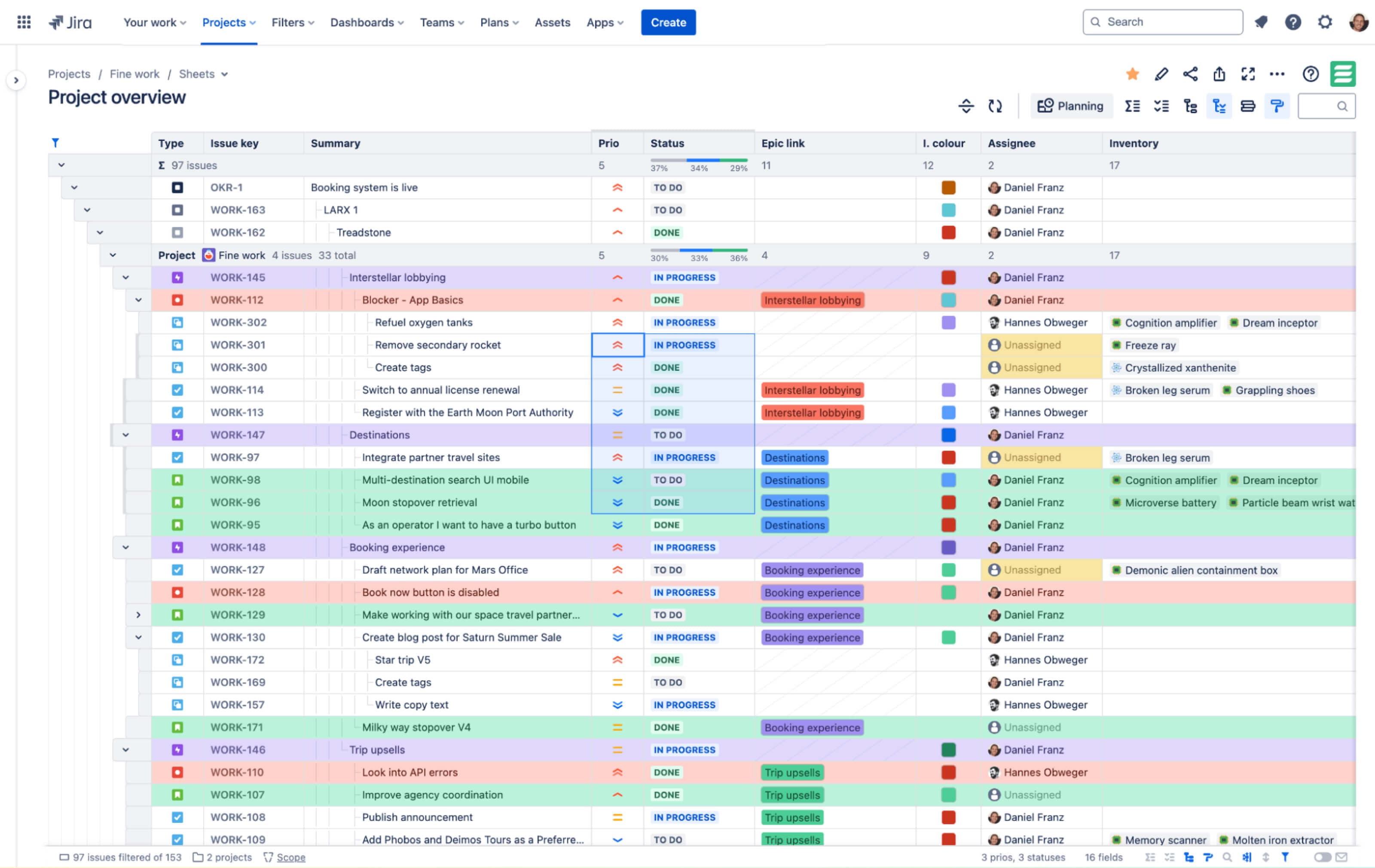
JXL has a spreadsheet-like interface within Jira, making it easy to work with large datasets. You can filter, sort, and work on inline edit issues quickly, all without leaving the Jira platform.
For example, you can do quick bulk edits using the “copy and paste” function for data across multiple issues.
JXL is the go-to solution for efficient, error-free bulk editing in Jira.
Power Scripts for Jira
Power Scripts for Jira enables complex bulk editing through SIL scripting, allowing for conditional field updates and custom calculations based on other field values. It provides both pre-built and custom scripts for automating intricate bulk changes.
Clone Plus for Jira
Clone Plus for Jira simplifies bulk cloning by allowing users to customize fields for each cloned issue, enabling modifications like assignees, due dates, and priorities across numerous issues simultaneously. It's ideal for scaling workflows without manual duplication.
Appfire is the one-stop shop for teams seeking efficiency, flexibility, and control in their Jira bulk workflow transactions.
Unleash Jira bulk edit power with Appfire
In short, Jira’s native bulk edit limitations – manual edits, complex field updates, performance issues – can slow project managers down and reduce accuracy. But with Appfire’s suite of solutions, especially JXL for Jira, these are a thing of the past, be it for conversational ticketing, IT support, or more.
With an intuitive spreadsheet-like interface, powerful filtering, sorting, and inline editing, JXL makes bulk editing a breeze. Combined with the advanced automation of Power Scripts for Jira and Clone Plus for Jira, you get a level of control and efficiency that Jira can’t match.
Don’t wait any longer to break free from Jira’s bulk edit restrictions.
See how JXL can help you simplify your workflows and boost team productivity with an error-free Jira experience so you can focus on what matters most – delivering results.
Try JXL for free