
Software development life cycle (SDLC) is a structured process that guides software from idea to release. It helps your engineering teams plan work, manage risk, and build reliable products step by step.
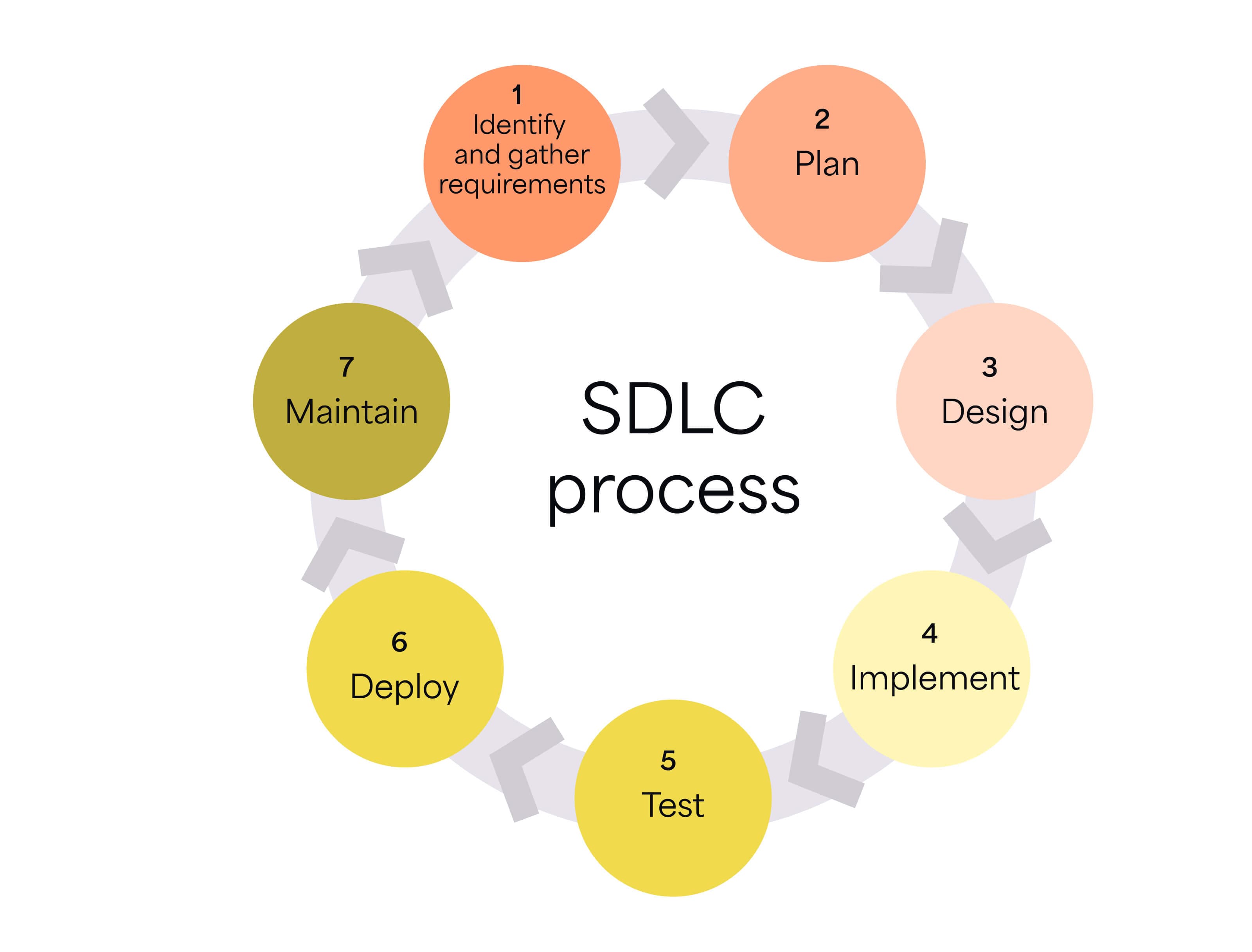
But that process is shifting quickly with generative AI. Research and real-world deployments from IBM and AWS show teams using AI across the SDLC can reduce development time by up to 30%. It also helps improve test generation and code quality by up to 25%.
Here are nine SDLC best practices that can help your teams achieve the same (or even better) results:
Best practice | What it means | Why it matters | Key outcome | Example metric |
|---|---|---|---|---|
Planning before coding | Define scope, risks, budget, and KPIs before development begins | Aligns stakeholders and reduces surprises later | Clear priorities and realistic timelines | Scope stability, planning accuracy |
Choosing the right development approach | Select a methodology that fits the product, team, and compliance needs | Creates structure for collaboration and iteration | Smoother delivery cycles | Sprint predictability, release cadence |
Shifting security and testing left | Run tests and security checks early in development | Issues are easier and cheaper to fix earlier | Fewer vulnerabilities and rework | Defect escape rate, security findings |
Automating wherever you can | Use CI/CD pipelines and infrastructure-as-code (IaC) to reduce manual steps | Improves consistency and speeds up releasesrelease speed | Faster and more reliable deployments | Deployment frequency, lead time for changes |
Connecting the tools your teams use | Integrate project management and version control systems | Shared visibility improves coordination | Faster issue resolution | Cycle time, cross-team dependencies |
PrioritizingNot missing code reviews | Make peer review part of the workflow | Uniform standards improve maintainability | Higher code quality | Change failure rate, review coverage |
Keeping documentation clear and searchable | Maintain lightweight, standardized documentation | Teams spend less time searching for answers | Faster onboarding and knowledge transfer | Time to onboard, documentation usage |
Running retrospectives regularly | Review what worked and what didn’t after each cycle | Continuous improvement strengthens delivery | More predictable performance | Code churn, sprint improvement trends |
Measuring what happens after deployment | Track performance, feedback, and security signals post-release | Real-world insights guide improvements | More reliable releases | Mean time to restore (MTTR), uptime, user satisfaction |
1. Plan ahead to avoid scrambling
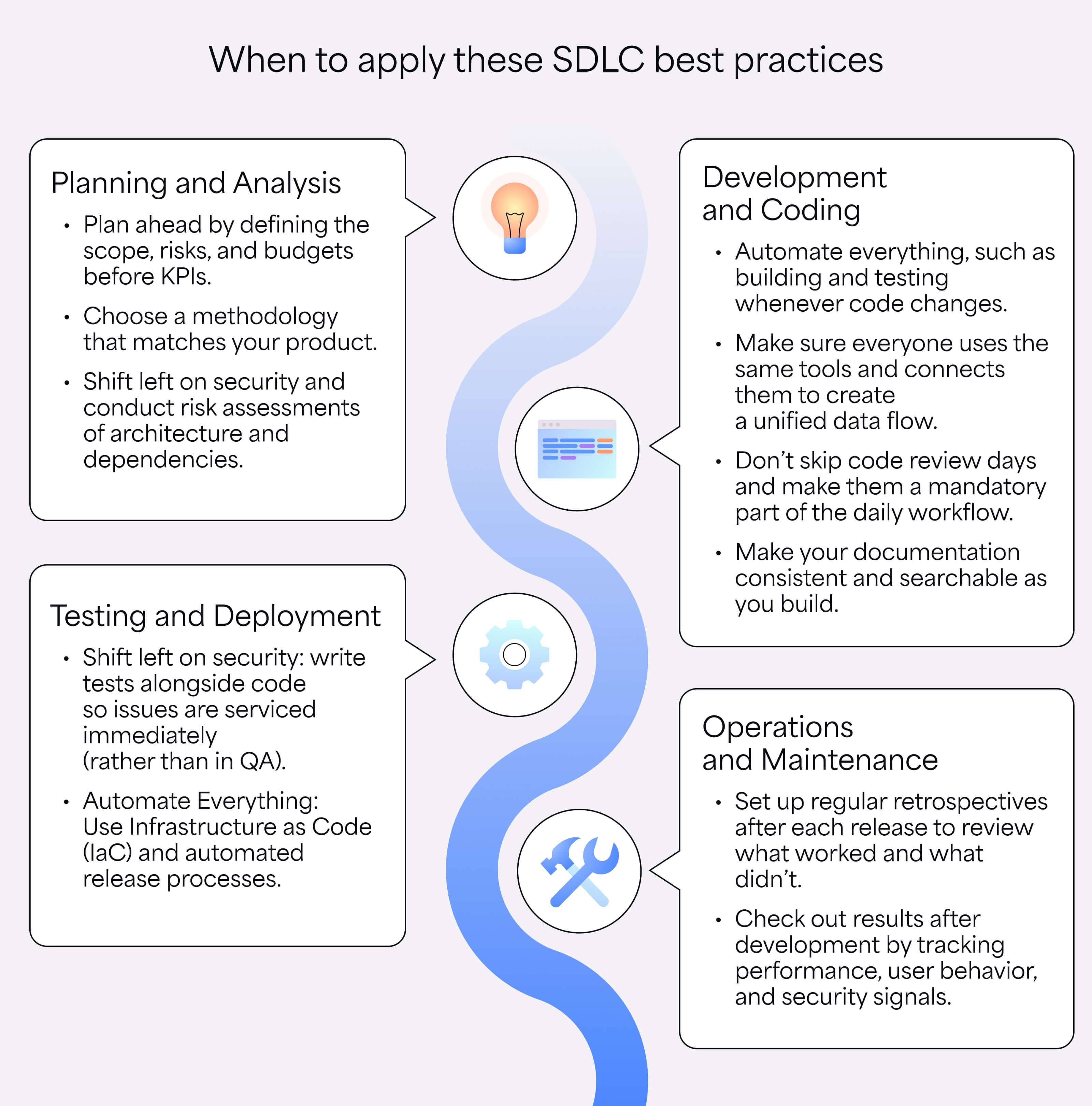
Strong projects start with clear planning. Early discussions around scope, risks, timelines, and resources can help your teams understand what success looks like before they even write the first line of code. And when your team knows the goals and limits of a project, it can focus its efforts on delivering against those goalspushing past those limits.
Intentional planning also supports SDLC security and better decision-making across projects. Risk reviews, realistic budgets, and shared expectations reduce scope creep and confusion later.
Your teams can track progress with meaningful software development metrics, while stakeholders stay aligned on priorities. Among all SDLC practices, this step often sets the tone for everything that follows.
To make planning (wayfar) more effective:
- Run a feasibility analysis: Review technical constraints, security risks, dependencies, and timeline expectations before committing to a solution.
- Set measurable KPIs: Define clear software development metrics, such as deployment frequency, defect rates, or cycle time, to track progress.
- Define roles and responsibilities: Make sure everyone knows who owns architecture decisions, testing, documentation, and security reviews.
2. Choose a methodology that works for you
Every team is different, so each oneand hence, every team builds software a little differently. The development methodology you choose shapes how work moves through the SDLC, how your teams collaborate, and how quickly changes can happen. Some projects need rapid iteration and feedback, while others require careful sequencing and strict approvals.
The key is choosing a framework that matches your product, team size, and compliance needs. For instance, a fast-moving SaaS product may benefit from Agile workflows and strong DevOps best practices, such as adopting a microservices architecture. But highly regulated systems may lean toward structured processes.
Here are some more examples:
Methodology | Best for | Key features |
|---|---|---|
Agile | Products that evolve quickly and need frequent feedback | Iterative sprints, continuous feedback, adaptable planning |
DevOps | Teams focused on rapid delivery and collaboration between development and operations | CI/CD pipelines, automation, shared responsibility for releases |
Waterfall | Projects with clearly defined requirements and strict approval processes | Sequential stages, detailed documentation, predictable timelines |
Lean | Teams aiming to reduce waste and improve efficiency | Continuous improvement, smaller batches of work, fast feedback loops |
A model that works for one team might not work for another, but aligning your workflow with secure SDLC best practices helps you maintain quality, visibility, and security throughout development.
3. Shift left on security and testing
Ask your developers about the experience of finding bugs right before release, and they’ll tell you how painful it is. It often requires them to trace changes across files, tests, and deployments.
Catching that same issue earlier is much easier. This idea underpins the shift-left approach: moving security and testing checks closer to the start of development instead of waiting until later stages.
Bringing security earlier in SDLC phases helps your teams catch vulnerabilities when code is still easy to change. It also reduces remediation costs and helps you meet compliance requirements, especially in regulated industries.
To shift security and testing earlier in the process:
- Write unit tests alongside code: Pair development with testing so issues surface immediately, not later in QA.
- Run risk assessments early: Review architecture, dependencies, and potential vulnerabilities during design and planning.
- Adopt fail-fast pipelines: Use automated continuous integration and continuous delivery (CI/CD) pipelines that stop builds when security scans or tests fail.
With the right SDLC tools and a DevOps or DevSecOps workflow, you can automate many of these checks, making security part of daily development rather than a final checkpoint.
4. Automate everything you can
Automation keeps modern development moving. CI/CD pipelines allow your teams to build, test, and deploy code automatically whenever changes are committed.
This steady flow of updates helps teams maintain a high deployment frequency while reducing the lead time between writing code and delivering value to users. Automation also reduces manual handoffs between teams, leaving less room for human errors.
Plus, security scans can run automatically, while teams track progress through meaningful engineering KPIs, such as deployment frequency, cycle time, and change failure rates.
To ensure effective automation:
- Commit small, frequent changes: Smaller updates move smoothly through CI/CD pipelines and are easier to test and review.
- Store configuration files in version control: Track infrastructure and environment settings the same way you track application code.
- Build artifacts once: Generate build artifacts a single time and promote them across environments to maintain consistency.
Infrastructure also benefits from automation. Using IaC ensures development, testing, and production environments remain consistent across teams. Instead of manually configuring systems, your teams can define environments in code and version them alongside applications, making setups repeatable and easier to audit.
Improve SDLC visibility with Appfire Flow
Tools like Appfire Flow provide visibility into workflows and help your teams see where automation is working — and where it isn’t.
Appfire Flow offers real-time insight into development processes through workflow diagnostics, helping you identify bottlenecks, reduce cycle times, and improve delivery performance. This means you gain clearer signals for improving efficiency and collaboration by analyzing how work moves through the SDLC.
5. Make sure everyone’s using the same tools
Software teams rely on a range of tools, including issue trackers, version control systems, CI/CD pipelines, and testing platforms.
When those tools work in isolation, teams lose visibility into what’s happening across the SDLC. Connecting platforms such as Jira with repositories like GitHub or GitLab helps you create a unified data flow from planning to deployment.
This shared visibility makes it easier to track progress across multiple teams. You can quickly see where work is moving smoothly and where roadblocks are forming. With the right integrations, you can monitor developer productivity metrics, maintain strong SDLC security, and catch blockers early before they delay releases.
Here are a few ways to align tools across teams:
- Set up end-to-end traceability: Link tickets, commits, pull requests (PRs), and deployments so your teams can track work across the entire lifecycle.
- Standardize review and quality gates: Apply consistent code reviews and automated testing along with security checks across repositories.
- Track measurable performance metrics: Use DORA and other developer productivity metrics to monitor things like deployment frequency and incident recovery time.
6. Don’t skip code review days
Code reviews keep your software healthy over time. A fresh set of eyes can catch logic errors, security gaps, and performance issues that the original developer may miss. Regular reviews also improve long-term maintainability because teams align on coding standards, architecture decisions, and documentation as changes move through the pipeline.
They also help teams share knowledge. When developers review each other’s work, they learn how different parts of the system function and how problems are solved.
Over time, this collaboration reduces single-person dependencies and strengthens security in SDLC phases, since more team members understand how code is written, tested, and deployed. A simple code review checklist can keep the process consistent without slowing teams down.
A few review habits that help boost efficiency:
- Make peer reviews mandatory: Require at least one reviewer before merging changes into the main branch.
- Use a shared code review checklist: Include checks for security, performance, test coverage, and documentation.
- Keep PRs focused: Smaller changes are easier to review and reduce the chance of hidden bugs.
- Automate basic checks: Run linters, security scans, and test suites automatically before code reaches reviewers.
7. Make your documentation consistent and searchable
Documentation works best when it’s simple, current, and easy to find. Engineers often skip outdated docs because they slow things down or create confusion. Keeping documentation lightweight and standardized helps your teams capture important knowledge without turning it into a maintenance burden.
Searchability matters just as much as accuracy. When your engineers can quickly find architecture decisions, deployment steps, or troubleshooting guidance, they spend less time digging through chats and more time building.
Clear documentation also supports tech leadership goals by making systems easier to understand across teams and locations. It can even reduce code review anxiety, since developers have a shared reference point for standards, patterns, and expectations.
Here are a few things that help create better tech documents:
- Semantic versioning records: Clear version histories so teams understand how and why software changes over time.
- Architecture diagrams: Add visual maps that show how services, dependencies, and infrastructure connect.
- Runbooks and onboarding docs: Build step-by-step guides that help handle incidents and deployments, plus new team member onboarding.
Better documentation also benefits from visibility into how work moves through development. Appfire Flow helps your teams understand their workflows with real-time diagnostics that highlight hurdles and delays.
And when your teams see where work slows down, they can improve processes and keep documentation aligned with reality.
8. Set up regular retrospectives
Retrospectives give your teams a chance to pause and reflect after a sprint, release, or major milestone. The goal is to review what worked, what slowed things down, and what should change next time. These conversations help you improve your process over time instead of repeating the same friction points.
Most teams hold retrospectives at the end of each sprint or release cycle. Regular sessions help surface patterns in delivery, collaboration, and quality.
For example, teams might notice rising code churn, unclear requirements, or recurring testing delays. Spotting these trends early helps your teams make small adjustments that improve future releases.
To make retrospectives more effective:
- Encourage open communication: Create a space where team members feel comfortable sharing honest feedback.
- Focus on the process: Discuss what helped or slowed the team rather than pointing fingers.
- Rotate facilitators: Let different team members guide discussions to keep sessions fresh and inclusive.
9. Check out results after deployment
Shipping code is only part of the job. What happens after deployment often reveals the most valuable insights. Monitoring performance, tracking user behavior, and reviewing security signals help your teams understand how changes perform in the real world.
To capture these signals effectively:
- Implement proactive alerting: Set up automated alerts for performance issues, error spikes, or unusual activity so teams can respond quickly.
- Gather active user feedback: Encourage users and internal stakeholders to report bugs and usability issues. They can even send requests for new features.
- Automate feedback collection: Use monitoring tools and analytics dashboards along with error tracking systems to collect insights continuously.
Reviewing these signals helps you measure success through meaningful software engineering metrics, such as system uptime, incident frequency, performance trends, and user adoption. Over time, these insights guide future improvements and help your teams deliver more reliable releases.
Why is SDLC important for scaling engineering teams?
A clear SDLC provides structure for planning, development, testing, and delivery so work stays consistent across teams. This structure becomes even more valuable as you adopt new software development trends like AI-assisted development and faster release cycles.
A strong SDLC helps your teams scale without losing visibility or quality. It gives you a shared framework for managing projects, tracking progress, and aligning your teams across different products or services.
Key benefits include:
- Risk reduction: Structured processes help identify risks in security, compliance, and operations earlier in development.
- Higher productivity and velocity: Clear workflows reduce confusion and help teams deliver updates faster.
- Quality standardization: Shared coding standards, testing practices, and review processes keep software reliable across teams.
- Better collaboration: Shared tools and processes help product managers and developers stay aligned.
- Efficient onboarding: New engineers can ramp up quickly when processes, documentation, and tooling are standardized.
- Reduced technical debt: Regular reviews and consistent development practices prevent issues from building up over time.
- Scalable knowledge sharing and management: Documentation and shared systems make knowledge accessible across growing teams.
Organizations often see these benefits in real-world implementations. For example, TwelveSec used Confluence together with Comala Publishing to build compliant ISMS and QMS documentation workflows.
The approach streamlined how teams created, reviewed, and published documentation, improving collaboration while maintaining strict compliance standards across their development and operational processes.
Overcoming common SDLC challenges
Even well-planned projects run into friction. Requirements shift, teams grow, and priorities change. Recognizing common issues early helps you adjust your processes and apply software development life cycle best practices that keep projects moving forward.
Many challenges also stem from disconnected workflows or limited visibility across teams. Addressing these gaps, especially during key moments such as the SDLC deployment phase, can help you fix hidden silos in your workplace and maintain smoother delivery across the organization.
Here are some of the main SDLC challenges and how to tackle them:
Problem | Solution |
|---|---|
Requirement misalignment | Involve stakeholders early, document requirements clearly, and revisit them during sprint planning to ensure everyone stays aligned. |
Scope creep | Set a clear project scope and use change management processes to evaluate new requests before adding them to the roadmap. |
Communication gaps | Use shared tools and centralized documentation so product, engineering, and operations teams can follow project progress in real time. |
Unrealistic timelines | Base timelines on historical delivery data and capacity planning instead of optimistic estimates. |
Technical debt | Schedule regular refactoring cycles and maintain strong testing and review practices. |
Resource management issues | Track workload across teams and balance assignments to avoid burnout and delivery bottlenecks. |
Deployment friction | Automate testing and release processes to make the SDLC deployment phase predictable and repeatable. |
Addressing these challenges early helps you build more resilient workflows and maintain consistent delivery as projects grow in size and complexity.
Improve your SDLC workflows with Appfire Flow
Managing complex development pipelines across multiple teams can quickly create delivery gaps. Appfire Flow provides real-time visibility into how work flows through the software development life cycle, making it easier to identify blockers and implement stronger SDLC best practices across teams.
With integrations across tools like GitHub, Jira, and Azure DevOps, Appfire Flow connects development data in one place. This visibility helps your teams identify delays earlier, streamline processes, and ship faster.
Book a free demo to see how Appfire Flow can help improve your SDLC workflows and delivery visibility.
SDLC best practices FAQ
What is the most important SDLC best practice?
All SDLC best practices play a role, but automation and visibility often form the foundation for scaling engineering teams. Automated pipelines, integrated tools, and clear delivery metrics help your teams move faster while maintaining consistent quality across projects.
How does Agile fit into the SDLC?
Agile is a methodology used to execute SDLC phases in short, iterative cycles. It doesn’t replace the SDLC. Instead, it simply organizes planning, development, testing, and deployment into smaller, repeatable sprints.
When should a company start standardizing its SDLC?
Standardization usually becomes critical once an organization grows beyond about 50 developers or begins preparing for major milestones like a public offering or private equity acquisition. At that point, consistent processes help maintain quality and visibility across teams.
How do you balance speed and security in the SDLC?
You can balance speed and security by shifting security checks earlier in development. When security testing runs alongside development and automation, it becomes part of the delivery process instead of a blocker at the end.
Book a free demo