

If you’re a new Atlassian admin, or your needs are fairly straightforward, the out-of-the-box Jira experience might be good enough to set your team up for success. But as your organization grows, so does its need for more flexible, custom processes.
Atlassian Marketplace apps can enhance Jira with automation apps to meet your team’s exact needs. Their capabilities range from offering point-and-click configurations — quick and easy to use — to excellent adaptability through scripting for admins who have to deal with some more complexity. And with our apps, you’re not bound to Jira’s automation limits on Cloud — you can run an unlimited number of automations, regardless of your Jira Cloud plan.
In this article, we’ll compare three of the most popular and established workflow and automation apps on the Atlassian Marketplace: JSU Automation Suite for Jira Workflows, Jira Misc Workflow Extensions (JMWE), and Power Scripts – Jira Workflow Automation.
We’ll go over key differences and explain why so many businesses and Jira admins rely on these solutions daily to streamline and accelerate their processes inside Jira.
Quick-start your Jira workflows
You are:
A Jira admin who wants to streamline workflow processes in Jira quickly, without added complexity. You don't have any scripting skills, or prefer workflow automation to be as simple and code-free as possible, especially if you have less experienced Jira admins on the team.
You need:
A workflow automation solution in Jira that’s simple, intuitive, and helps you hit the ground running. The scale of workflow automation is relatively straightforward and manageable in size, so you don’t expect to recreate the same workflow configurations on a regular basis.
Check out:
JSU Automation Suite for Jira Workflows — an entirely no-code Jira automation app to quickly level up your Jira workflows. It comes with a beginner-friendly, intuitive User Experience (UX) that helps you get to where you need to be as quickly as possible.
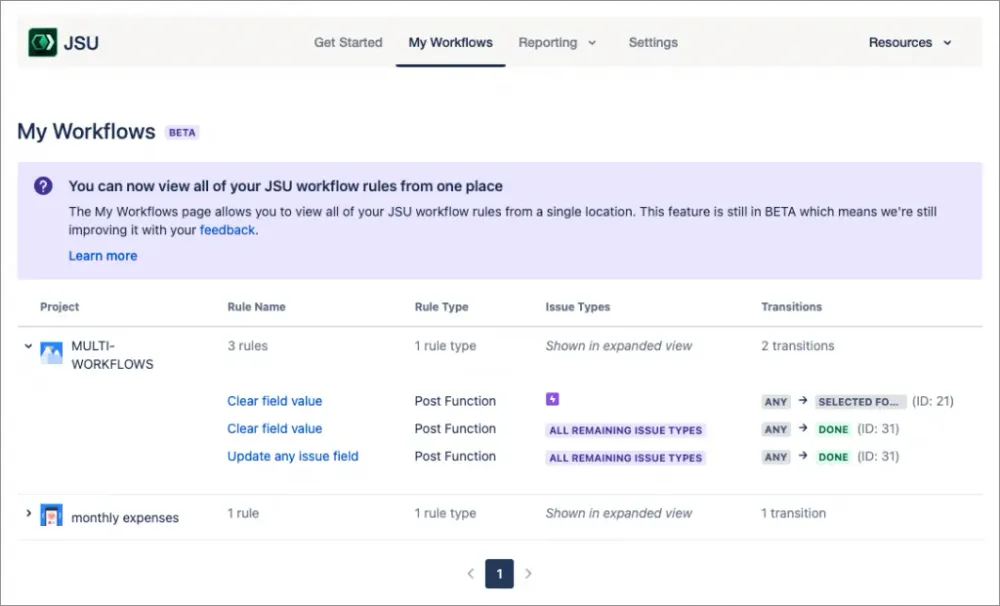
At the center of the UX is a global navigation which provides easy, quick access to frequently used features, such as the ‘My workflows’ page — a single-page overview of all saved JSU workflow rules, including the projects and transitions where they have been enabled. This lets you quickly see how JSU has been implemented across your entire instance, enabling faster workflow management.
JSU gives administrators an intuitive, code-free environment with the Universal Rule Builder (URB). It’s a streamlined rule editor that offers JSU users a modular “what-you-see-is-what-you-get” style of configuring workflows.
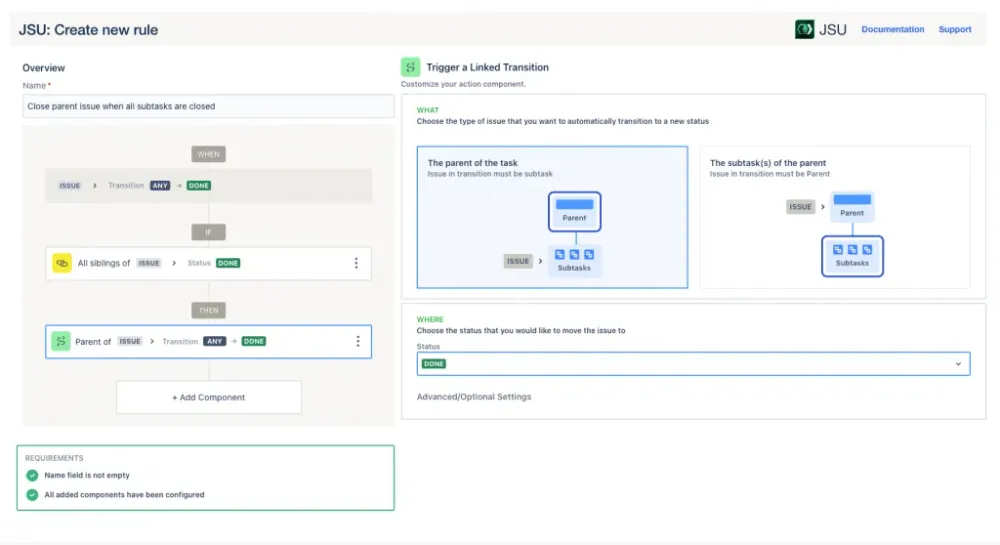
With the URB, even non-technical Jira admins can easily build simple or complex rules. All configuration in theURB is done in a single place, eliminating the need to navigate Jira multiple times or having to click through text-heavy, mandatory fields. You can review your complete rule summary in an easily comprehensible WHEN–IF-THEN format, edit individual components, and change their order via drag & drop before saving the rule.
With so much focus on ease of use and simplicity, you’d be excused to think that JSU lacks in other areas such as depth of workflow customization. JSU comes with a surprisingly robust set of workflow automation building blocks that help Jira admins tailor workflows to their team’s specific needs. As a result, JSU covers common use cases well, from automatically creating subtasks to onboard new members, calculating field values to estimate work effort, to even setting up conditional approvals to streamline budget requests.
In summary, JSU Automation Suite for Jira Workflows is a great place to start for admins who need to quickly level up their workflow automation in Jira, but don’t want to deal with complexity.
Advance your Jira workflows
You are:
A Jira admin with relatively mature, complex processes in Jira. You prefer to rely on no-code, point & click extensions to customize and automate Jira workflows. From time to time, you don’t shy away from using a bit of scripting to create more sophisticated workflow processes.
You need:
Above simplicity, you need a solution that combines ease-of-use with flexibility. Flexibility to choose how you solve workflow problems, be it with ready-made templates or through scripting. For more sophisticated use cases, having the option to write your own scripted workflow extensions is a nice bonus. And finally, as the scale and process requirements grow inside Jira, so does your need for a tool to help ease the daily grind of setting up and tweaking various workflows.
Check out:
Jira Misc Workflow Extensions (JMWE) – a flexible Jira workflow automation plugin that combines no-code, point & click configurations with simplified, low-code scripting capabilities. You can automate almost any use case with a comprehensive library of 40+ built-in workflow extensions that you can quickly configure without writing a single line of code.
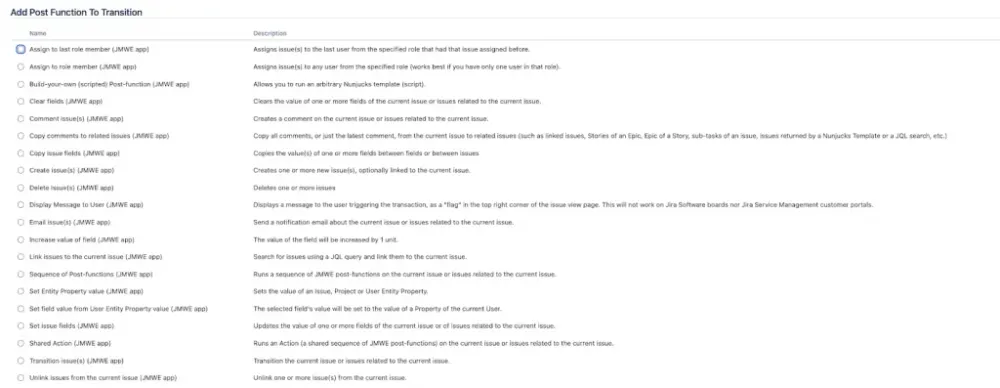
To meet your team’s more sophisticated workflow needs, you can take these extensions further with a little scripting. Essentially, instead of writing the whole workflow extension yourself, you simply customize JMWE with snippets of code.
For example, if you want to transition all linked issues and provide, for one of the transition screen fields, a calculated value, you just need to write a few lines of code that calculate that value. This is especially handy when someone in your organization wants to review JMWE configurations later without getting lost in lines and lines of code.
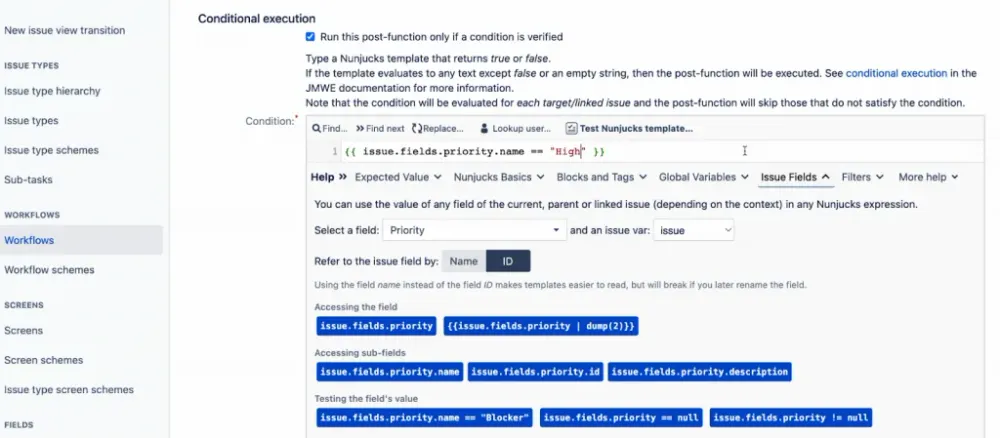
There are various options for how you approach workflow automation in JMWE. For ultimate control and adaptability to your business needs, JMWE lets you build your own scripted workflow extensions with the simple yet powerful scripting editor. Thanks to its smart, interactive inline help system, syntax highlighting, and built-in script tester, Jira admins with little to no coding experience can deploy advanced, bug-free workflows.
Automation in JMWE isn’t limited to just Jira status changes, i.e. when an issue transitions from OPEN to IN PROGRESS. With Event-based Actions, you can run any of the JMWE post functions — or sequences of post functions — outside of Jira workflows. These actions can be triggered by a variety of changes and events, such as elapsed time, if someone comments on a Jira issue, or creates an attachment. For example, let’s say an engineer in your organization has updated a Jira issue with the number of hours they worked on a project. JMWE can validate this change against requirements and automatically calculate labor costs.
Once your Jira instance has multiple workflows, it won’t be long before you’ll find yourself recreating the same configurations over and over again. Using Shared Actions, common configurations can be quickly reused across multiple transitions and projects. You can set multiple fields using a single “set field value post-function”, configure a post function to send an email, and then apply them to different workflow transitions as one Shared Action, without the need to recreate them over and over again.
All of the above makes Jira Misc Workflow Extensions (JMWE) a great all-purpose automation plugin for Jira admins who aren’t afraid to deal with a bit of complexity in exchange for more flexibility and power.
Dive deeper into Jira automation
You are:
A Jira admin who hit a wall when trying to customize, enhance, and extend Jira’s functionality to fit your unique needs. You appreciate the full flexibility that comes with a scripting solution.
You need:
Something that’s fully customizable, helps you create tailored solutions to address day-to-day challenges, or speeds up one-off projects like migrations. As the size of your Jira instance grows, so does your need for something scalable. The perfect tool would allow you to control every aspect of Jira, from the user interface to custom field calculations and external system integrations.
And since you want to help your teams share data from Jira seamlessly with other business-critical tools, your ideal solution should include flexible integration options to connect with your existing tech stack outside of Jira.
Check out:
Power Scripts - Jira Workflow Automation, a versatile scripting-based solution to develop advanced automation, customization, and integration in Jira. Power Scripts allows Jira admins to automate anything: repetitive bulk tasks, event-based or scheduled actions, custom workflows, and more.
At the core of Power Scripts is SIL (Simple Issue Language), an intuitive, JavaScript-like scripting language that gives Jira admins complete flexibility. Custom scripts in Power Scripts allow Jira admins to customize Jira to meet their needs, from adding custom fields to building automations based on conditional logic.
When getting started, users can leverage ready-made script templates that cover most common use cases, or create and modify existing scripts with basic text editing in the SIL Manager.
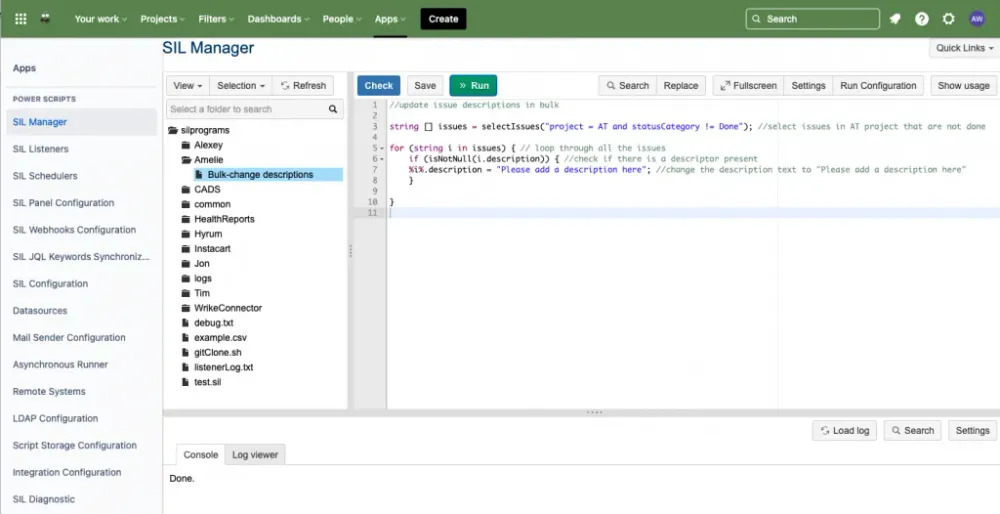
Designed exclusively for Jira and Confluence, SIL is much simpler and more efficient than general-purpose scripting languages such as Groovy. SIL also makes it easy to maintain automations in the long run. Unlike with Groovy, you won’t have to update and manually rewrite SIL scripts when you upgrade to a new Jira version or move between Jira Server/DC and Cloud. You can quickly move to a new Jira version with little to no downtime for the business.
As you scale, Power Scripts helps you safeguard your Jira instance against human error. With Live Fields, available on Server/DC, you can customize the Jira user interface at a much deeper level, and even add custom layers of security and data validation. You can modify standard and custom fields in Jira, or even tweak various graphic elements in the UI, such as buttons and tabs, to pre-fill fields, restrict visibility, or make fields read-only for specific users.
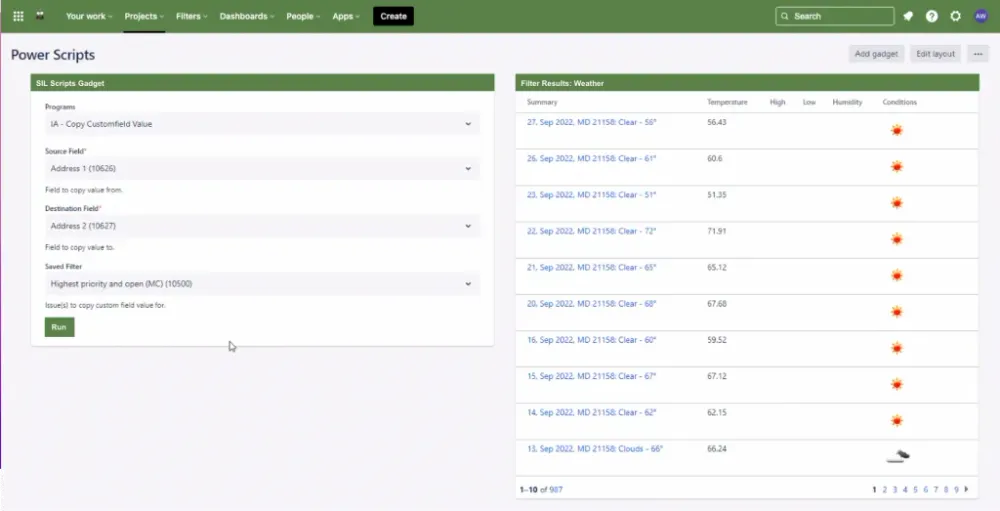
If you need to step outside Jira's boundaries, integrations via RestAPI and webhooks allow you to connect Jira to thousands of external, business-critical tools and data sources. Transform incoming emails into Jira tickets, connect to Slack, integrate your CRM, HR, or BI tools for reporting purposes, or query databases or LDAP. Power Scripts can help you make the most of Jira – for all your teams.
Overall, Power Scripts - Jira Workflow Automation is a robust Swiss army knife with unlimited potential. With powerful capabilities, it helps you automate not only your workflows but all aspects of Jira, and handle even the most complex scenarios at scale.
The right Jira automation app for the right team
While this article introduces just three of the most powerful and widely used workflow automation apps available on Atlassian Marketplace, we hope it’ll help you choose the app that best fits your organization’s needs. Whether you are just starting out, looking for more flexibility, or want to create fully tailored solutions through scripting, Appfire has you covered.
JSU Automation Suite for Jira Workflows |
Jira Misc Workflow Extensions (JMWE) |
Power Scripts - Jira Workflow Automation |
| Quick-start your workflow automation | Advance your workflow automation | Access deeper levels of automation, customization, and integration |
| + Entirely no-code solution + Fast, simple navigation + Drag & drop visual rule builder + Easy onboarding with hints & tips | + Large collection of no-code extensions + Extend with simplified scripting + Automate based on events & schedules + Reusable workflow configurations | + Full scripting-based solution + Automate beyond Jira workflows + Customize Jira UI + Integrate with external tools |


These apps reduce the repetition, human error, and manual maintenance that often come with Jira workflows. Beyond unlocking a much higher level of customization and scale in Jira, these tools help any Agile-minded company accelerate its business processes to match the demanding pace of today’s market.
If you’re looking for your perfect fit, it doesn't have to be an either-or. Many Jira admins use a combination of automation options, or combine third party apps with Jira built-in automation.This provides admins access to sophisticated scripting options but also the means to set something up quickly and simply when the situation demands or when someone less experienced joins the admin team.
For example, CBS Broadcasting Inc. increased process efficiency by 30% and got a clearer picture of work-in-progress by enhancing Jira’s native functionality with Power Scripts and JMWE.
Ultimately, the best way to learn how these apps fit into your existing Jira processes is to try them out yourself. In addition to a free 30-day trial, these apps are free on Cloud for up to 10 users. So why not take these apps for a quick spin in your Jira instance and see how they can make your workflow?
Download our free guide on six automation strategies for Jira that’ll make you — and your team — happy using the right automation app.
