
TL;DR
- Jira’s native dashboards can’t scale with your teams — especially when you need cross-project views, real-time data, or external sharing
- Dashboard Hub Pro gives you advanced gadgets, flexible layouts, and multi-instance visibility
- Track sprint health, SLA trends, or team velocity from a single screen — no exports or workarounds required
- With support for Confluence, GitHub, Opsgenie, and more, you’ll unify your reporting and keep every stakeholder aligned
Native Jira dashboards only get you so far
Jira’s built-in dashboards offer just enough to get started — they visualize core metrics using standard gadgets like pie charts or bar charts. But is this enough when your team needs cross-project views, dynamic filters, or multi-instance data sharing?
A recent study found that 69% of organizations say access to real-time, streaming data directly improves decision-making, and static dashboards with rigid structures just aren’t built for that.
With native Jira dashboards, it’s hard to:
- Combine metrics from multiple Jira sites or instances
- Pull in data sources from tools like Confluence or GitHub
- Customize gadgets to surface key insights by team or status
- Share updates outside of Jira without a manual workaround
In this article, we’ll review how Appfire’s Dashboard Hub Pro helps you overcome such limitations, giving your Jira dashboard the power to unify, personalize, and share real-time insights easily.
What are the limitations of native Jira dashboards?
While Jira’s default dashboards offer a functional starting point, they often can’t keep pace with growing reporting needs. As your teams and data scale, the cracks begin to show, especially when managing multiple projects, handling complex project reporting, or sharing updates outside of Jira.
Here are five common roadblocks your teams may encounter with native dashboards:
1. Limited layout flexibility and gadget design
Native dashboards only allow basic placement and layout controls. Your options are limited if you need a fully custom dashboard screen or want to reorganize widgets to highlight top priorities.
2. Lack of reporting across multiple Jira projects/instances
You’re often restricted to what’s happening in a single Jira instance, making cross-project views nearly impossible, especially in enterprise environments.
3. Limited/lack of customization in visuals
Gadgets like the standard spring burn-down gadget or average age gadget don’t let you customize gadgets to reflect meaningful project progress, priority segmentation, or real-time filtering. Most visuals remain static.
4. No support for external data sources
If your team uses tools like GitHub, Confluence, Bitbucket, or Insight, you can’t bring those data sources into the default Jira dashboard gadgets. This creates disconnected reporting workflows and forces your teams to rely on manual reports.
5. Difficulty sharing dashboards outside Jira
Sharing dashboards with clients or leadership who don’t have Jira access is a pain. Native dashboards lack external sharing capabilities or secure public links, adding friction where there would be transparency.
A Salesforce study found that 73% of executives say their teams work in silos—each using separate systems—while half of their employees struggle to share information across departments. These disconnects mirror what many teams experience in Jira: isolated dashboards, fragmented Jira data, and limited collaboration.
Meet Dashboard Hub: A smarter way to visualize Jira
While native Jira dashboards fall short, Appfire’s Dashboard Hub gives your teams a smarter, more flexible way to visualize and act on Jira data. It works seamlessly with Jira Cloud, Confluence, Bitbucket, and other connected Jira applications to create unified dashboards, so you no longer have to juggle views across disconnected systems.
With Dashboard Hub, you can:
- Build cross-project and cross-instance views in a single interface, which is ideal for teams managing data across several Jira sites or business units.
- Create dynamic dashboards that pull live data from multiple data sources, including GitHub, Statuspage, Opsgenie, Insight, and more.
- Use dashboard gadgets with enhanced layout controls, visual rules, and the ability to customize gadgets for better clarity and focus.
- Share dashboards externally through secure public links; no Jira license or user access required.
According to a McKinsey study, organizations that use integrated analytics tools are 23 times more likely to outperform competitors in acquiring new customers and 19 times more likely to be profitable.
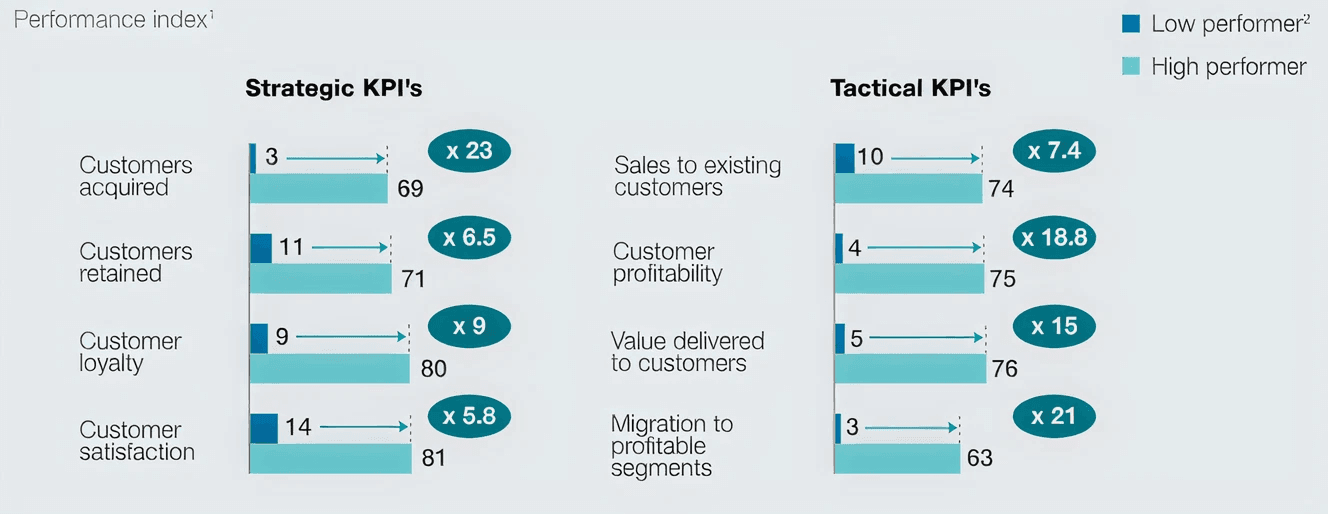
Source: McKinsey
What gadgets come with Dashboard Hub?
Unlike native gadgets, Dashboard Hub’s advanced widgets are pre-built for clarity and layered insights, saving your team time, guesswork, and manual workarounds. Whether you’re tracking team progress, visualizing issue statuses, or surfacing hidden blockers, these gadgets go far beyond what Jira offers by default.
Here are some high-impact gadgets available in Dashboard Hub by Appfire:
Cumulative Flow Diagram
The Cumulative Flow Diagram provides a real-time view of workflow health for teams managing work items across multiple stages. It highlights bottlenecks, backlog growth, and delivery delays over a selected time period. With intuitive color brands and dynamic filtering, it’s ideal for visualizing project progress at a glance.
This gadget supports agile best practices and is particularly helpful for Kanban teams monitoring queue stability and work-in-progress limits.
Time to Resolution gadget
Need to keep SLA breaches in check? The Time to Resolution gadget calculates how long it takes to close issues—perfect for tracking resolved issues and resolution date trends across Jira Service Management queues.
It gives support and IT teams real metrics on where delays occur, helping drive better accountability and faster turnaround. It also allows teams to track time spent managing requests, a critical component for SLA audits and time tracking transparency.
Team Velocity gadget
Planning Agile sprints? The Team Velocity gadget measures story points completed over time, enabling side-by-side sprint comparison across multiple Jira projects. It supports teams' retrospectives, capacity planning, and performance tuning by visualizing team progress.
Sprint Progress and Forecast gadgets
These gadgets track the current sprint in real time, visualizing what’s complete, what’s in progress, and what’s at risk. The forecast view uses historical data and current scope to predict likely delivery outcomes, helping teams spot scope creep early and improve sprint planning accuracy.
The visuals update dynamically and work well in both calendar format and traditional burndown views.
Service Management SLAs gadget
This gadget surfaces key SLA metrics, such as time to first response, resolution breach rates, and time-based compliance, for service desks using Jira Service Management (JSM).
It helps your teams spot where issues are falling through the cracks, so project managers can act quickly and keep performance on track. The gadget works across multiple reports and projects assigned to different queues, consolidating them into a single, actionable view.
How do different teams use enhanced Jira dashboards?
Enhanced Jira dashboards aren’t just about better visuals; they drive better department decisions. With Dashboard Hub, every role gets the focused metrics and reporting clarity they need, all from a single screen.
Here’s how different teams can get more from their dashboards:
Support teams
Support and IT operations teams can use gadgets like the Time to SLA to track SLA regulatory compliance in real time (see visual walk-thru), monitor issue statuses by priority, maintain backlog hygiene, and improve visibility into time tracking across various requests.
They can also monitor unresolved issues and escalate when necessary, helping reduce the average response time across projects assigned to various queues.
Agile teams
Agile teams can track sprint scope, burndown trends, and velocity across multiple projects. With real-time visibility into throughput, blockers, and remaining work, these dashboards enable faster retrospectives and more predictable sprint outcomes.
Use gadgets like Team Velocity, Cumulative Flow Diagram, and Sprint Forecast to bring transparency to every sprint.
Executives and managers
Appfire’s Dashboard Hub consolidates data points from across Jira Cloud instances into executive-friendly views for leaders needing a high-level view of project health, cross-team blockers, and delivery risks.
They can monitor project timelines, assess team bandwidth, and check project reporting status, without digging through individual Jira boards.
Engineering leads
Engineering leaders can track, commit, and pull request data from GitHub, Bitbucket, and other data sources to monitor throughput, review cycles, and deployment blockers.
With gadgets designed to show created vs resolved issues, burnups, and repo trends, teams get the insights needed to support continuous delivery and dev efficiency.
How do you set up and configure Dashboard Hub?
Are you ready to enhance your Jira dashboard experience? Getting started with Dashboard Hub is quick, intuitive, and designed to fit seamlessly into your team’s workflow.
Here’s how to set it up:
1. Install
Visit the Dashboard Hub Pro Atlassian Marketplace listing. Click ‘Get it now’ to add it to your Jira instance. No complex setup, just plug in and go.
2. Connect
Dashboard Hub supports a wide range of data sources, including:
- Jira projects and Jira Service Management queues
- Confluence pages for integrated documentation views
- GitHub and Bitbucket for code visibility
- Insight (Assets), Opsgenie, Statuspage, Projectrack, and more
This enables fully centralized reporting without needing to jump between platforms.
3. Choose a template
You can load one of the pre-configured templates (ideal for Agile, ITSM, or executive reporting) or create dashboard layouts from the ground up. Either way, you’ll start from a clean, structured dashboard screen.
4. Custom configuration
Use the add gadget function to insert nearly 100 advanced widgets. Customize gadgets with real-filters, conditional formatting, and dynamic visuals, whether you’re working with a line chart, calendar format, or SLA tracker.
Apply visual rules based on issue statuses, deadlines, or custom fields to determine what matters most.
5. Share
Use secure public links or permission-based access to share your dashboards internally or externally with stakeholders, clients, or vendors. This solves the classic navigation bar limitation of native Jira views, allowing non-Jira users to access insights with ease.
Why do teams choose Dashboard Hub over native dashboards?
When it comes to building smarter dashboards inside Jira, teams across industries choose Dashboard Hub for one simple reason: it’s scalable to meet their needs.
Here’s why high-performing teams trust it over native Jira dashboards:
Ready-to-use gadgets for all teams
Dashboard Hub includes advanced dashboard gadgets designed for agile development, customer support, IT service management, and operations. From spring burndown gadgets to SLA trackers and project timelines, these widgets let your teams visualize performance without having to build reports from scratch.
No more workarounds or third-party exports, just drop in the right gadget and go.
Cross-project and cross-instance visibility
Need to report across multiple projects, instances, or teams? Dashboard Hub connects your Jira instance with tools like GitHub, Confluence, Bitbucket, and Insight to create unified views of your work items and data points.
This ensures consistent project reporting and eliminates the need to chase updates across disconnected dashboards.
Customizable views for better communication
Whether you're presenting to stakeholders, aligning remote teams, or surfacing blockers to execs, Dashboard Hub’s ability to customize gadgets and apply visual rules makes it easier to highlight what matters.
You can tailor charts, filters, and thresholds based on role, status, or due dates, ensuring every viewer gets relevant, real-time insight from the dashboard screen.
Scalable for teams of any size
From startups building their first personal dashboards to global enterprises managing complex workflows, Dashboard Hub scales smoothly. It supports multiple reports, cross-team usage, and robust sharing without sacrificing speed or flexibility.
From data clutter to dashboard clarity
If your Jira dashboard can’t answer “what’s happening now?” or “what’s the hold-up?”, then you’re not getting the full picture. As projects grow and teams expand, relying on static views, disconnected dashboard gadgets, or incomplete Jira data only leads to missed insights and decision delays.
Dashboard Hub gives your team the power to unify data sources, streamline project reporting, and build dashboards that scale with your needs, whether you’re working across multiple projects, managing SLAs, or keeping stakeholders aligned on team progress.
Better visibility starts with a smarter dashboard. Contact us today to learn more about Dashboard Hub Pro for Jira, or explore Appfire’s full suite of reporting apps built to help you turn complexity into clarity.
Try Dashboard Hub Pro for free today