

When your release process feels slower than it should, the friction usually hides in plain sight: scattered tools, approval delays, and teams working in isolation.
A strong DevOps implementation plan can help smooth those gaps. Instead of waiting on handoffs, your teams move together with shared visibility and faster feedback loops.
Adoption is accelerating, but maturity still varies. The latest DevOps statistics reveal that 40% of businesses now list DevOps expertise as a must-have skill for development and IT roles, showing how central these practices have become to modern delivery. Teams that evolve are better positioned to support continuous delivery. Teams that stay siloed often deal with delays, rework, and unclear ownership.
Learn how to implement DevOps step by step, align your teams around shared workflows, and build a delivery process that scales with your product and organization.
What is DevOps implementation?
DevOps implementation brings people, processes, and technology together to deliver value continuously. It helps you connect development, operations, and security teams through a shared DevOps strategy, so everyone can work toward the same outcome: reliable releases that reach customers faster.
It also involves DevOps orchestration, coordinating how tools, workflows, and responsibilities interact throughout the delivery lifecycle. This includes:
- Automating how code moves from commit to deployment
- Syncing updates between systems like Jira and CI/CD pipelines
- Making sure the right information reaches the right people at the right time
DevOps implementation is an ongoing evolution of how your teams collaborate. Over time, workflows become more automated, decisions become more data-driven, and delivery becomes more predictable without adding extra overhead.
How to implement DevOps in 5 steps
Every organization starts from a different place, but the path to faster, more reliable delivery tends to follow similar patterns. A strong DevOps implementation plan gives you a clear way to reduce friction, improve visibility, and build momentum over time.
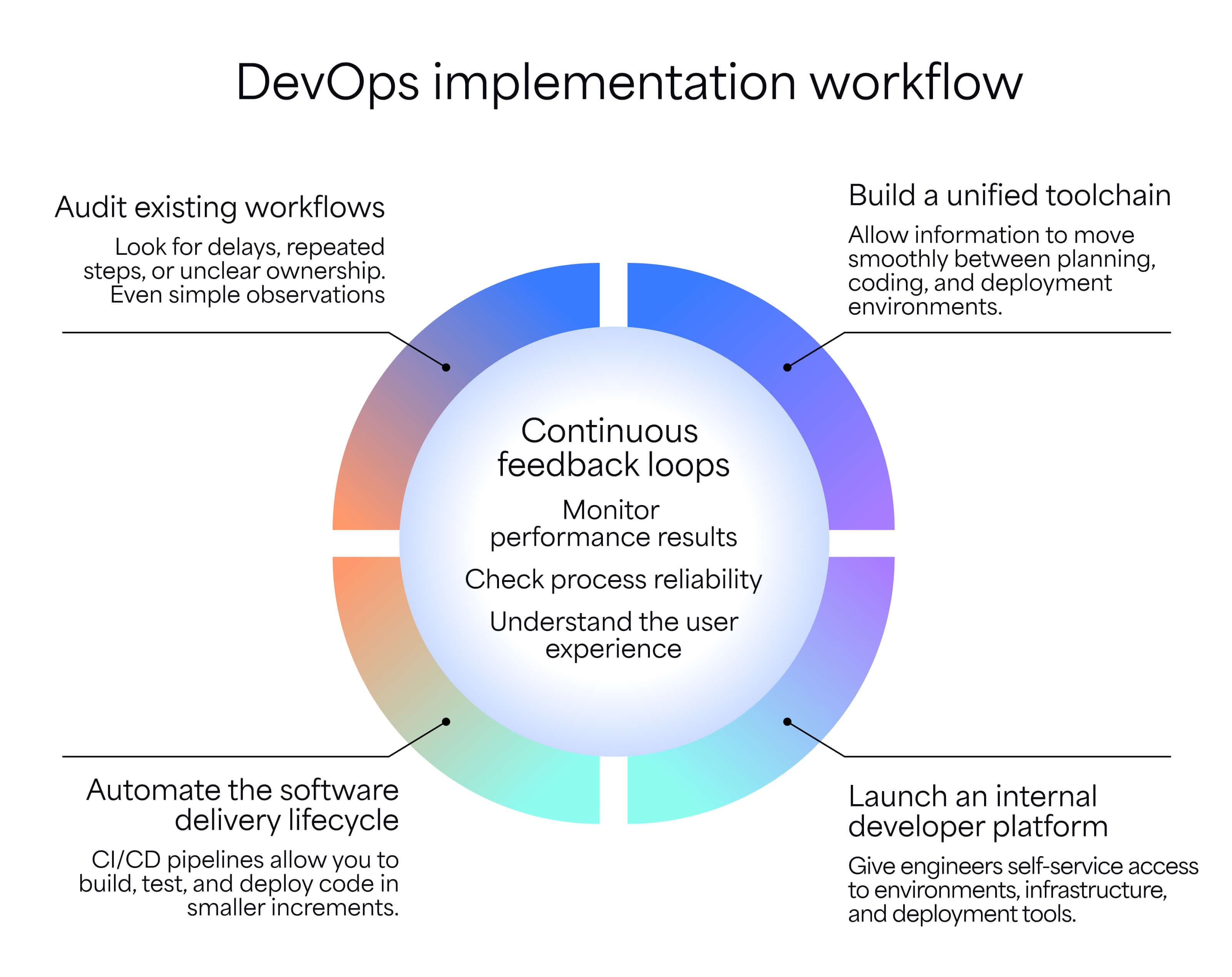
The following five steps reflect proven DevOps implementation strategies used by high-performing teams. Think of them as a flexible roadmap that fits your structure, tools, and pace of change.
Step | Key outcome to aim for | What success looks like | Example metric to track |
|---|---|---|---|
Audit existing workflows | Shared understanding of how work flows | Teams agree on where delays happen and which stages need improvement | Lead time for changes |
Build a unified toolchain | Connected systems that share context automatically | Updates in Jira reflect development activity without manual syncing | Tool integration coverage |
Automated delivery lifecycle | Reliable, repeatable release process | Builds, tests, and deployments run consistently without manual coordination | Deployment frequency |
Launch internal developer platform | Faster environment access for developers | Teams provision infrastructure independently using approved templates | Environment setup time |
Establish feedback loops | Data-informed improvement cycle | Production insights directly influence backlog prioritization | Mean time to recovery (MTTR) |
Step 1: Audit your existing development workflows
Start by understanding how work moves today. Map the journey from idea to deployment. Look for delays, redundant steps, or unclear ownership. Even simple observations (like how long a ticket waits for review) can reveal hidden bottlenecks.
Tools like Jira already contain useful signals. Look at cycle time, blocked issues, and handoff patterns between teams. When you combine DevOps and value stream mapping, it becomes easier to see where manual work slows progress or introduces risk.
This step creates clarity. Before automation can improve anything, you need a shared view of how work actually flows across teams.
Step 2: Build a unified DevOps toolchain
Disconnected tools create disconnected teams. A unified toolchain allows information to move smoothly between planning, coding, testing, and deployment environments.
Choosing tools that integrate naturally with Jira and Confluence helps prevent duplicate data and context loss. Engineers can view requirements, updates, and documentation in one place, without switching between systems.
Strong integrations also support SecDevOps collaboration. Security checks can run automatically inside the development workflow, helping your teams identify issues early without slowing delivery.
Step 3: Automate the software delivery lifecycle
Automation reduces friction and creates consistency. CI/CD pipelines allow you to build, test, and deploy code in smaller increments, which lowers the risk of large release failures.
Removing manual approvals for routine tasks helps you focus on meaningful work. Automated tests and quality checks create predictable outcomes and reduce last-minute surprises.
Over time, automation becomes part of your daily work habits, helping your teams move faster while maintaining confidence in every release.
Step 4: Launch an internal developer platform
Platform engineering continues to shape how teams scale delivery. An internal developer platform gives your engineers self-service access to environments, infrastructure, and deployment tools.
Instead of waiting for manual setup, developers can provision resources when needed. This reduces delays and frees operations teams to focus on higher-impact improvements. It also helps streamline request management as your organization grows.
A well-designed platform creates consistency across projects. Teams follow shared standards without sacrificing flexibility, helping maintain quality as the organization grows.
Step 5: Establish continuous feedback loops
DevOps does not end at deployment. DevOps monitoring tools provide real-time insights into performance, reliability, and user experience.
Connecting production data back to the backlog helps you prioritize improvements based on real outcomes. Issues discovered in production can quickly inform updates, fixes, or optimizations.
Continuous feedback supports steady improvement. Each release becomes a learning opportunity that strengthens future development decisions.
Key DevOps performance metrics
Tracking the right software engineering metrics helps you understand whether your delivery process is actually improving. DORA metrics are widely used engineering KPIs that show how efficiently teams build, release, and recover from change.
Together, these metrics provide a balanced view of speed, stability, and reliability:
- Deployment frequency: How often your team successfully releases changes to production. Frequent deployments usually indicate smaller, lower-risk updates.
- Lead time for changes: The time it takes for code to move from commit to production. Shorter lead times suggest fewer bottlenecks in the delivery pipeline.
- Change failure rate: The percentage of deployments that result in errors, rollbacks, or degraded service. This metric highlights release quality.
- Mean time to recovery: How quickly your team restores service after a failure or incident. Faster recovery reflects strong monitoring and incident response processes.
- Cycle time: The total time it takes for a task to move from “in progress” to completion. This metric is useful for identifying workflow inefficiencies.
- Work in progress (WIP): The number of tasks actively being worked on at the same time. Keeping WIP manageable helps your teams maintain focus and reduce context switching.
- Escaped defects: Issues discovered after release rather than during testing. Tracking this helps improve test coverage and release confidence.
Consistently monitoring these engineering KPIs helps you evaluate progress and refine your approach over time.
Common DevOps implementation challenges
Most DevOps roadblocks come from habits, expectations, and communication gaps. Teams may adopt new tools but still work in old ways, which slows progress and creates confusion.
Identifying these challenges early helps you adapt faster and apply practical DevOps best practices that support long-term success:
Challenge | Why it happens | Early warning sign | Business impact | Way forward |
|---|---|---|---|---|
Cultural resistance | Teams are used to working independently with separate goals | Teams hesitate to share ownership of releases | Slower collaboration and delayed improvements | Align incentives around shared outcomes and team-based goals |
Toolchain complexity | Too many tools added over time without integration planning | Teams manually copy data between systems | Lower efficiency and unclear visibility | Standardize core tools and reduce duplicate functionality |
Security bottlenecks | Security reviews happen late in the release process | Releases delayed due to last-minute vulnerabilities | Increased risk and slower delivery cycles | Embed security checks directly into CI/CD workflows |
Overloaded teams | Too much work in progress at the same time | Frequent context switching and missed deadlines | Reduced focus and slower output | Monitor developer productivity metrics and limit parallel work |
Limited visibility into process flow | Work progress is difficult to track across systems | Teams rely on manual updates for status | Poor forecasting and reactive planning | Use dashboards that connect workflow data end-to-end |
Overcoming cultural resistance and silos
Changing how your teams collaborate can feel uncomfortable at first. Developers, operations, and security teams may be used to working independently, each measured by different goals and priorities.
DevOps encourages shared ownership of outcomes rather than isolated outputs. Technical leadership plays an important role by aligning incentives, encouraging knowledge sharing, and reinforcing shared accountability through meaningful software development KPIs, such as sprint burndown and lead time.
Solution: Establish shared goals tied to delivery outcomes rather than individual tasks. Cross-team planning sessions and shared metrics encourage collaboration instead of competition.
Managing tooling fragmentation and complexity
Teams often accumulate tools over time, leading to disconnected workflows and duplicate data. When your engineers spend more time managing integrations than building features, momentum slows, and frustration grows.
Reducing fragmentation improves visibility and simplifies onboarding. A streamlined toolchain also helps teams track developer productivity metrics, such as flow velocity and cycle time, without stitching together multiple reporting sources.
Solution: Prioritize tools that integrate naturally and reduce context switching. Standardizing core platforms helps maintain consistency while still allowing flexibility where needed.
Integrating security into the automated pipeline
Security is sometimes introduced late in the delivery cycle, which can create delays when vulnerabilities are discovered close to release. Treating security as a separate step often leads to rushed fixes or postponed deployments.
Embedding security checks earlier in the workflow supports smoother releases and fewer surprises. Automated scanning and policy checks help teams maintain quality without slowing delivery.
Solution: Integrate security checks directly into CI/CD workflows. Early validation helps you resolve issues sooner and maintain confidence in release readiness.
Reducing overloaded teams and context switching
Teams often try to move too many initiatives forward at the same time. When priorities constantly shift, developers spend more time switching contexts than making meaningful progress, slowing delivery and increasing error rates.
Limiting WIP helps teams focus on completing tasks before starting new ones. Tracking developer productivity metrics can highlight when workload imbalance begins affecting delivery quality and predictability.
Solution: Set clear WIP limits and align priorities across teams. Fewer parallel tasks lead to faster completion and more stable releases.
Improving visibility across the value stream
When teams cannot easily see how work moves from idea to production, planning becomes reactive. Lack of visibility makes it harder to identify delays, measure improvement, or forecast delivery timelines.
Combining DevOps and value stream mapping helps you understand how work flows across tools and teams. Clear visibility supports better decisions and more accurate software development KPIs.
Solution: Use dashboards that connect delivery data across systems. Shared visibility helps you spot risks earlier and improve planning confidence.
Scale your DevOps implementation with Appfire Flow
As your DevOps implementation evolves, maintaining visibility across teams, tools, and workflows becomes critical. Appfire Flow supports this growth by helping you connect planning, development, and delivery data into a single view, making it easier to improve coordination and strengthen continuous delivery practices.
Organizations like Lightspeed have used Appfire Flow to better understand how work moves through their delivery pipeline, improving predictability and aligning engineering efforts with business priorities. These insights support more consistent releases, clearer planning, and a more resilient DevOps workflow.
See how Appfire Flow helps engineering teams streamline DevOps implementation, reduce friction, and improve delivery speed.
Book your free demoDevOps implementation FAQ
How long does a typical DevOps implementation take?
Most organizations see early improvements within a few months, but intermediate DevOps maturity often takes six to 18 months. The timeline depends on your team size, legacy tooling, and how quickly your workflows evolve. DevOps works best as a gradual shift rather than a one-time rollout.
What is the difference between DevOps and Agile implementation?
Agile focuses on how your teams plan and manage work in smaller increments. DevOps extends those principles into deployment, infrastructure, and operations. Together, they support faster delivery with stronger collaboration across the entire software lifecycle.
Do I need to hire new people for DevOps implementation?
No, you don’t always need to hire new people for DevOps implementation. Many organizations begin by upskilling existing teams and redefining responsibilities. Over time, some may introduce specialized roles, such as platform engineers, to support automation and scalability.