
In software development, tracking the right Key Performance Indicators (KPIs) is essential for measuring the success of engineering efforts. If you're not tracking KPIs yet, now’s the time to start.
Monitoring software development KPIs improves workflow, boosts productivity, and enhances customer satisfaction.
But which KPIs should you focus on and why?
This article covers the essential software KPIs, how to measure them, and examples for each.
What’s a KPI?
Key Performance Indicators (KPIs) measure a business's performance, providing a clear way to evaluate the effectiveness of a process or outcome.
KPIs track progress, showing how far you've come and what still needs to be done. In software development, they offer real-time insights for adjustments.
Beyond tracking, KPIs highlight strengths and weaknesses, guiding better decision-making. Relying on data, rather than gut feelings, leads to more informed choices.
Many businesses mistakenly choose the wrong software development metrics to gauge their software team’s success. Metrics like lines of code, fixed bugs, and deploys can be misleading, often failing to align with key business goals.
This common misstep happens because business managers may lack the deep understanding of software development needed to define project success.
Benefits of using the right KPIs for software development
KPIs act as a compass, guiding software development teams to align with both short-term objectives and long-term goals. Here are four key benefits of using KPIs in your projects:
1. Enhanced project visibility
KPIs offer a clear, quantifiable view of project status. This transparency helps stakeholders understand scope, budget, and timelines, allowing teams to address issues and adjust resources where needed.
2. Improved decision making
Data-driven KPIs empower managers to make informed decisions, whether adjusting timelines, reallocating resources, or prioritizing features based on capacity. This reduces guesswork and enhances strategic actions.
3. Increased efficiency
KPIs like cycle time and code churn identify inefficiencies. By understanding these metrics, teams can streamline workflows, adopt better practices, and boost productivity.
4. Quality assurance
Tracking code quality KPIs, such as code coverage, ensures a high-quality final product. These indicators highlight areas needing more attention, reducing post-launch errors and saving maintenance time.
Incorporating the right KPIs into your development processes optimizes workflows and aligns teams toward common goals, driving higher productivity, quality, and user satisfaction.
13 best software development KPIs to track
1. Velocity
Velocity represents your team’s pace, showing how much work they can complete in a given period, usually measured in story points or tasks.
Story points quantify the effort and tasks required for project completion.
In Agile, a sprint is a set period dedicated to completing a specific amount of work.
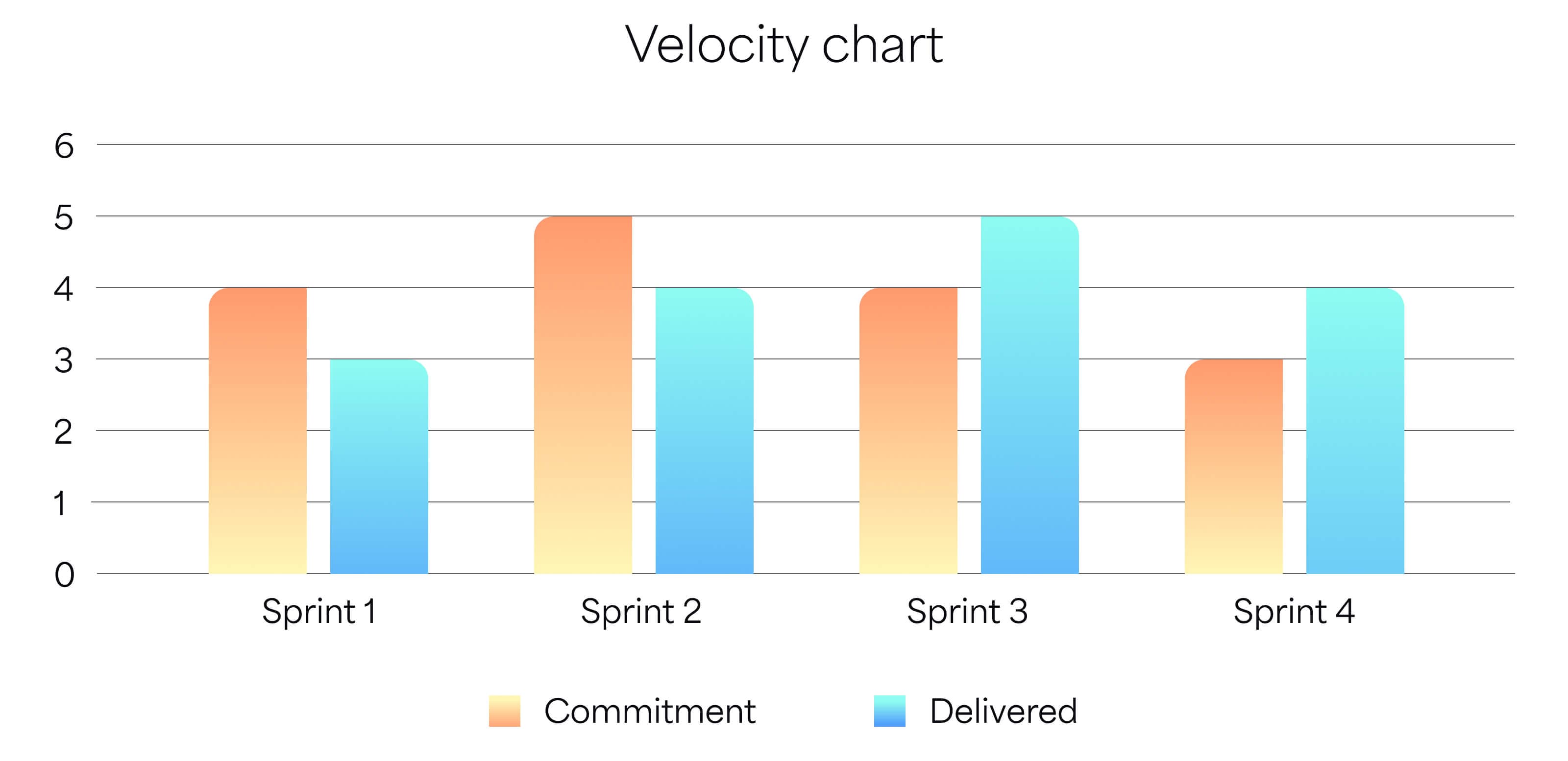
Velocity chart showing committed and delivered work across Sprints.
How to calculate velocity
To measure velocity, divide the total story points completed by the number of sprints:
Velocity = [Total story points completed] / [Number of sprints]
For example, if your team completed:
- Sprint 1: 20 story points
- Sprint 2: 25 story points
- Sprint 3: 18 story points
- Sprint 4: 22 story points
Total story points = 85
Number of sprints = 4
Velocity = 85 / 4 = 21.25 story points per sprint
But why calculate velocity manually? Apps like Dashboard Hub Pro can automatically calculate velocity for you, integrating seamlessly with work management systems like Jira.
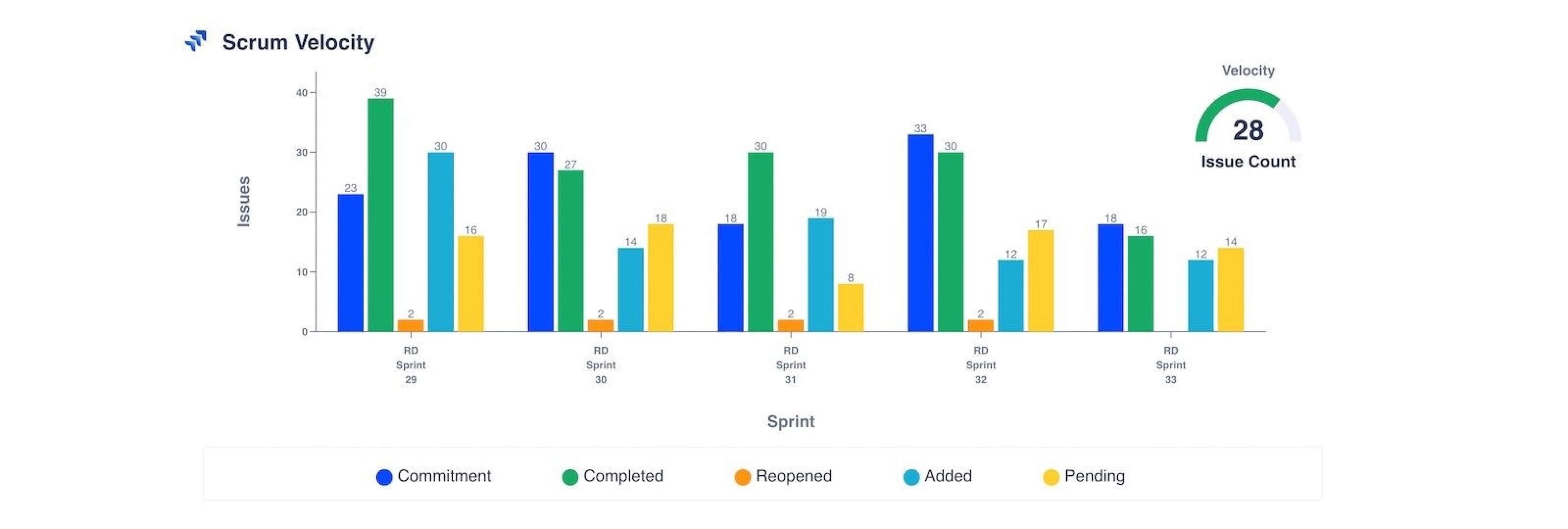
A Sprint Velocity widget in Dashboard Hub Pro visualizing the team’s Jira data.
2. Sprint burndown
Sprint burndown is a key tool for Agile teams to track progress and stay on track with sprint goals. It visually compares completed work to the initial plan using story points.
The burndown chart highlights deviations from the plan, making it easy to spot when the team falls behind and enabling timely adjustments to meet sprint deadlines.
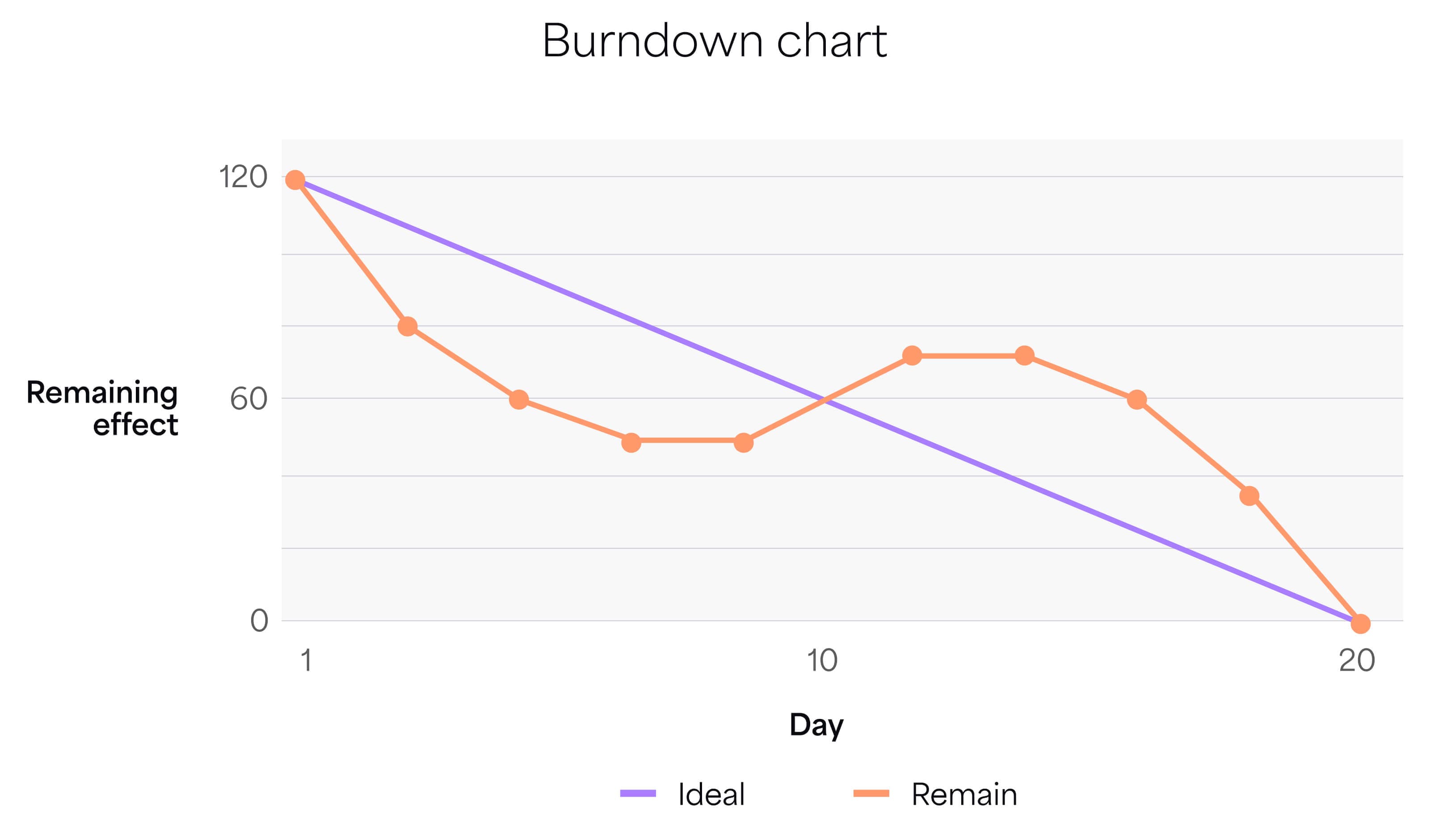
A visualization of a Sprint burndown.
How to measure burndown?
The formula for sprint burndown is:
Sprint burndown = [Initial story points] – [Completed story points]
For example, if your team starts with 40 story points and completes 10 after two days:
Sprint burndown = 40 – 10 = 30 story points remaining
This means 30 story points are remaining to be completed by the end of the sprint.
Ideally, burndown should be measured daily, but it can be time-consuming for developers. Apps like Dashboard Hub Pro simplify this by visualizing Sprint progress on custom dashboards, giving teams quick insights without distractions.
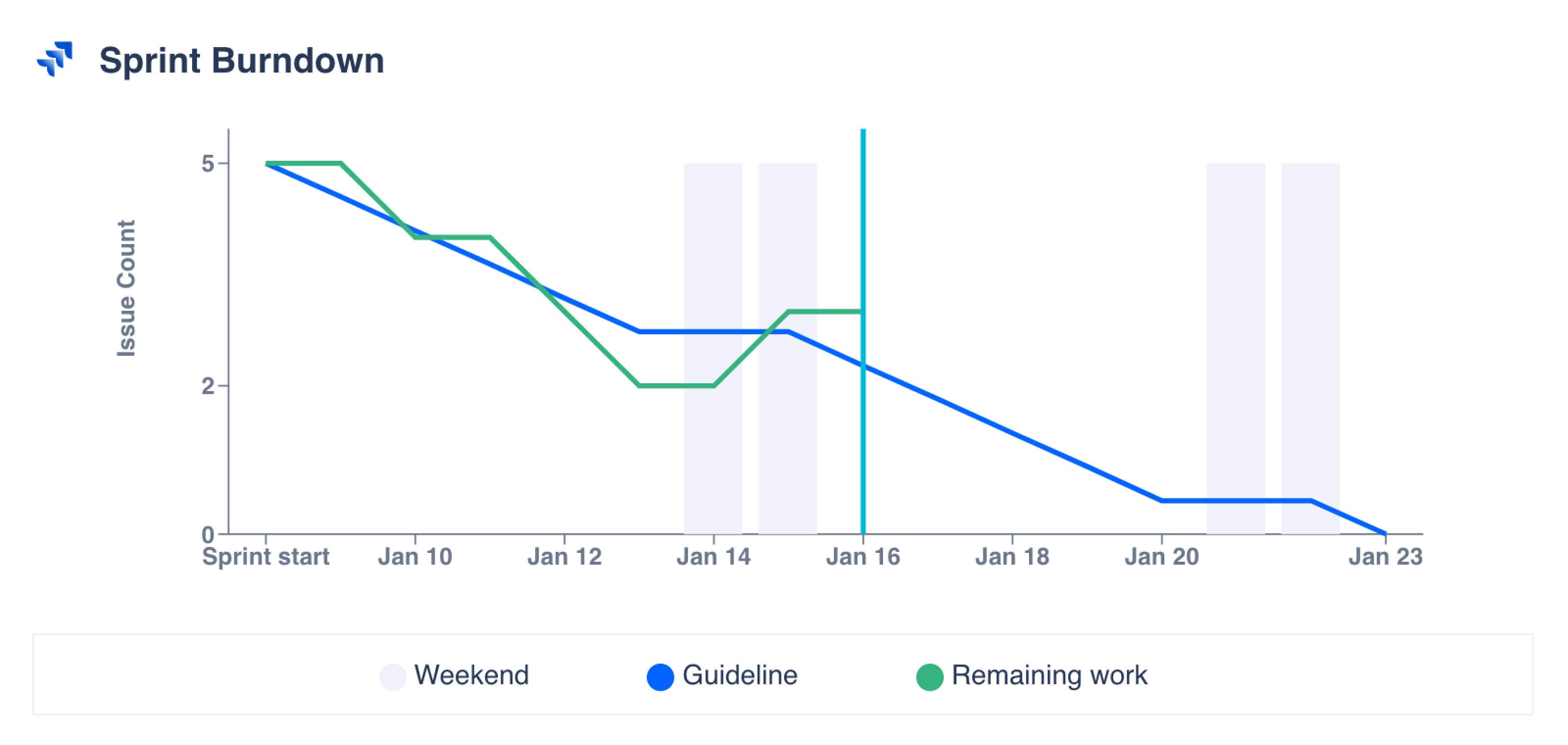
An example of a Sprint burndown chart in Dashboard Hub Pro.
3. Release burndown
Release burndown is the big-picture version of sprint burndown. While sprint burndown tracks individual sprint progress, release burndown covers the entire product release cycle.
It helps project managers, developers, and stakeholders see whether they’re on schedule or falling behind.
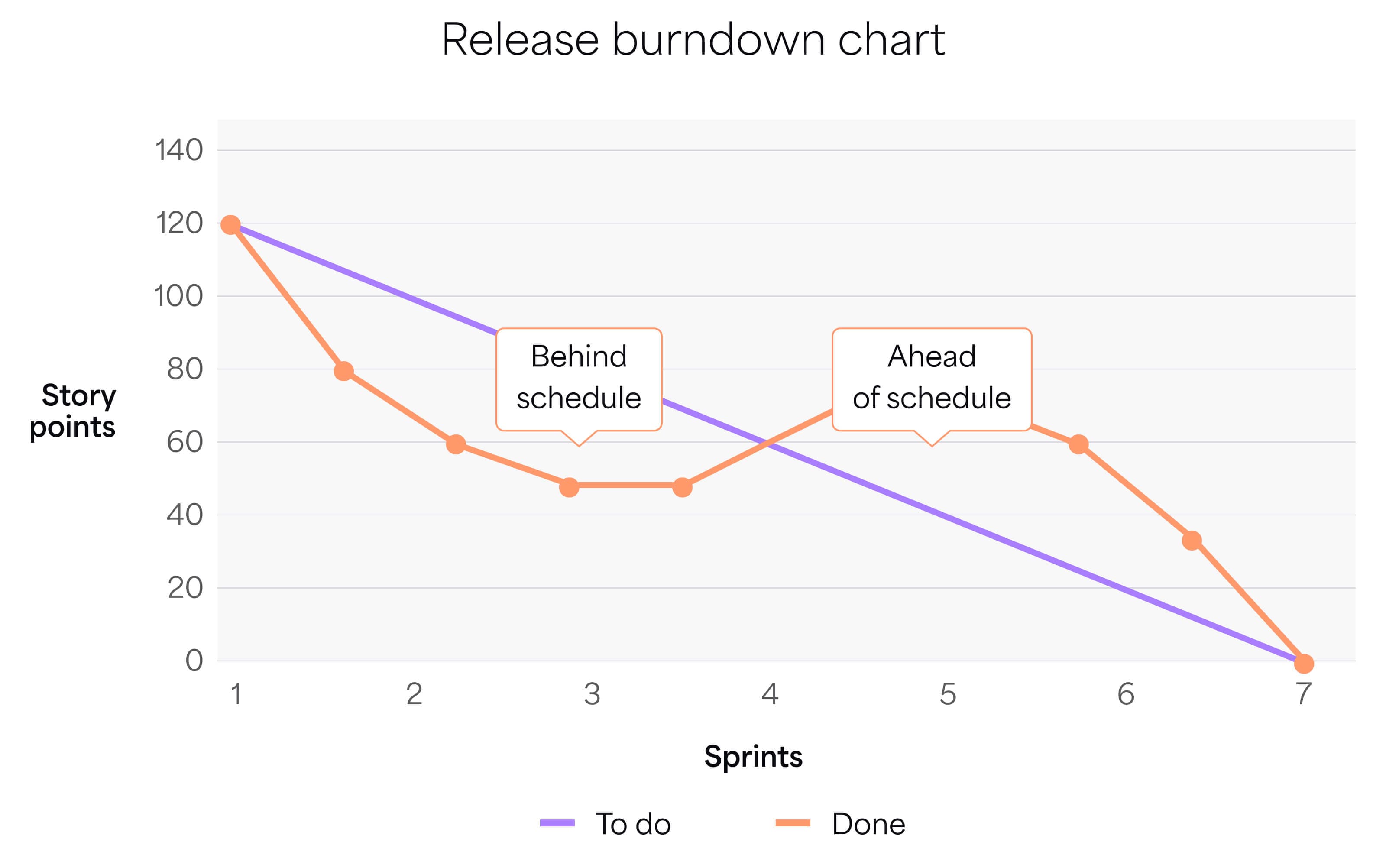
Release burndown charts offer businesses clear data to communicate with stakeholders. They help set expectations with customers on release schedules and inform shareholders about return on investment timelines. This transparency builds trust.
How to measure Release burndown
The formula is: Release burndown = [Total planned story points] – [Total completed story points]
For example, if a project has 100 planned story points, and the team completes 90 by the end of the project:
Release burndown = 100 – 90 = 10 story points remaining
4. Cumulative flow
Cumulative flow is a powerful visual tool, often used in Kanban, represented as an area chart. It shows the quantity of tasks in various stages of a process over time.
Each layer of the chart represents a different workflow stage (e.g., To Do, In Progress, Done), tracking how tasks accumulate and move through the process.
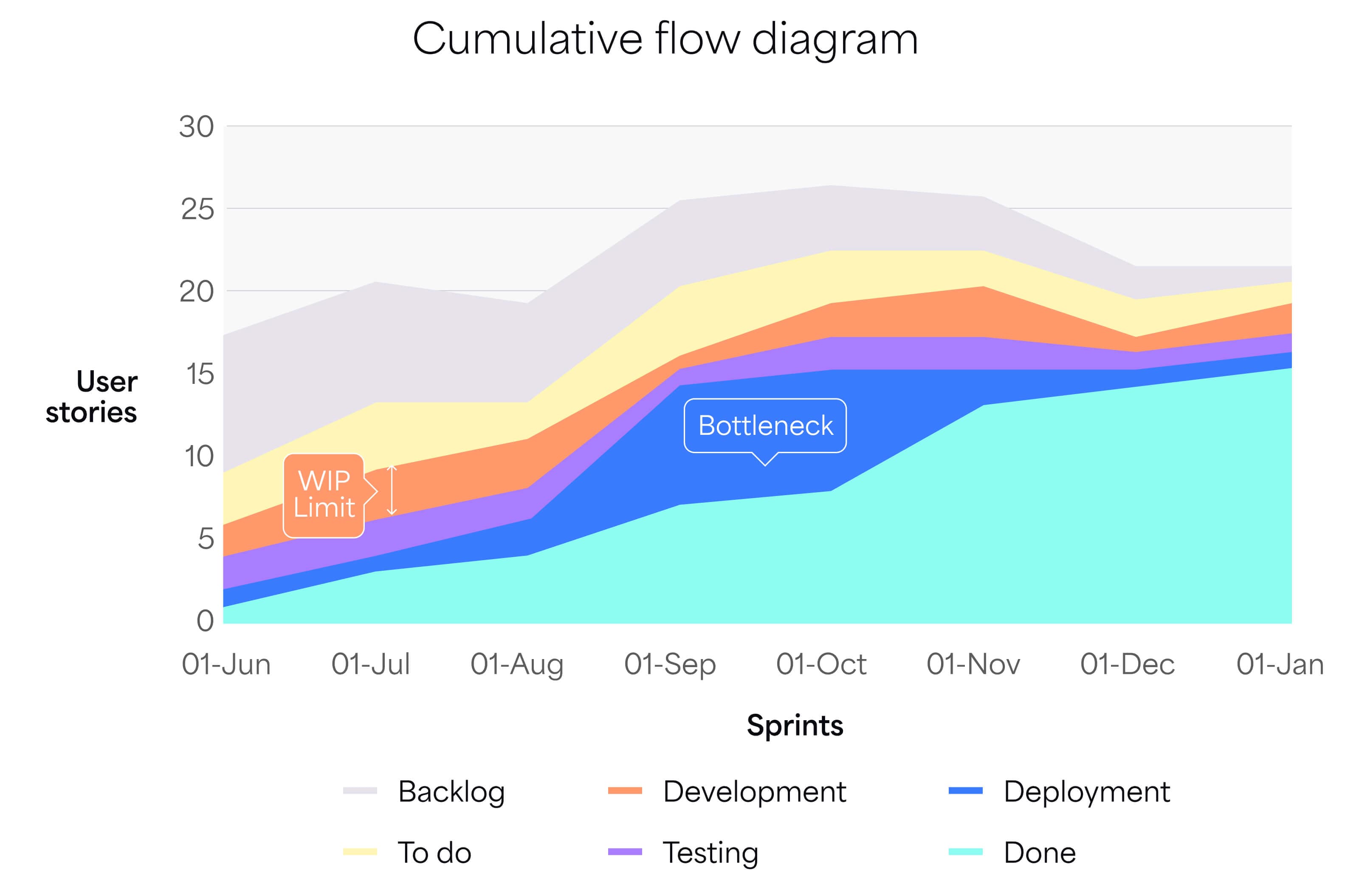
A Cumulative Flow Diagram
Cumulative flow offers several benefits that improve project management and team dynamics:
- Identifies bottlenecks: It visualizes where tasks pile up, helping teams quickly address issues and maintain workflow.
- Improves process transparency: The chart gives everyone a clear view of project progress and workload, enhancing communication and coordination.
- Facilitates better forecasting: Tracking task movement helps project managers predict performance and set realistic timelines.
- Enhances workflow balance: Cumulative flow shows how work is distributed, enabling teams to adjust assignments and optimize productivity.
How to measure the cumulative flow
There’s no formula for this KPI — you create a Cumulative Flow Diagram (CFD) and analyze the findings. Here’s how in four steps:
- Identify workflow stages: e.g., To Do, In Progress, Testing, Done.
- Collect data: Record the number of tasks in each stage at regular intervals.
- Plot the data: Use an area chart to plot each stage over time, with the vertical axis representing the cumulative task count.
- Analyze the chart: Look for widening layers (bottlenecks) and consistent thickness (balanced flow).
If your organization uses Jira Software, you can automate some of this. Go to your Jira project, click “Reports,” and select “Cumulative Flow Diagram.” Customize the report with date ranges and filters as needed.
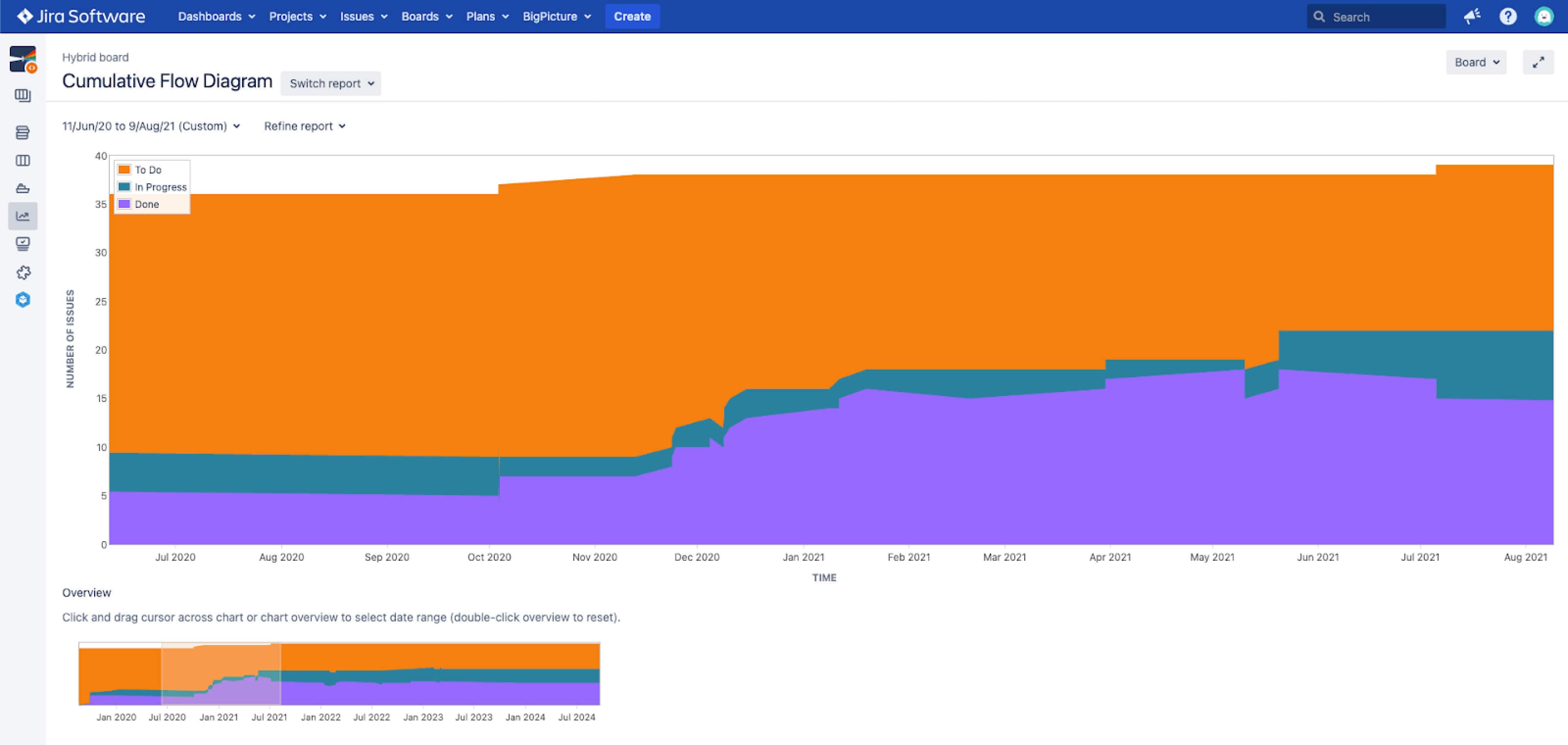
An example of a Cumulative Flow Diagram in Jira Software.
5. Lead time
Lead time measures the average time from task creation to delivery. It tracks the total time from when your team commits to a user story or project to when it's delivered.
Lead time is crucial in manufacturing and software development — shorter lead times mean faster delivery, increasing customer satisfaction and freeing up teams for other projects.
But lead time isn’t just about the start and finish — it’s about analyzing the delivery process to find optimization opportunities.
How to calculate lead time
The formula is simple:
Lead time = [Delivery date] – [Request date]
For example, if a feature was requested on January 1 and delivered on January 15, the lead time would be 14 days.
Reporting apps can calculate lead time automatically and track changes over time. With Dashboard Hub Pro’s lead time widget, you can easily track lead time on your Agile dashboard and identify workflow bottlenecks.
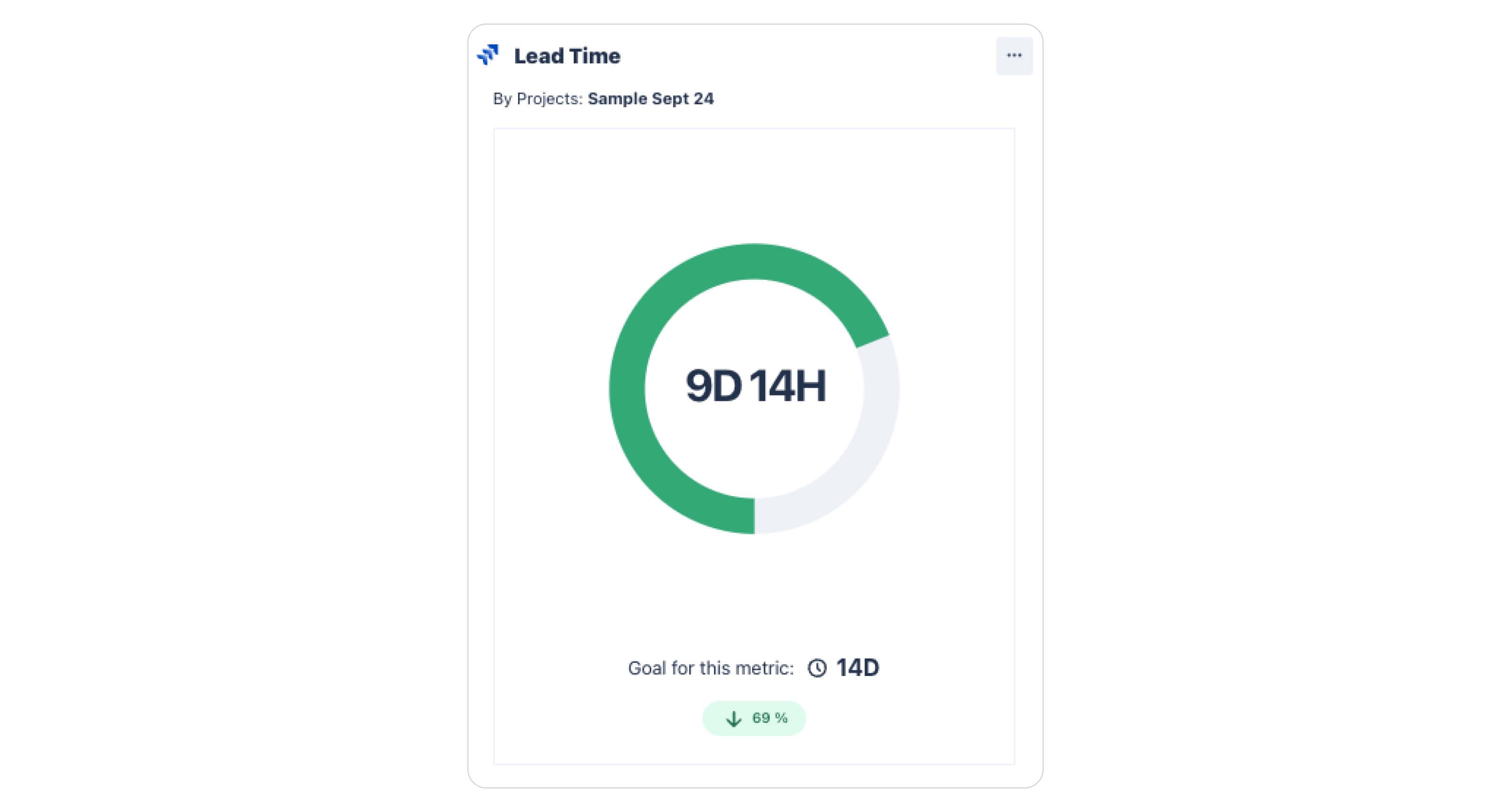
An example of lead time in Dashboard Hub Pro.
Aside from lead time, the gadget shows individual stats per assignee, goal comparisons, and more. It’s not just a number — it provides context and additional data for deeper analysis.
6. Cycle time
Cycle time measures the average time it takes to complete a work item, from start to delivery. By tracking it, teams can see how quickly they’re completing tasks and user stories.
How to calculate cycle time
Cycle time = [Net production time] / [Number of units produced]
- Net production time: The actual time spent working, minus idle time or delays.
- Number of units produced: The total number of items completed in the given time frame.
For example, if a process produces 1,000 widgets in 40 hours:
Cycle time = 40 hours / 1,000 widgets = 0.04 hours per widget (around 2.4 minutes)
Track cycle time with Dashboard Hub Pro for epics, projects, or individuals. You can also report cycle time on JQL queries and compare it to a goal to ensure you’re improving.
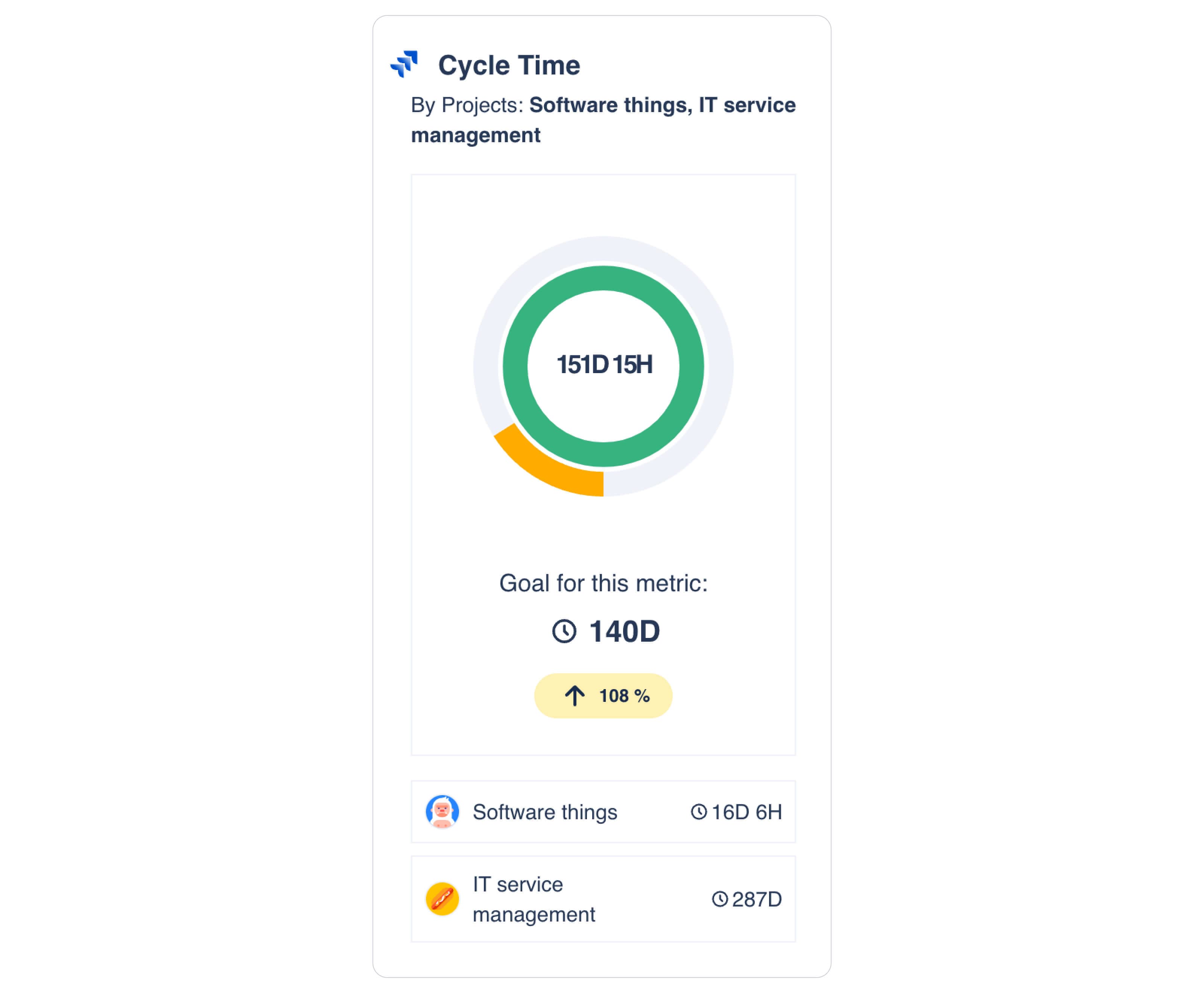
Dashboard Hub Pro’s Cycle Time widget. It shows the metric in the context of a goal and a list of relevant projects.
7. Flow efficiency
Flow efficiency measures the percentage of time work items spend in active work states versus waiting states. Often, work-in-progress signals inefficiencies, leading to increased waiting times between tasks.
Flow efficiency metrics identify low-efficiency periods, allowing teams to address the causes and streamline processes.
How to measure flow efficiency
Flow efficiency (%) = [Total active time / Total lead time] x 100
For example, if a team spends 20 hours actively working on a task, and the total lead time is 30 hours:
Flow efficiency (%) = (20 / 30) x 100 = 66.67%
8. Wasted effort metric
Wasted effort measures the percentage of time or effort spent on activities that add little or no value, such as rework, defects, or over-engineering.
If feature prioritization is a challenge, tracking wasted effort can help by highlighting areas to focus on for greater efficiency and customer satisfaction.
How to measure wasted effort
Wasted effort = [Total wasted time] / Total productive time] x 100
For example, if a project has 100 hours of wasted time and 500 hours of productive time:
Wasted effort = (100 / 500) x 100 = 20%
In this case, 20% of the project’s time was spent on non-value-adding activities.
Value stream mapping can also help identify and visualize wasted efforts in your workflow.
9. Interruptions time
Interruptions are unplanned events that divert attention from work tasks.
A study of four Agile software development teams found an average of 9.5 interruptions per day, each lasting around 8.4 minutes.
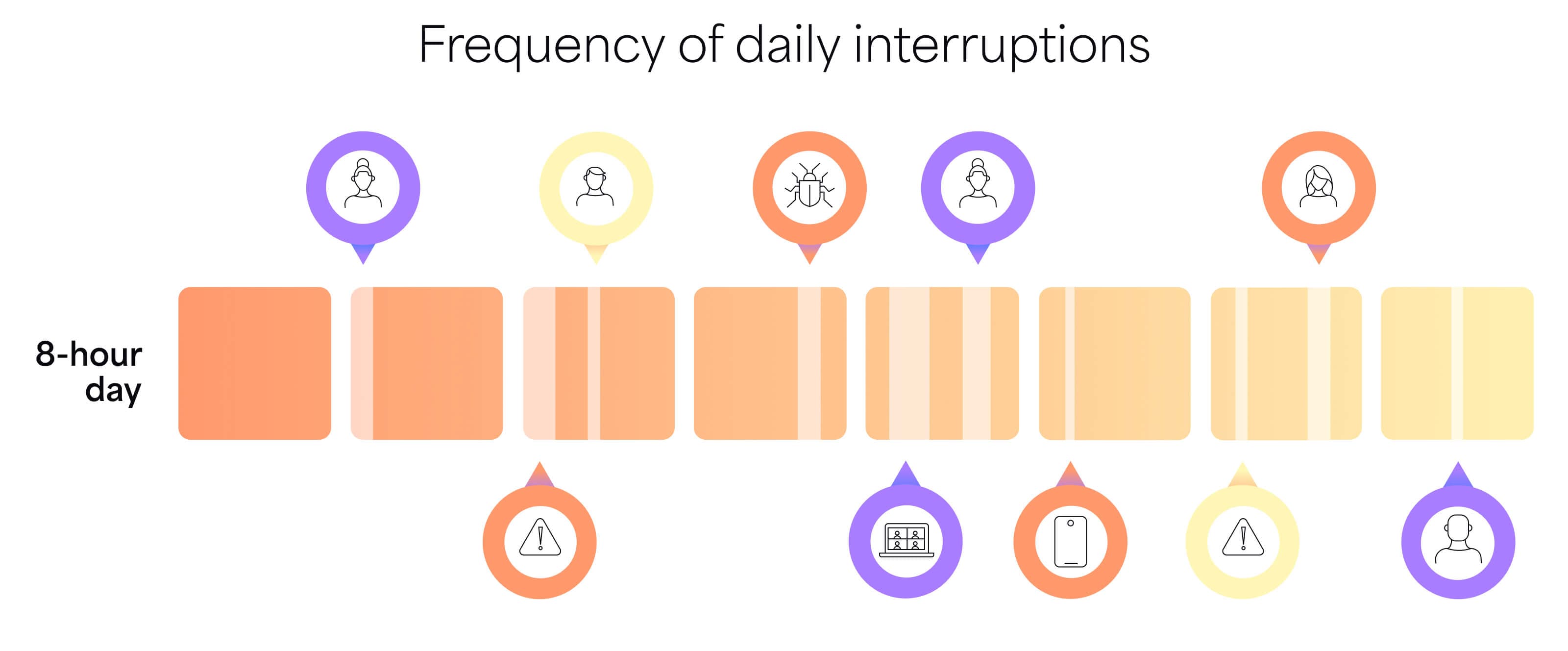
A visualization of the interruptions throughout a developer’s work day.
Interruptions can be grouped into three categories, each impacting work differently:
- Developer’s team productivity: Impromptu meetings, priority shifts, or technical glitches that affect the team's efficiency.
- Software performance: Crashes, performance bottlenecks, or compatibility issues that disrupt development.
- Defects and usability: Bugs or critical functionality issues that require immediate fixes.
These can all be accounted for as interruptions.
How to measure interruptions
Interruption impact = [Interruption frequency] × [Interruption duration] / Total work time
For example, if your team has 3 interruptions a day, each lasting 15 minutes, and your total work time is 8 hours (480 minutes):
Interruption impact = (3x15) / 480 = 11.25%
In this case, interruptions account for 11.25% of the workday.
10. Code coverage
Code coverage helps development teams assess code quality by measuring the percentage of source code executed by automated tests. It acts as a quality assurance tool, reducing the risk of bugs and allowing teams to focus on more important tasks.
How to measure code coverage
Code coverage = [Lines of code tested] / [Total number of lines of code] x 100
For example, if you have 100 lines of code and 80 are covered by tests:
(80 / 100) x 100 = 80% code coverage
While 100% coverage isn’t necessary, higher coverage means fewer bugs to handle.
11. Code stability
Stable code implies minimal changes, helping maintain product longevity and reducing technical debt — the cost of shortcuts taken during development. It also reflects how easily your source code can be modified or updated to meet changing requirements.
How to measure code stability
Though tricky to measure, one method is using the Maintainability Index, which considers factors like code complexity and duplication. The higher the index, the more stable and maintainable the code.
Example: If your Maintainability Index consistently scores above 80 (on a scale of 0 to 100), it’s a sign of a highly stable codebase, making modifications easier for your team.
12. Code simplicity
Code simplicity measures how intricate or complex the source code is. Fewer independent paths in the codebase mean greater simplicity.
How to calculate code simplicity
The most straightforward method is cyclomatic complexity, calculated with the formula:
M = E – N + 2P
Where:
- M is cyclomatic complexity.
- E is the number of edges in the control flow graph.
- N is the number of nodes in the control flow graph.
- P is the number of connected components.
In addition to quantitative metrics like cyclomatic complexity, manual code reviews can assess simplicity based on factors like naming conventions, structure, and readability.
Simpler code is easier to understand, test, and maintain, saving time and money.
13. Code churn
Code churn measures the percentage of code that undergoes significant changes, such as rewrites, updates, or deletions, within a time period. It can also indicate code stability and quality.
Common metrics include rework percentage (code modifications after initial creation) and defect percentage (code changes due to bugs).
How to measure code churn
Code Churn = (Lines added) + (Lines modified) + (Lines deleted) in [Time period]
For example, if in one week you add 200 lines, modify 150, and delete 100, your code churn would be:
Code Churn = 200 + 150 + 100 = 450 lines of code in 1 week
Stay on top of your KPIs with Dashboard Hub Pro
While Jira offers 20+ report types, you might need more. Many software KPIs aren’t available in Jira. Looking for a way to expand Atlassian’s reporting capabilities? Dashboard Hub Pro has you covered.
Our reporting app enables you to track over 100 metrics using Jira data. Plus, you can create and track your own metrics. Group KPIs into custom charts or use our ready-made templates, like the sample Agile dashboard.
With 15+ integrations, including Confluence, BigPicture, and Comala Document Management, your data flows quickly and reliably.
Once your dashboards are ready, share them with stakeholders in seconds. Advanced permissions ensure that only authorized users can access reports.
Try the app free for 30 days and see how it enhances your reporting.
Try Dashboard Hub Pro for free