

Your stakeholders rely on you to nail down accurate estimates for resources, budget, and timeline before launching a software project. Miss the mark on timing, and you'll face complaints about delays. Overshoot the budget, and your project might come to a halt. Accurate forecasting is essential to keep everything on track and your stakeholders confident.
Traditionally, forecasting aims to eliminate uncertainty in software development. However, complete elimination of uncertainty is impossible. Even with a perfect development workflow, external factors like sudden market shifts and supply chain issues can cause delays and deficits.
The key to software forecasting is to prepare for uncertainty, not eliminate it. By collecting historical data on your team’s performance, you can make accurate forecasts for future projects, aiding decision-making on resources, budget, and timeline. Minimizing risk involves accounting for variables you might otherwise miss. This guide will cover a step-by-step process for using data to create precise and dependable software forecasts.
What are software forecasts?
Software forecasting involves making data-driven predictions about the three most crucial variables in software development: resources, timeline, and budget.
Let’s break down these three variables:
- Resources: These are the assets needed for a development project to succeed. They include intellectual labor, development tools, and the raw data necessary for creating new software.
- Timeline: This is your project schedule, calculated in billable hours and often broken down into tasks, phases, and iterations.
- Budget: This is an advanced estimation of the funds required to complete the software project. It’s influenced by the resources and timeline needed for the entire project.
Accurate data is essential for making reliable software forecasts. Without it, your estimates can be as random and arbitrary as a guess.
Software forecasts: a step-by-step guide
How do you turn all that data into an accurate software forecast? Follow this seven-step process:
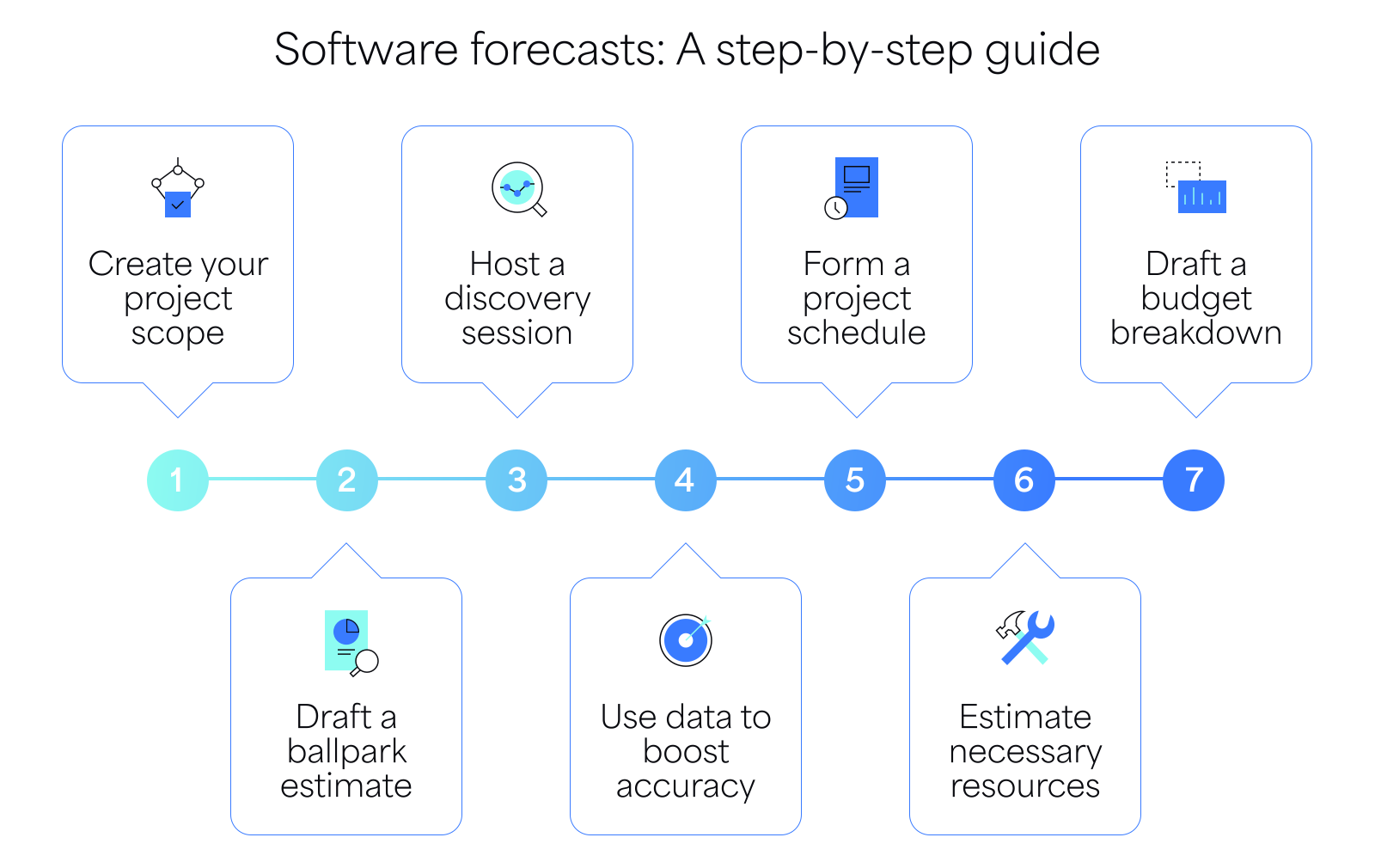
Step 1: Create your project scope
The project scope is a brief outline created as part of the project management process. It documents your project goals, tasks, and deliverables.
Start by creating a simple ranking system to categorize projects by complexity:“obvious,” “complicated,” “complex,” or “chaotic.” Then, break down the project into smaller components such as tasks, phases, and iterations.
- Tasks: Single features to develop or bugs to fix.
- Phases: Groups of tasks, such as “design” and “troubleshooting.”
- Iterations: Different versions that your software solution will be rolled out in.
Breaking down your project into smaller chunks helps forecast the resources needed for each development stage.
Step 2: Draft a ballpark estimate
A ballpark estimate is an initial forecast based on past experience and informed guesswork. It doesn’t have to be precise but should provide a basic framework for your actual forecast.
Using the project scope you prepared, make a rough forecast aiming for about 25% accuracy. This estimate helps decision-makers assess the project’s feasibility and allocate initial resources.
Create your ballpark estimate using a simple spreadsheet. Key metrics to include:
- Project complexity
- Start date
- End date
- Estimated hours
- Workforce required
- Project cost
Step 3: Host a discovery session
The discovery session is a key meeting where your development team and project stakeholders discuss the project’s goals, requirements, and potential bottlenecks. This is your chance to get detailed about project stages, develop a proper roadmap, and address any functional challenges.
During the discovery phase, analyze the project scope with your team and ask for their estimates on the time and resources needed for each task, phase, and iteration. Your quality assurance team, for example, knows best how long it will take to test for bugs, so approach the people responsible for each task and gather their input.
Discovery sessions can be challenging to organize. Without a systematic approach, they can become chaotic. Here are some gamified techniques to streamline the process:
Planning Poker: This is a common technique in agile projects. The session host reads a project task aloud, and participants guess the effort needed using number cards. The turn continues until a consensus is reached, then the host moves on to a new task.
T-Shirt Sizing: Participants assign a t-shirt size to each task, from Extra Small to XXL, representing anything from work hours to project complexity. Unlike planning poker, t-shirt sizing uses relative estimation, which is useful for more complex ideas.
Bucket System: When there are too many tasks, the bucket system can supplement planning poker. Teams assign each task to a numbered bucket instead of using poker cards. This method is faster because the host doesn’t have to go over each item individually.
Step 4: Use data to boost accuracy
Even with a productive discovery session, you're still relying on educated guesses and personal opinions. But for a forecast that really hits the mark with your client, you've got to go beyond guesswork and use historical data.
By relying on analytical data collected from your team’s performance on past projects, you can make more intelligent predictions on how long it would take to complete a new functionality, phase, or iteration. The right time-tracking software can help you gather data on development projects in real time.
For comprehensive and accurate data, use 7pace Timetracker for Azure DevOps. It's integrated with Azure DevOps, allowing your team to seamlessly record and manage their time. With its advanced reporting capabilities, managers can gather long-term data and gain insights that support accurate forecasting.
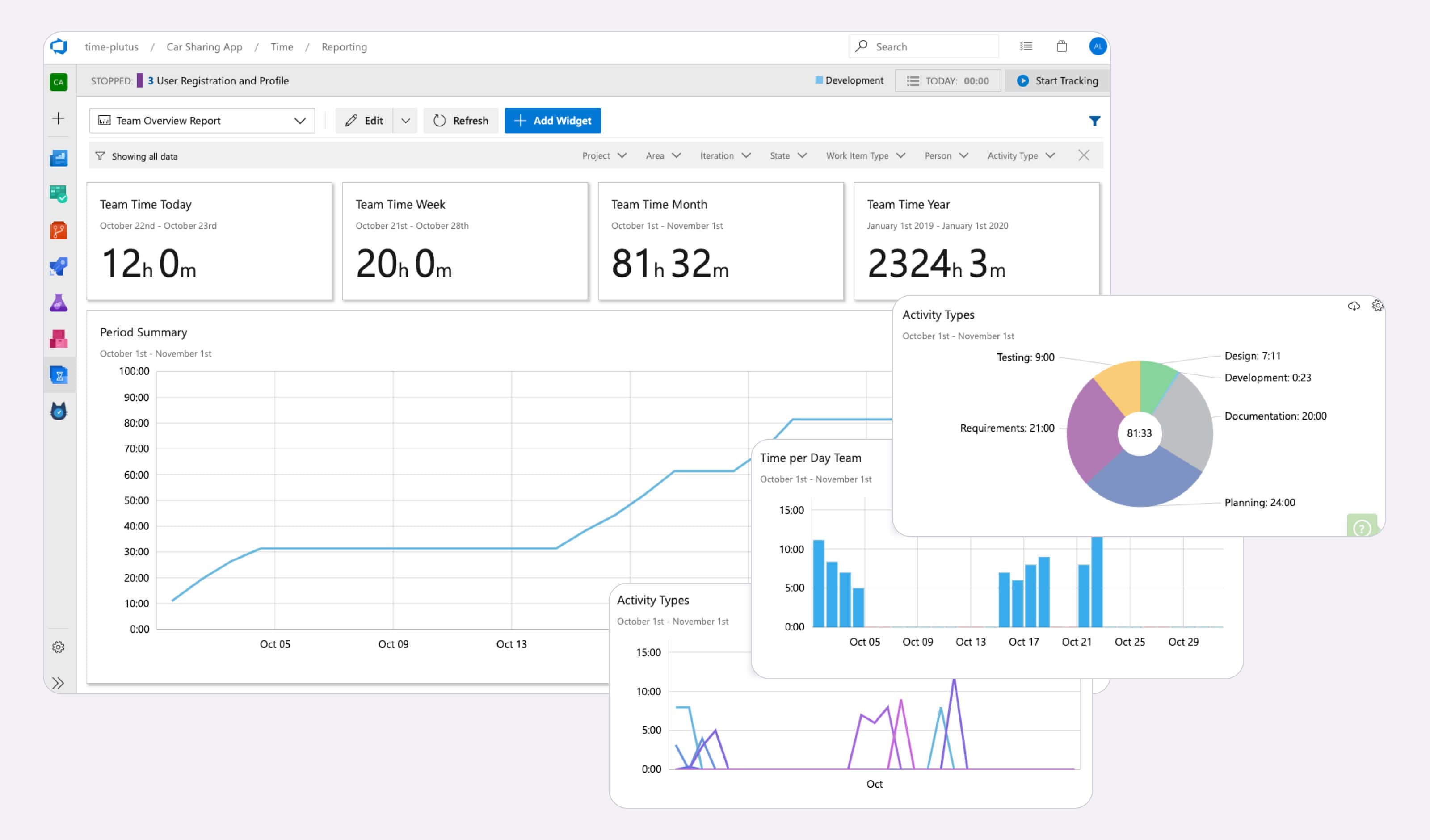
Tracking your team’s working hours and performance data within your development environment is a powerful advantage. 7pace Timetracker also uses a metric called Pace to show how your estimates compare to the actual time taken to complete a project.
Step 5: Form a project schedule
A project schedule keeps your team on track with deadlines and clarifies individual responsibilities. You can create it using text documents or dedicated project management software like monday.com or Jira.
To draft your project schedule:
- Identify the strategic dependencies for each task based on the project scope
- Assign roles to clarify each team member's responsibilities
- Compare feedback from your discovery session with historical data from your time tracker to set realistic deadlines
- Add a 20-25% risk buffer to your deadlines to account for potential delays
This approach ensures your team stays organized and prepared for any challenges.
Step 6: Estimate necessary resources
Resource forecasting involves evaluating the demand and availability of resources needed to complete a project.
The most vital resource for any software agency is your team of developers. A large portion of software projects revolves around managing your workforce and allocating developers to various tasks. Resources also include secondary elements like your software stack and data sources.
In software development, the best way to estimate resources is to use employee-level techniques. Since each team member has a unique workflow and requirements, asking them directly is the most effective method. This is why the discovery process is so important.
Step 7: Develop a budget breakdown
According to McKinsey Digital, 66% of software projects suffer from cost overruns. Common causes include:
- Inaccurate project estimates: Underestimating the project’s scope and complexity or overestimating the team’s efficiency can lead to unrealistic expectations and commitments, causing a cascade of problems.
- Scope creep: Increased work, time, and resources due to scope changes introduce new risks and complexities, potentially reducing deliverable quality and leading to stakeholder dissatisfaction.
- Poor risk management: Overlooking risks that cause delays or require additional resources to fix can rack up significant costs.
- Hidden costs and performance failures: Low-quality code, inadequate testing, or lack of proper documentation, training, or support can increase costs. Legal, ethical, or regulatory issues can also contribute.
To avoid these issues, define your project scope clearly and translate each dependency into specific costs.
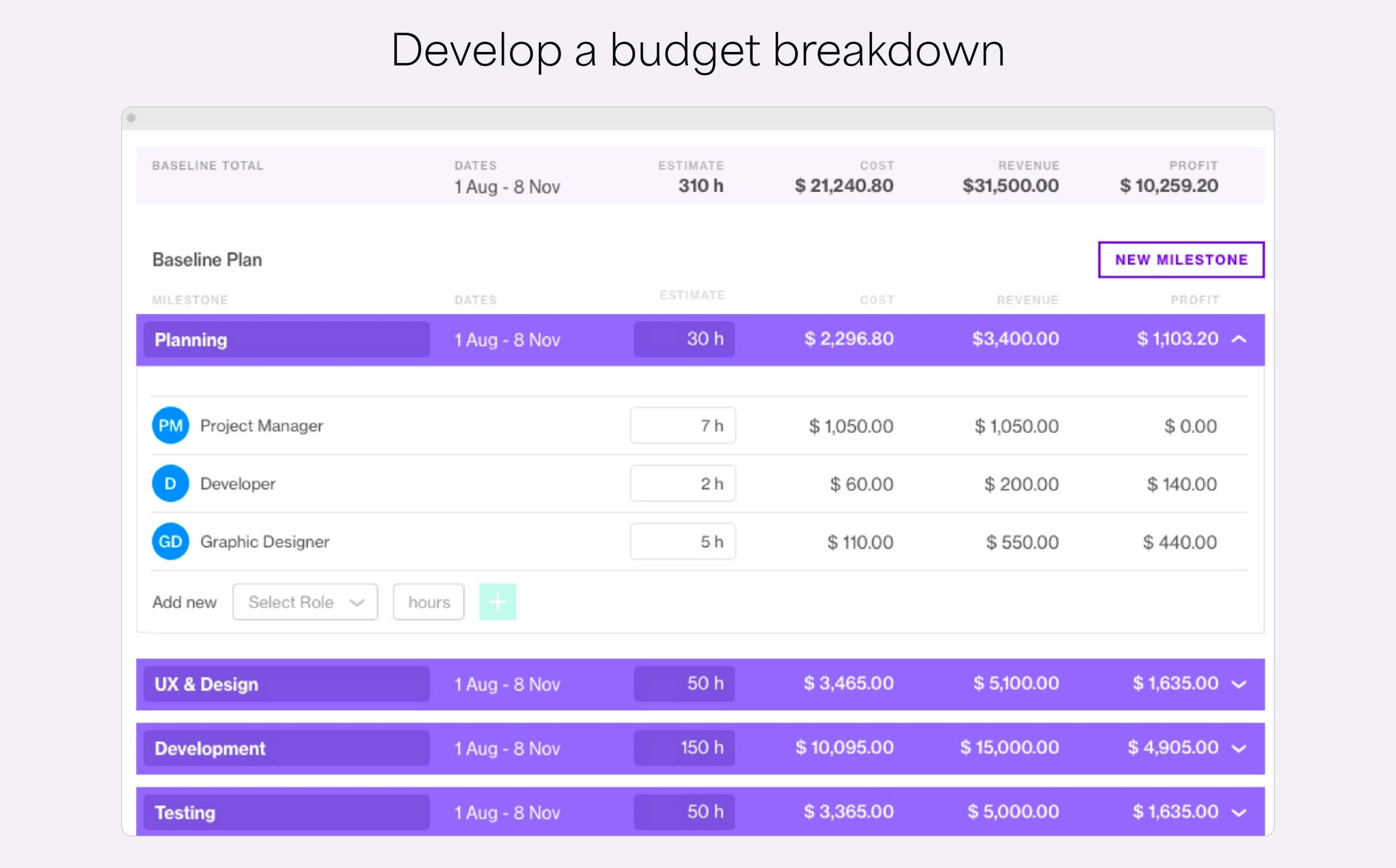
Create a detailed budget breakdown to allocate funds within your project. Some things you might want to include are:
- Labor expenses
- Software subscriptions
- Infrastructure spends
- Overhead costs
- Profit goals
Add a risk buffer to your budget to account for unexpected expenses. Some agencies even create multiple budgets for optimistic, realistic, and worst-case scenarios.
Why historical data matters in software development
Data analytics extends beyond software forecasting. It provides a foundation for for business planning and project management decisions. Here's how historical data can empower your software agency:
- Gauge project complexity and anticipate bottlenecks: Historical data assists in making smarter decisions about taking on new projects by understanding potential challenges beforehand.
- Manage risks: Focus resources on tasks that are likely to be challenging, ensuring effective risk management.
- Optimize resource allocation: Free up resources from less challenging tasks, reducing costs and improving profitability.
- Manage client expectations: With a clear understanding of your resources, you’re less likely to overpromise and underdeliver, ensuring quality project deliverables.
Historical data transforms how your development agency operates, making it a powerful tool for smarter decision-making and improved project outcomes.
Create data-based software forecasts with 7pace Timetracker
With 7pace Timetracker, you can use historical data to create accurate software forecasts. The app allows your team to break down time spent on various development activities, such as coding, design, and QA. Knowing how much time tasks typically take at the team level helps you make informed predictions instead of relying on guesswork.
The 7pace Budgets page makes it easy to assign specific work to a budget, serving as a reference for future budget forecasts. It also simplifies tracking billable and non-billable work.
7pace Timetracker is also ideal for everyday time-tracking activities. Developers can quickly record and log time directly in their work items, manage their time data over longer periods, and visualize their progress to boost productivity.
Managers can use the team's time data to generate reports and gain insights into project progress, all within Azure DevOps.
Want to see it in action? Try the 7pace for Azure DevOps today!