
Choosing the right billing model for your software development team can make or break your business. The wrong approach can leave you struggling to cover costs or make your prices too high to stay competitive.
Here’s what you need to know about different software development billing models, their pros and cons, and how to choose the right one for your business.
Plus, learn the key practice that will set you up for success — no matter which model you choose!
What is a software development billing model?
A software development billing model determines how you charge clients for a project. It can significantly impact project profitability, cash flow, and your company’s financial health.
But which pricing model is right for you?
The answer depends on several factors:
- Project approach
- Development environment
- Team size
- Software features
- Project complexity
- Risk control
- Timeline
- Client involvement
We’ll explore five different models and explain what makes each one effective in different scenarios.
5 most common types of software development billing models
Here are the five most common types of billing models and their pros and cons for custom software development projects.
1. Time & Materials (T&M)
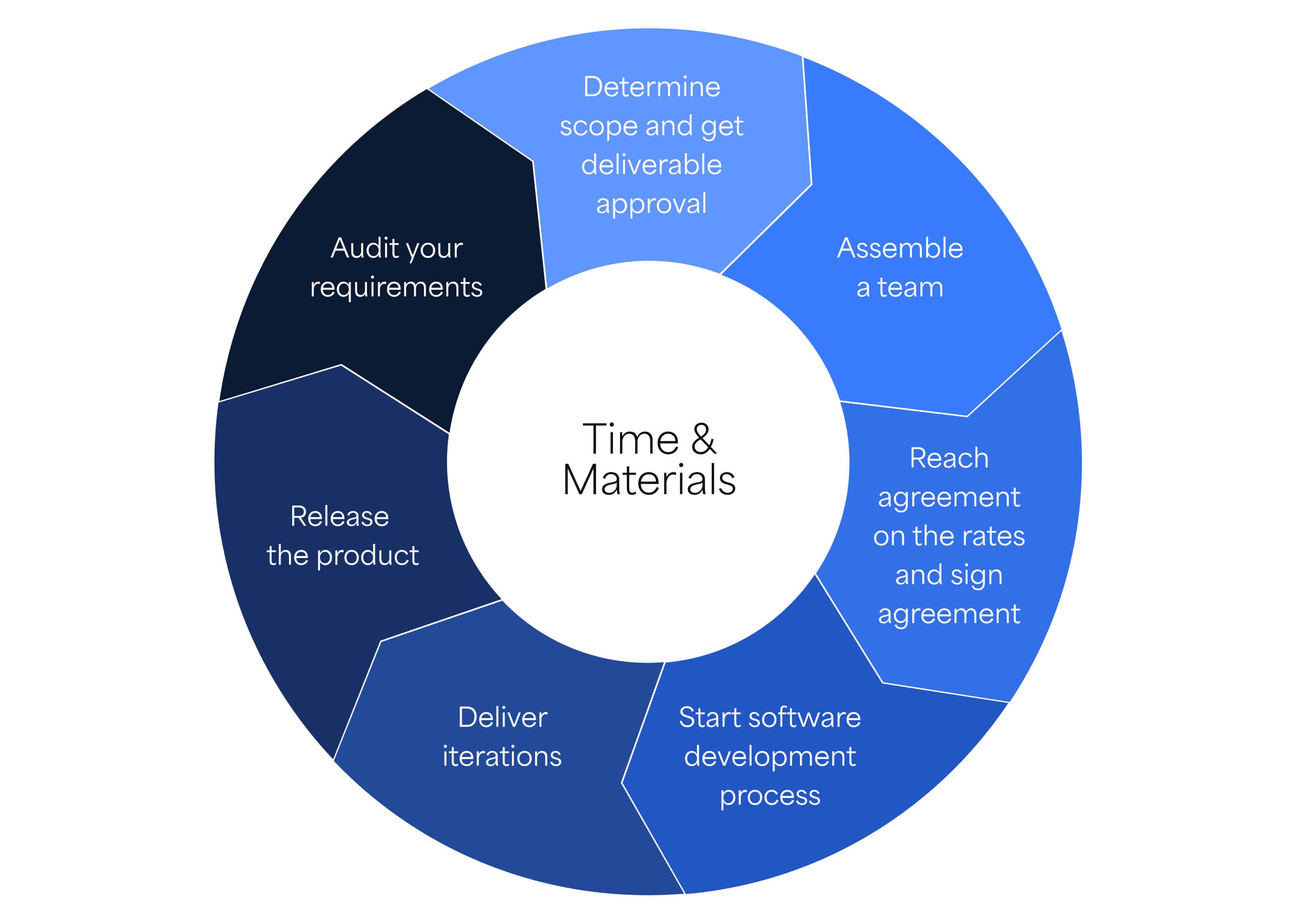
In a T&M model, you charge clients for hours worked and the cost of materials used. While flexible, T&M can be difficult to estimate and budget.
Benefits of a time and materials pricing model
There are a lot of benefits to choosing T&M:
- Flexibility: You have nearly unlimited flexibility to change, adjust, and adapt scope and price as needed.
- Speed: You can get started quickly without a full scope.
- Simplicity: T&M is easy to understand and common in the industry.
Challenges of a Time and Materials pricing model
The biggest challenge with T&M billing is that it’s a big question mark for all involved.
- Uncertainty: Costs can vary widely, making accurate estimates challenging.
- Inconsistent billing: Not all hours may be billable due to meetings or other tasks.
When to use T&M billing
How do you know if a Time and Materials contract is right for your team or for project?
Look for these signs:
- Short timeline to get started that won’t allow for full scope and price to be determined,
- No clear “definition of done” that would enable you to scope/price entirely,
- Fluid requirements that might involve a changing cast of stakeholders,
- Indefinite project length with no strict deadlines,
- Ongoing projects (like maintenance).
When to avoid T&M billing
The most notable case where T&M is not viable is a project with a fixed budget. Because the hallmark of a T&M project is variable pricing, it’s almost impossible to land at a precise development cost.
And consider the length of the development project. For long-term projects, costs may increase over time, reducing profits if billing rates stay the same. You can mitigate this by setting milestones for rate negotiations or using a graduated rate table.
How to implement T&M billing
Implementing T&M is pretty straightforward. Usually, you’ll start with the “M.” What are the materials or other costs associated with the software project before factoring in the actual dev time? This could be anything from startup costs to software licensing.
Next, you simply need to determine a reasonable hourly rate schedule for all of the time that’ll be billed to the client. This can either be a single, fixed rate for all hours. Or it can be broken down by specialty or role.
For example:
- Senior developers: $300/hour
- Developers: $235/hour
- Project managers: $250/hour
Finally, you need to be able to accurately track and bill time. Time tracking for developers is a notoriously touchy subject. And having arduous timesheet systems will eat into your team’s billable hours. Fortunately, apps like 7pace Timetracker for Azure DevOps can make it easier for your team members to log their hours.
With 7pace Timetracker’s deep integration with Azure DevOps, team members can add an entry in the work item in just a few seconds. And choosing whether the time is billable or not takes one click.
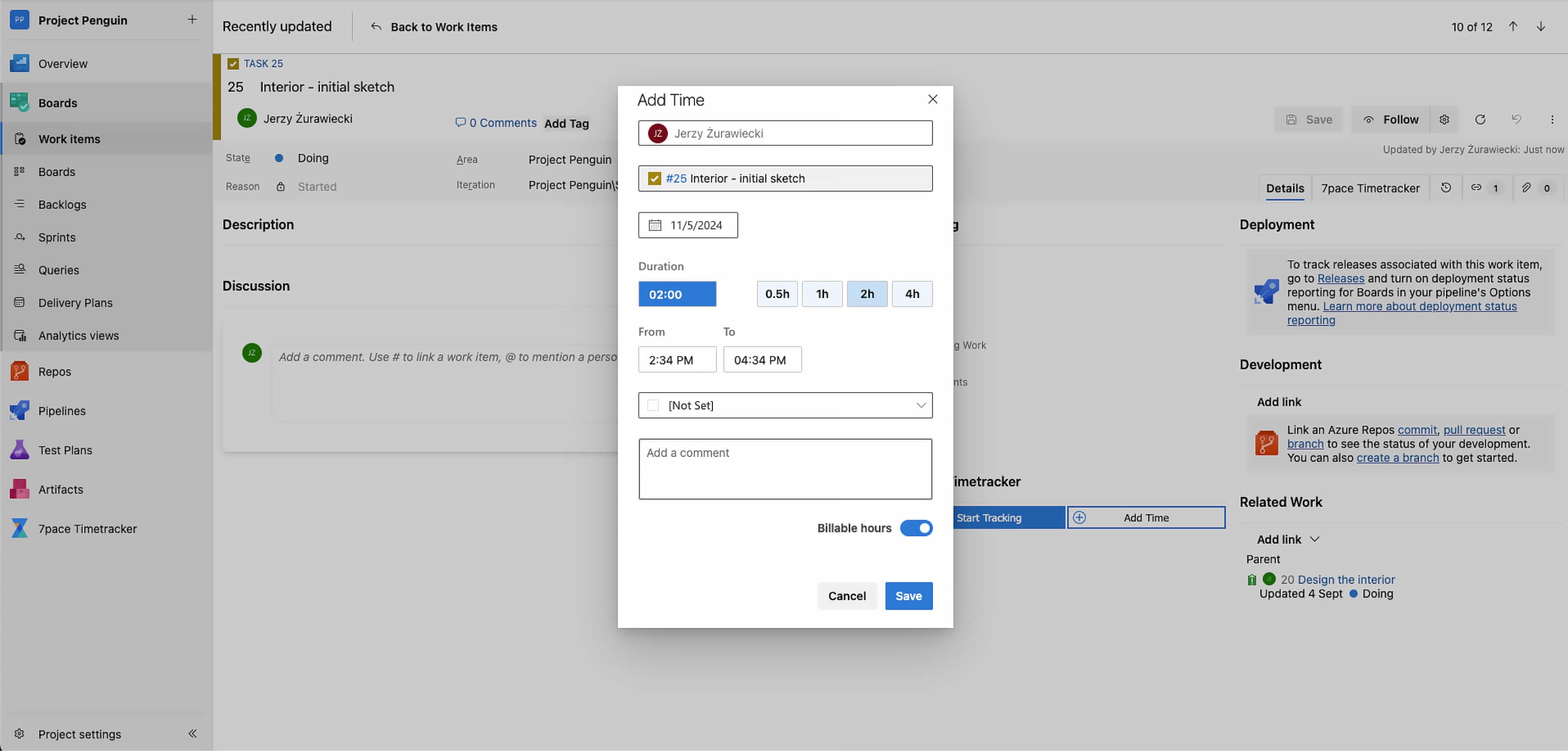
Managers can assign work to budgets to categorize the completed work. Knowing exactly what work falls into a given budget helps with billing and can serve as a reference point for future projects.
2. Fixed price model
A fixed price model commits to a final cost upfront, covering agreed deliverables. While predictable, it can introduce risk if surprises arise.
Benefits of a fixed price billing model
- Budget predictability: Clients know the cost from the start.
- Cashflow: Payments often include deposits and milestone releases.
- Transparency: In theory, a fixed price project provides the ultimate level of transparency for both sides. There’s a specific product you’ll deliver for the agreed-upon price.
But this is also the tricky thing about fixed price billing.
Challenges of a fixed price billing model
Fixed price billing requires two things:
- Price
- Scope
Anyone in software development knows that — no matter what the textbooks say — these are the most challenging things to pin down. Surprises can crop up throughout a project that can disrupt even the best-laid plans.
In fact, McKinsey found that 66% of enterprise software projects have cost overruns.
That could spell trouble for your business if development costs balloon, but the contract requires that you deliver at the original budget amount.
This means you need a rock-solid system for estimating costs and a contract that clearly stipulates what kind of exceptions or mitigating circumstances would no longer fall within the original agreement.
When to use a fixed price billing model
This pricing strategy works best for projects with a fixed or limited budget, where no contingency is possible. It’s ideal for small projects like MVPs or prototypes, or those with a detailed scope, clear change requests, and defined workflows for new features.
When to avoid fixed price billing
Fixed price projects carry significant risk for software providers, so it’s best to avoid them unless they meet specific criteria.
Just to reiterate the challenges involved:
- Extensive time spent upfront scoping, pricing, and validating the software forecast.
- The need to finalize scope and specs before development.
- Project management must fully understand and communicate all risks.
- Unclear requirements or poor communication can lead to unmet expectations or budget overruns.
- Setting a release date amplifies these risks, leaving little margin for error.
How to implement fixed price billing
Entering a fixed price contract is more involved than an hourly agreement, often requiring weeks or months of due diligence.
First, define the software scope with a detailed breakdown and success parameters for each feature. Then, translate these specifications into a work estimate (hours, story points, etc.).
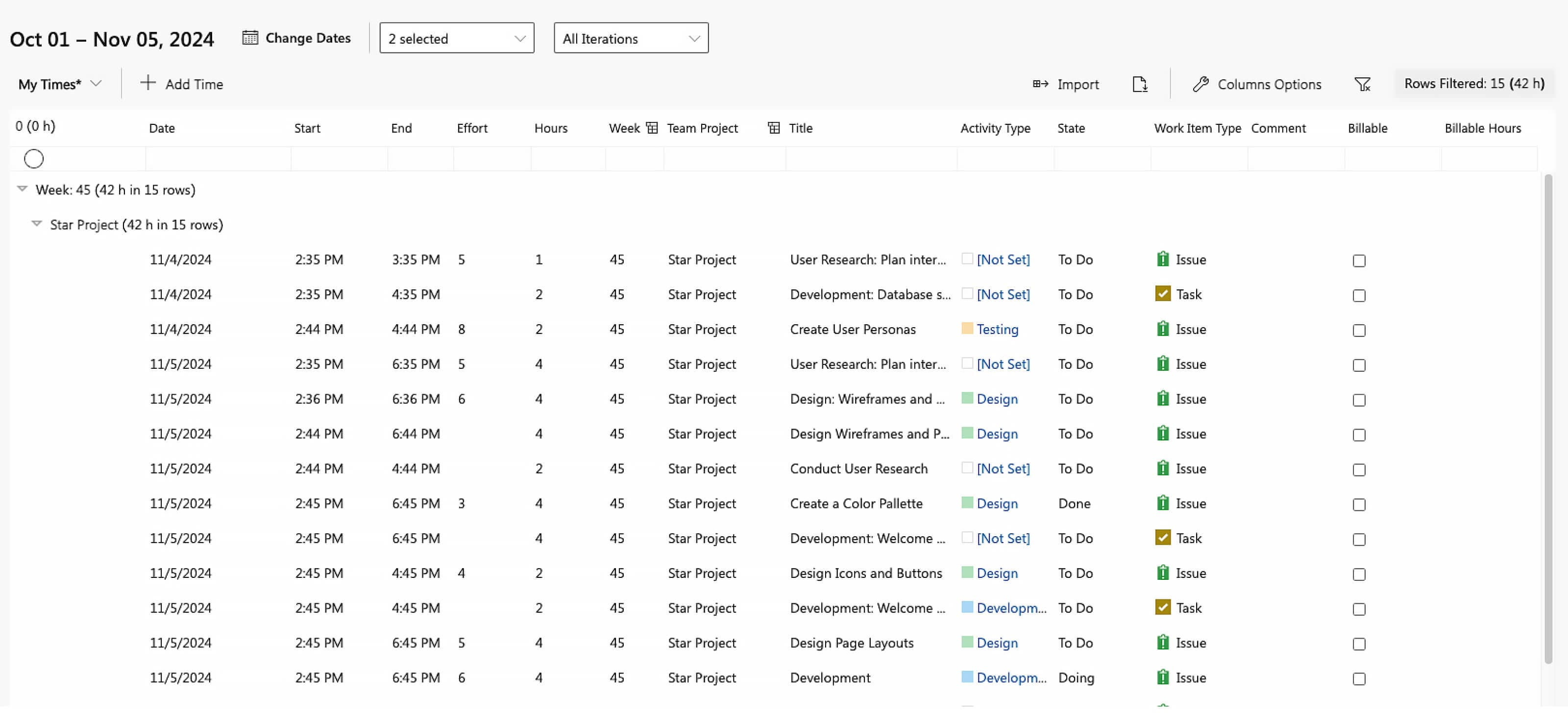
Accurate time tracking is crucial for estimating costs. With 7pace Timetracker, you can access detailed time data even months after a project is complete. Use the Times Explorer view to filter and export data to Excel with a single click.
3. Milestone model
Milestone billing divides the project into phases, with payments tied to deliverables. This approach reduces risk by breaking the project into manageable chunks.
Benefits of a milestone billing model
- Risk reduction: Smaller deliverables lower the chance of scope creep.
- Alignment with Agile: Works well with Agile development cycles.
Challenges of a milestone billing model
Is there anything not to love about milestones?
- Payment delays: Milestones need to be accepted before payment, potentially causing cash flow issues. But this can be overcome with clear acceptance criteria spelled out in the contract.
When to use a milestone billing model
This pricing model works best with trusted clients, but nearly any large project can be broken into short-term milestones.
How to implement milestone billing
Milestone billing blends fixed price and T&M models. Start by breaking the project into milestones, then scope and price each one individually. Ideally, each milestone is a functioning version of the product.
For functional milestones, follow the fixed price approach by defining the scope, creating a work estimate, and applying a cost estimation method.
4. Service subscription model
Also known as software development as a service, this model involves clients paying a fixed monthly fee for development services.
Benefits of a service subscription (“SDaaS”) billing model
Recurring revenue: Provides predictable income.
Simplified staffing: Easier to plan for team resources.
Long-term relationships: Another big advantage of this approach is building a long-term relationship with customers, likely working across multiple projects or products.
Challenges of an SDaaS billing model
It’s easy to think that selling software development as a subscription would solve all of your problems. But it’s worth noting there are some drawbacks, too.
- Inconsistent workloads: Customers will be inclined to “cash in” their balance if it expires at the end of the period. This means your team may experience some major swings in workload.
- Additional overhead: This approach usually requires more hands-on account management to handle requests.
- Fractional involvement: Because your team is effectively “on call,” it’s possible they’ll be plugged into projects on an ad hoc basis, jumping into problematic projects and hopping from one thing to the next.
When to use an SDaaS billing model
This pricing model works well for long-term projects, or when you work with a client on smaller maintenance tasks, especially after you have completed a large project for them.
It’s also a great option for open-ended projects without a clearly defined scope.
When to avoid an SDaaS billing model
SDaaS can create a conflict of interest in the case of fixed-timeline or fixed-budget projects.
While it’s not necessarily wrong to deploy this pricing strategy in these cases, an SDaaS model can cause problems of perverse incentives — unintended, undesirable results — that arise from applying a subscription price to a confined scope of work.
Implementing SDaaS
In this case, the scope and budget for any individual project, feature, or work item is irrelevant.
Instead, all you need to know are your costs. Add up your operating costs, including overhead and developer time or salaries. Then apply a target profit margin.
Now, divide this total sum into increments — say 10-hour blocks. Then price your SDaaS packages according to the appropriate amount of time or work included in the package.
5. Dedicated team model
In this model, clients "rent" an entire development team for a set period. The client assumes the full cost of the team, providing consistent revenue.
Benefits of a dedicated team billing model
Consistent revenue: Clients cover the team’s full salary regardless of workload.
On-demand access: Clients get a dedicated team ready to work on their needs.
Challenges of a dedicated team billing model
Financial risk: Client turnover can put a strain on finances.
Unclear division of responsibilities: Who’s responsible for project management, assigning work, and managing the overall workflow? These need to be spelled out clearly from the start to avoid any miscommunication and frustration.
When to use a dedicated team billing model
This pricing model works best when a client wants more control over the software solution, uses a specific (and uncommon) tech stack, or has dynamic requirements that require dedicated resources. You can satisfy their needs without shouldering the additional costs.
When to avoid a dedicated team billing model
Because the biggest risk for the dedicated team model is financial, it’s best to avoid this approach if you’re a smaller firm that can’t absorb the costs of additional salaries.
If you don’t have deep enough pockets to fund the team during downturns, pursuing this approach could put your entire business at risk.
How to implement dedicated team billing
In this model, individual project costs and scope don’t matter—only the costs and overhead of sourcing and hiring the right team.
To implement, add up all costs (salaries, hiring, project management, overhead, etc.), then apply a profit margin to calculate the final cost. Set clear ground rules for project management responsibilities — whether handled by your team or the customer.
How to choose the right software development billing model
There’s no one-size-fits-all answer. You may use different pricing models for different clients or projects. Consider these factors to optimize project management and financial performance:
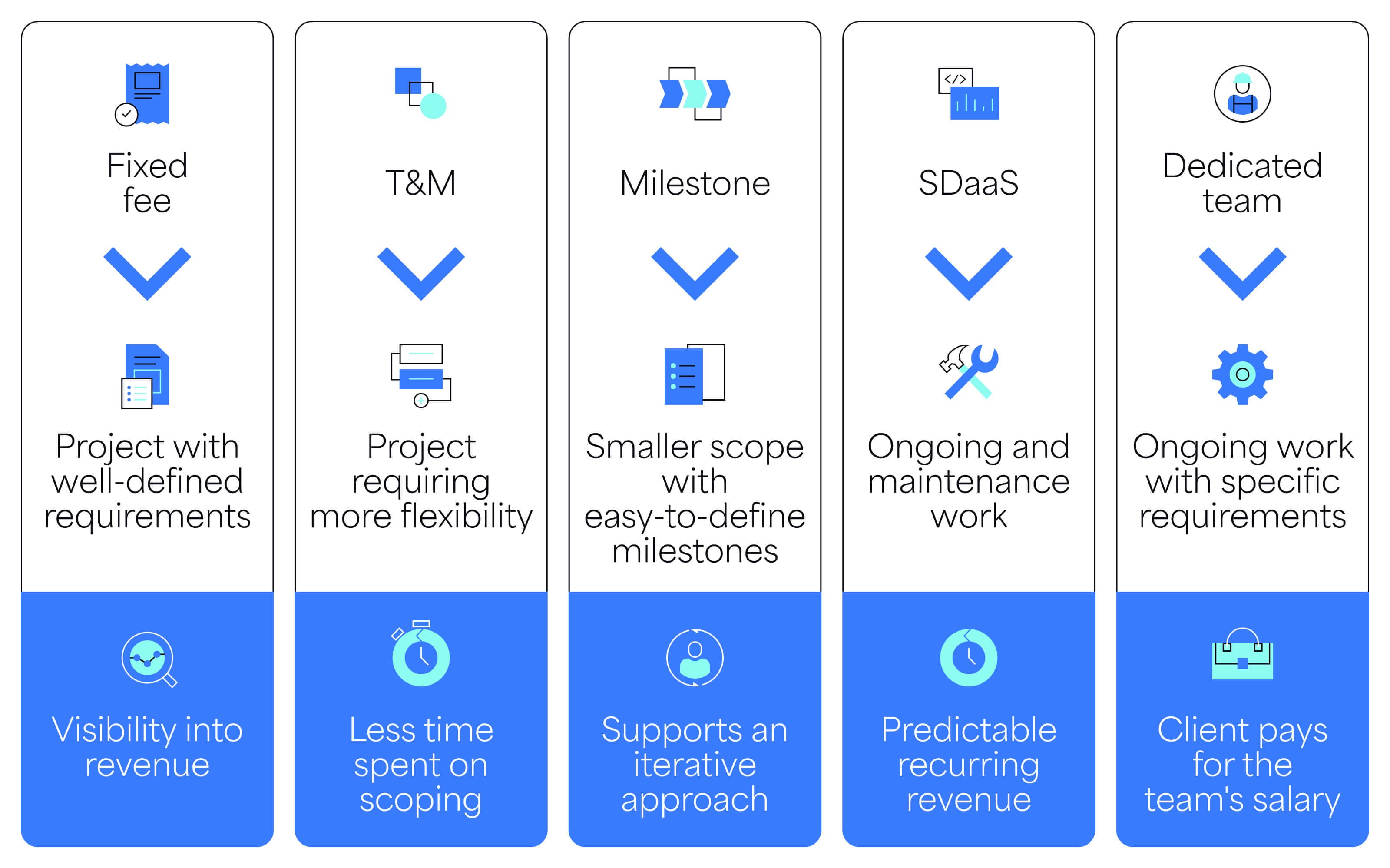
- Project size: Larger projects are better suited to Milestone or SDaaS models. T&M works well for minimizing risk.
- Scope: T&M, Milestone, SDaaS, and dedicated team models are ideal for flexible, less-defined scopes. A small, clear scope fits well with Milestone billing, especially for returning clients.
- Duration: SDaaS or dedicated team models work best for long-term, ongoing projects.
- Revenue: SDaaS and dedicated team models provide predictable income, while Fixed Price contracts offer a payment schedule.
- Billable work: T&M, SDaaS, and dedicated team models require less scoping, allowing more billable time. Fixed Price offers more visibility but requires upfront scope definition.
Summary
No matter which model you choose, accurate time tracking is key to understanding project costs and informing billing.
With 7pace Timetracker, your team can log time quickly, either through work item details or in Timesheet and Monthly views. Managers can approve timesheets, access detailed time data, and generate reports with ease.
7pace integrates seamlessly with Azure DevOps, helping your team track time without disrupting their workflow. Test it free for 28 days and see the difference.
Get started