

Every new project or task raises the question: How long will it take? As much as you’d like to provide an accurate answer, it’s often difficult to provide realistic estimates.
The bad news is that most managers hold knowledge workers accountable for taking longer than they initially estimated. Missed deadlines cause stress and can impact the delivery of other tasks or projects. So you really want your estimates to be on point.
Let’s examine why it’s so tough to come up with accurate time estimates (and what you can do about that).
Common challenges in time estimation
Task complexity
When you break tasks down in your work management software, they look straightforward. But they almost never are. Knowledge work is complex and unpredictable. Tasks often involve variables that aren’t immediately apparent.
For example, a software development project might encounter unexpected technical challenges that require troubleshooting and, consequently, take more time. Research projects can uncover information that raises additional questions, extending the project's scope and timeline. Marketing campaigns might experience delays due to miscommunication or technical difficulties.
Individual differences
Say you have two team members in the same role. One is probably more efficient than the other. Estimating work based on Team Member A when it’s actually Team Member B who will do the task won’t work.
Unfortunately, organizations often fall into this trap. You might hear a manager say, “This person needs X days to complete this task, so that’s how much time you’ll have, too.”
It’s important for both individuals and managers to understand that time estimates are non-transferrable. Everyone needs to do their own time estimating to be accurate.
Parkinson’s law
Usually, knowledge workers underestimate the time they need to complete a task. But sometimes, it’s the exact opposite. There’s a term for this: Parkinson’s Law.
Parkinson’s Law states that work expands to take up the entirety of the time you’ve set aside for it, regardless of how much time it would normally take.
For example, if you’ve scheduled an hour for a task that would normally take 30 minutes, you’ll find a way to use up that entire hour.
From a business perspective, this is a waste of time and money. The employee could have used some of this time to focus on other work, accelerating its completion.
Multitasking and interruptions
Most people juggle between tasks every day, even if they don’t mean to. You might start working on a task, but then someone messages you with a question or a problem that needs solving ASAP. An impromptu meeting pops up. Suddenly, it’s three hours later, and you’ve made no progress on the original work item. But the deadline hasn’t changed.
Distractions also slow you down in another way. It takes time to pick up where you left off and get back in the zone. One study claims it takes about 23 minutes to fully refocus after a distraction. In an 8-hour workday with many distractions, this adds up to a lot of wasted time.
Worst of all, most knowledge workers don’t account for potential distractions when estimating time. That’s why disrupting the workflow is so detrimental to efficiency.
Lack of historical data
If you’re working on a type of task for the first time, you have no point of reference. You can ask someone with experience in this type of work, but their answer might not be accurate. After all, people with experience tend to complete their work faster than newbies.
Then, there are repetitive tasks. Most people estimate them based on what they think they usually take. But having historical data at your disposal can verify those assumptions. The problem is that most knowledge workers don’t have access to accurate time stats because they lack the ability to track it in the first place.
Strategies to improve time estimation
Improving task understanding
One of the most effective ways to improve time estimation is to break larger tasks into smaller, manageable components. This breakdown simplifies estimation and provides clear milestones that can be monitored.
Defining clear objectives and expected deliverables for each sub-task helps set realistic deadlines and benchmarks.
Reducing distractions
Whether you work in an office or remotely, there are things you can do to limit distractions. Start by letting others know you’re busy by setting up “focus work” statuses in your calendar and/or Slack.
Also, turn off notifications. Not every email or direct message is important at a given moment.
If you’re the source of your own distractions, there are ways to manage that, too. One popular method is the Pomodoro Technique. This personal time management method uses a timer to break work into intervals, usually 25 minutes in length, separated by short breaks. The Pomodoro Technique helps enhance focus and concentration by cutting down on interruptions and provides regular breaks to combat cognitive fatigue.
Adding a buffer to account for interruptions
Even if you minimize interruptions, they will still happen occasionally. It's better to acknowledge and plan for them instead of fighting a losing battle to eliminate them completely.
While you can’t predict how many interruptions you’ll face while working on a task, adding a 10% buffer is a solid option.
This extra time enables you to deal with unexpected disruptions. If they don’t occur, you can either impress your superiors by finishing a task early or take your time and let Parkinson’s Law run its course.
Consistent time tracking makes a difference
While the strategies above are helpful, nothing beats access to real data. Regularly tracking your time stats is the best reference point for future estimations. The good news is that most work management software includes time tracking capabilities.
The best time to start tracking your time is now. Keep at it consistently and make a habit of it. You’ll have realistic time data to base your estimations on in no time.
How 7pace Timetracker can make your estimation more accurate
Time is crucial in knowledge work, regardless of your role or department. Accurate estimation is usually based on historical data, which can only be obtained when knowledge workers track their time consistently. Having the right environment to track and manage your time can make a world of difference. That’s where 7pace Timetracker for monday.com comes in.
It’s a seamlessly integrated time tracking solution designed to effortlessly record, manage, and report on time directly in monday.com.
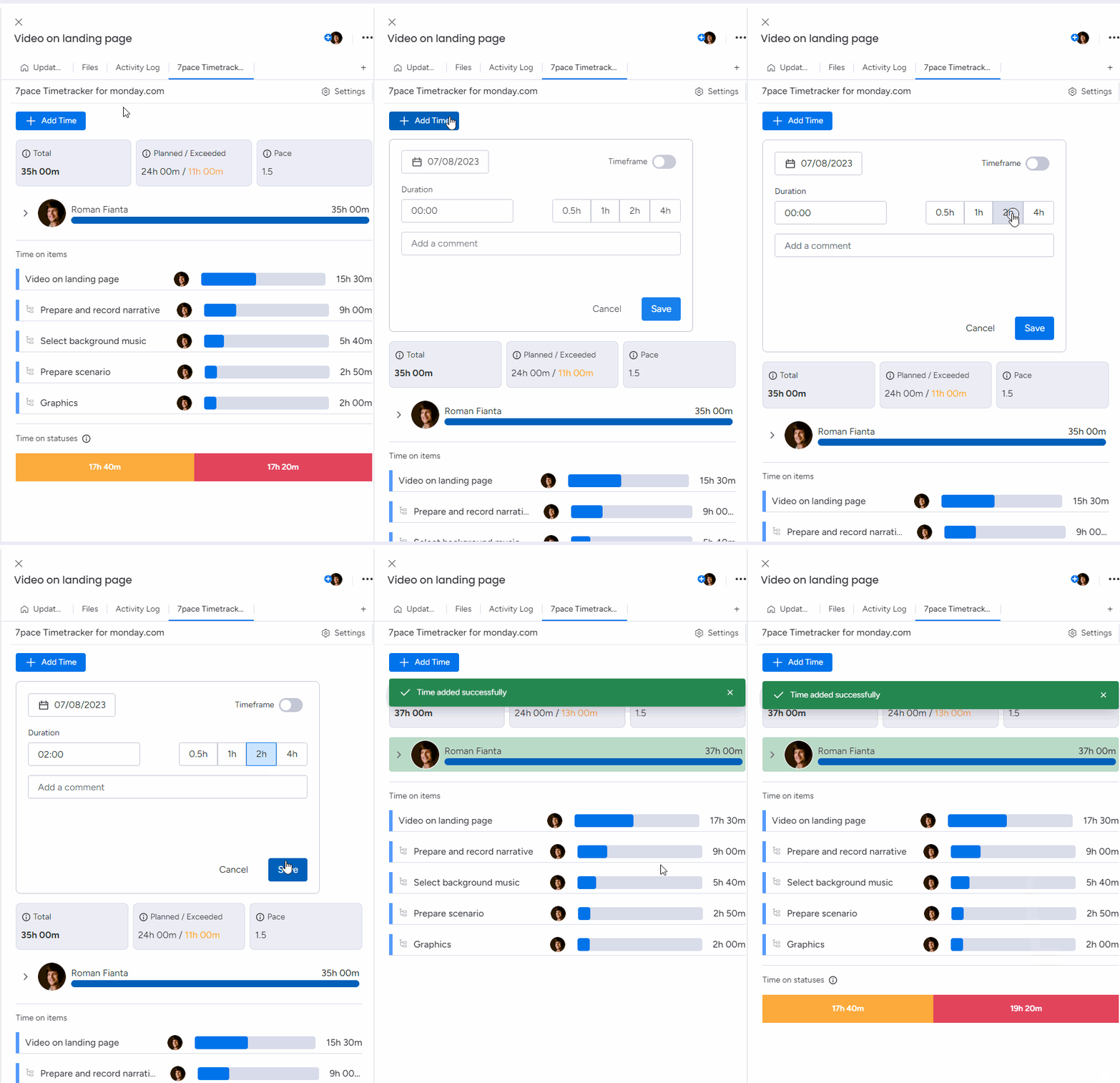
Team members can log time in their work items and subitems, so time tracking happens in the same place where they manage their work. Better yet, multiple people can add time to the same item or subitem.
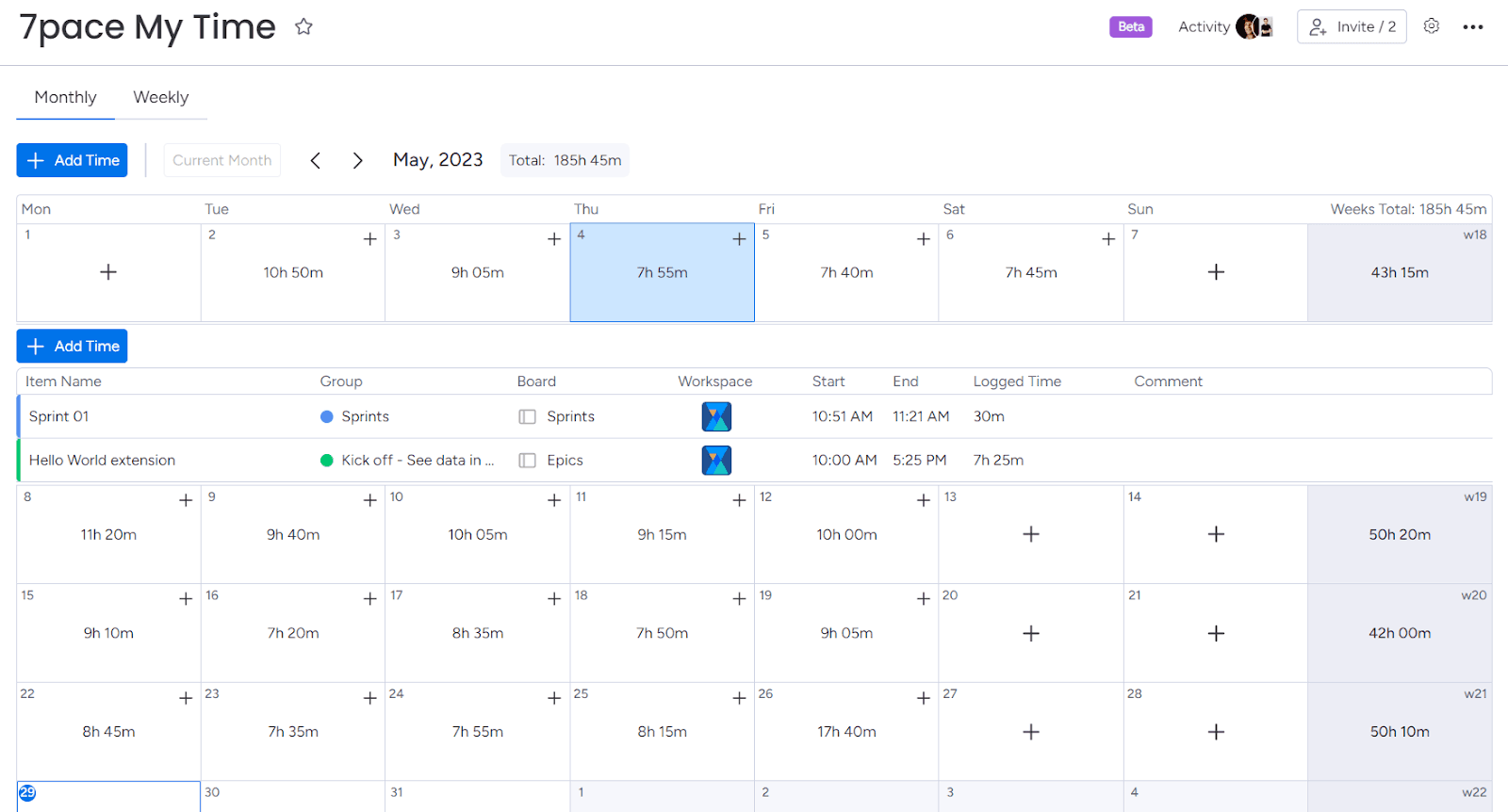
But what if a team member wants to see their time stats in a broader context? 7pace Timetracker has got them covered. The My Time view enables users to see the breakdown of their time entries across the whole week or month. They can make necessary updates and see aggregated data.
This clarity helps them to better manage and understand how they spend their time. Those involved in multiple initiatives will appreciate that 7pace gathers time data across boards and workspaces.
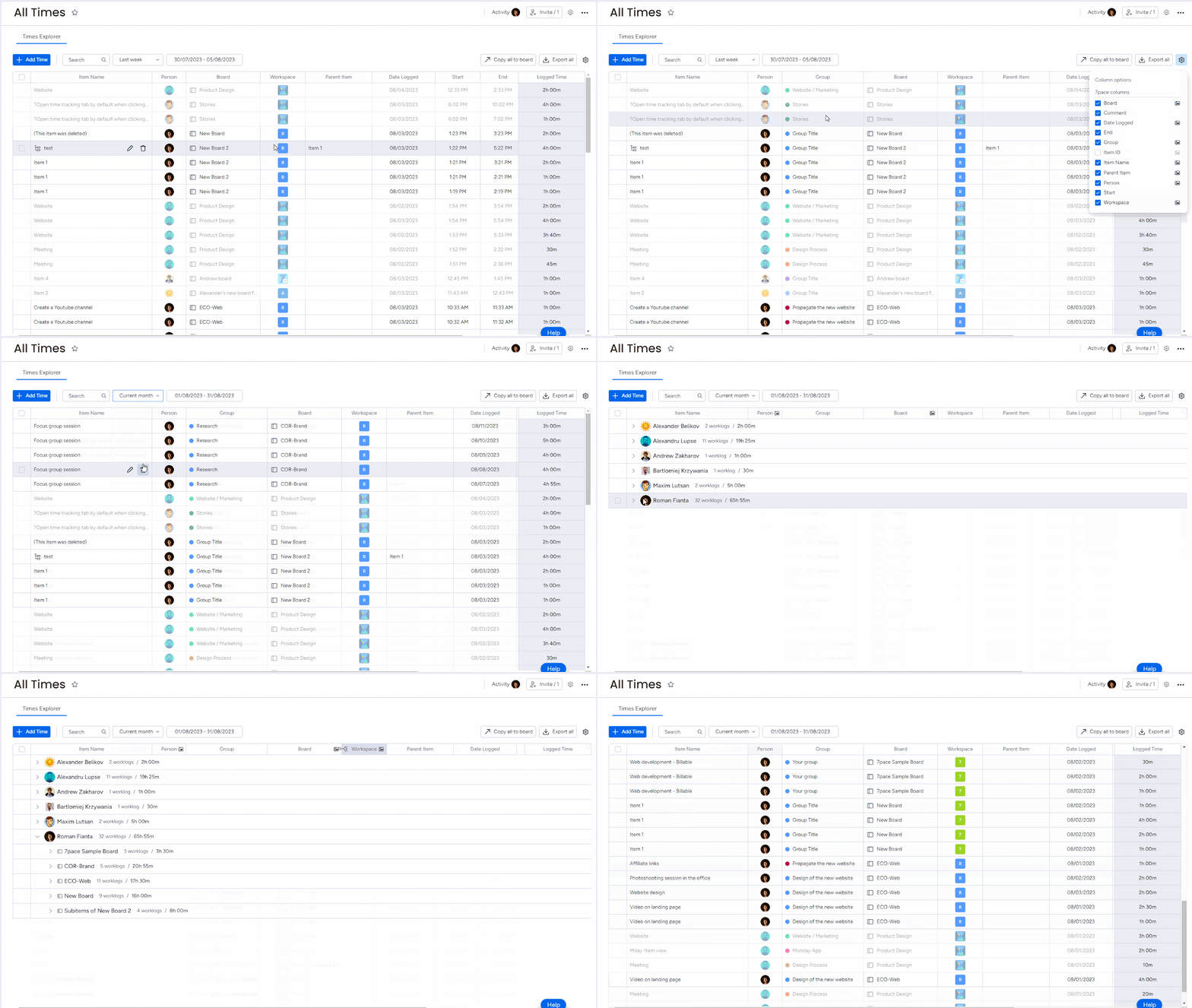
Comprehensive time tracking software helps managers, too. The All Times view collects the time stats of the whole team and displays them in one place. Managers can slice and dice data according to their needs. To simplify reporting, selected data can be quickly exported to a spreadsheet or used to create a dedicated monday.com board in seconds.
Want to establish a solid foundation for estimations? Focus on time tracking. If you use monday.com for work management, there’s no better way to track and manage time than with 7pace Timetracker for monday.com.
Start your free trial today